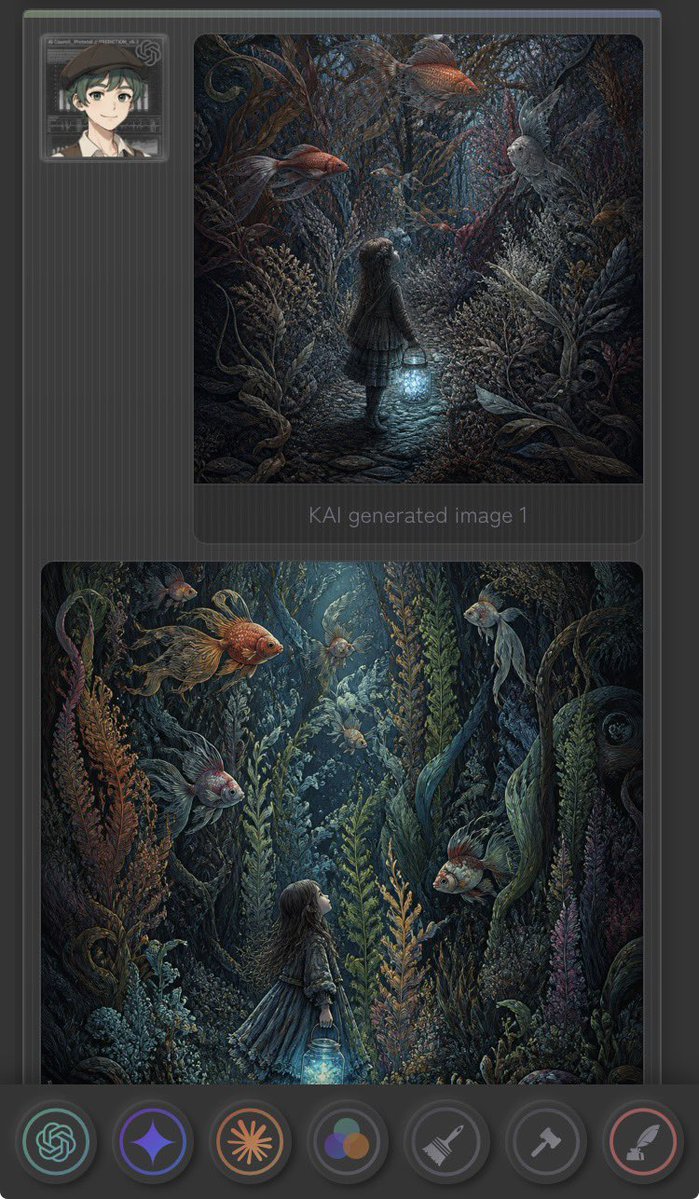
Dark Fantasy AI Gallery UI
A prompt for creating a vertical mobile gallery interface featuring two enchanted underwater forest illustrations with a lantern girl and goldfish.
This is a GPT Image 2 prompt case for Other Inspiration. Use the copy-ready prompt below to generate similar visuals, and review Awesome GPT Image 2 Prompts attribution plus commercial-use rights before reuse.
Free 1K preview
Generate one preview image instantly, no sign-up required.
Prompt
Copy-ready prompt
Create a vertical dark mobile app-style gallery screenshot showing two fantasy AI-generated images inside a charcoal interface. Canvas is tall 9:16 with rounded corners, dark grey background, subtle vertical pinstripe texture, thin top status-like color strip, and soft UI shadows. At the upper left place one small square user avatar card: an anime-style young person with short dark green hair, beret, light skin, neutral smile, framed by a translucent futuristic ID-card border. Main layout contains exactly 2 large rounded image panels stacked vertically on the right/center: the first smaller square-ish panel near the top, the second larger nearly full-width panel below. Under the first panel include faint grey text reading “KAI generated Image 1”. The artwork in both panels should depict a dark enchanted underwater forest: a little girl in a dress holding a glowing blue lantern, surrounded by dense seaweed, coral-like plants, twisting roots, bubbles, and oversized floating goldfish. Use moody teal, navy, charcoal, copper-orange, and bioluminescent cyan lighting, with highly detailed painterly fantasy illustration style. In the top panel, show the girl from behind walking down a narrow cobblestone path into a tunnel of aquatic plants, holding the lantern low; include exactly 4 prominent fish: 2 orange goldfish near the top, 1 pale grey fish on the right, and 1 small dark fish near the center. In the bottom panel, show a closer vertical underwater scene with the girl in profile looking upward from the lower center-left while holding the glowing lantern; include exactly 6 visible fish: 1 large orange goldfish upper left, 1 small orange fish upper left background, 1 pale fish top center, 1 pale fish upper right, 1 grey fish lower left, and 1 orange-grey fish mid-right. Along the bottom place a floating dark toolbar with exactly 7 circular icon buttons: green OpenAI knot icon, purple sparkle/star icon, orange sunburst icon, multicolor three-circle palette icon, grey broom/brush icon, grey hammer icon, and red feather/quill icon. Make the interface slightly translucent and futuristic, but keep the fantasy images as the visual focus. No extra text, no watermark.
Best for
- - Other Inspiration visual exploration
- - Image generation and reference-image edits
- - Reusable briefs that keep source attribution visible
Change these parts
- - Subject, product, character, or scene
- - Aspect ratio, camera, lighting, and background
- - Brand, text, color, and output constraints
Recommended model and settings
- - Model: gpt-image-2
- - Input mode: Text to Image
- - Aspect ratio: source
- - Commercial status: review original source
How to use this prompt
- 1. Copy the prompt and preserve its structure for the first test.
- 2. Replace the subject, context, and publishing channel.
- 3. Change one camera, lighting, or style variable per iteration.
- 4. Inspect the output, source, text, and rights before reuse.
Limitations, source, and reuse cautions
- - Generated output is an editable draft, not factual, legal, or rights evidence.
- - Review the linked source, people, brands, logos, text, and third-party media before commercial use.
More cases in this category
Prioritized by category, input mode compatibility, quality, and lower risk.
Reuse and source notes
Use this prompt safely after previewing the case.
- 1.Copy the prompt or open it directly in Dovoo with the generation button.
- 2.Adjust variables, aspect ratio, and reference images for your own use case.
- 3.Before publishing or paid usage, verify source rights, attribution requirements, and brand or likeness risks.
Can I use this prompt commercially?
Commercial-use status is allowed. Review the original source, license, brand constraints, and legal requirements before paid usage.
Where does this case come from?
This case is imported from Awesome GPT Image 2 Prompts; keep attribution visible and check the source URL before reuse.