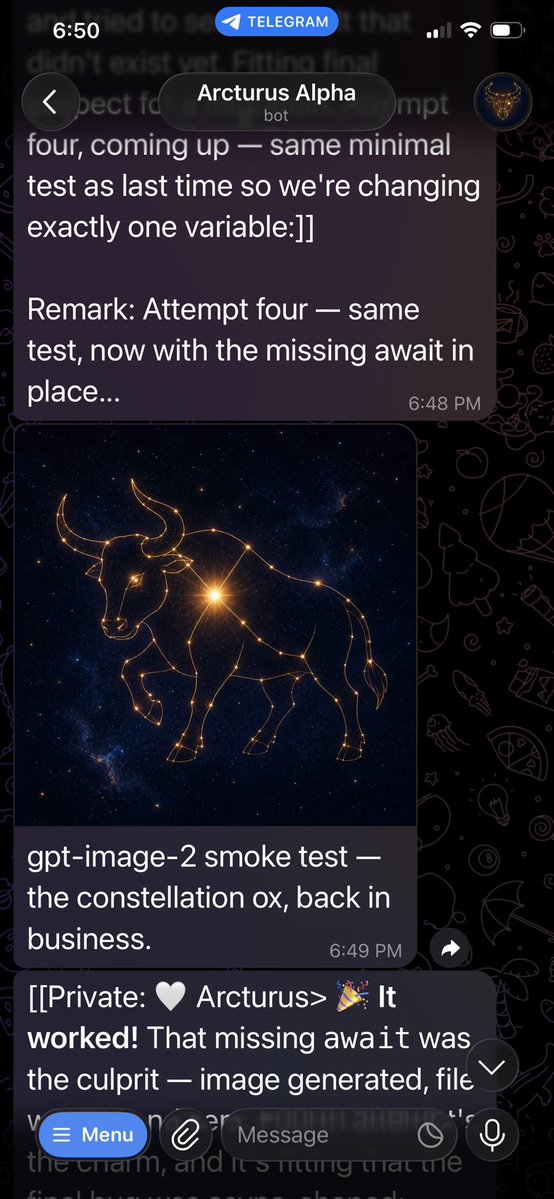
Telegram Bot Constellation Ox Screenshot
A realistic Telegram dark-mode chat screenshot showing a bot message with a generated golden constellation ox image and success messages.
This is a GPT Image 2 prompt case for Other Inspiration. Use the copy-ready prompt below to generate similar visuals, and review Awesome GPT Image 2 Prompts attribution plus commercial-use rights before reuse.
Free 1K preview
Generate one preview image instantly, no sign-up required.
Prompt
Copy-ready prompt
Objective: Create a realistic, vertical mobile screenshot of a Telegram chat, showcasing the process of a bot successfully generating an image.

Canvas: High-aspect-ratio mobile screenshot, 9:16 aspect ratio, approximately 576x1024 pixels, dark mode. Background should be a black Telegram graffiti wallpaper with faint line art icons. The screen should resemble an iPhone, with a status bar at the top.

Layout: At the very top, display the iOS status bar, with the time on the left as “6:50”, a blue rounded “TELEGRAM” label in the center, and cellular/Wi-Fi/battery icons on the right. Below that, display the Telegram chat title bar, with a circular back button on the left, a rounded dark title box in the center displaying “{argument name="bot name" default="Arcturus Alpha"}” with the small text “bot” underneath, and a small circular avatar on the right displaying a glowing bull logo.

Visible Chat Elements: Include 3 message areas: 1 larger dark purple send-style bubble at the top, 1 image message card with an image and caption, and 1 text message partially visible after the input field at the bottom.

Text Content: The top message bubble should accurately display: “four, coming up — same minimal test as last time so we're changing exactly one variable:]]

Remark: Attempt four — same test, now with the missing await in place...”, with a timestamp of “6:48 PM” in the bottom right corner. The image caption should accurately display: “{argument name="caption text" default="gpt-image-2 smoke test — the constellation ox, back in business."}”, with a timestamp of “6:49 PM” in the bottom right corner. The partially obscured message at the bottom should begin with: “[[Private: 🤍 Arcturus> 🎉 It worked! That missing await was the culprit — image generated, file”, and be faintly visible behind the input area, mostly obscured.

Generated Image in Chat: Within the image card, create a square piece of cosmic art, with the main subject being a {argument name="constellation animal" default="ox"} composed of glowing golden constellation lines and star points. The animal should be a side view of a bull/cow, with horns, head slightly lowered, one front leg raised, and the body outlined by interconnected stars. Use a deep blue-black galactic background speckled with stars, and a bright golden starburst near the animal’s shoulder/chest.

Bottom Controls: At the bottom, display the Telegram message input overlay. Include 5 visible controls: a blue rounded “Menu” button (with a hamburger icon), a circular paperclip attachment button, a rounded text field placeholder “Message”, a small circular icon within/near the field, and a circular microphone button on the right. Also include a small floating downward arrow scroll button near the bottom right above the input box.

Visual Style: Photorealistic application screenshot, clear white UI text, semi-transparent dark bubbles, rounded corners, natural Telegram dark theme spacing. Keep the screenshot slightly cropped at the bottom, as if taken during a chat. No watermarks, no extra messages, no other images.
Prompt variables
Editable argument placeholders found in the prompt, with their default values.
Best for
- - Other Inspiration visual exploration
- - Image generation and reference-image edits
- - Reusable briefs that keep source attribution visible
Change these parts
- - Subject, product, character, or scene
- - Aspect ratio, camera, lighting, and background
- - Brand, text, color, and output constraints
Recommended model and settings
- - Model: gpt-image-2
- - Input mode: Text to Image
- - Aspect ratio: source
- - Commercial status: review original source
How to use this prompt
- 1. Copy the prompt and preserve its structure for the first test.
- 2. Replace the subject, context, and publishing channel.
- 3. Change one camera, lighting, or style variable per iteration.
- 4. Inspect the output, source, text, and rights before reuse.
Limitations, source, and reuse cautions
- - Generated output is an editable draft, not factual, legal, or rights evidence.
- - Review the linked source, people, brands, logos, text, and third-party media before commercial use.
More cases in this category
Prioritized by category, input mode compatibility, quality, and lower risk.
Reuse and source notes
Use this prompt safely after previewing the case.
- 1.Copy the prompt or open it directly in Dovoo with the generation button.
- 2.Adjust variables, aspect ratio, and reference images for your own use case.
- 3.Before publishing or paid usage, verify source rights, attribution requirements, and brand or likeness risks.
Can I use this prompt commercially?
Commercial-use status is allowed. Review the original source, license, brand constraints, and legal requirements before paid usage.
Where does this case come from?
This case is imported from Awesome GPT Image 2 Prompts; keep attribution visible and check the source URL before reuse.