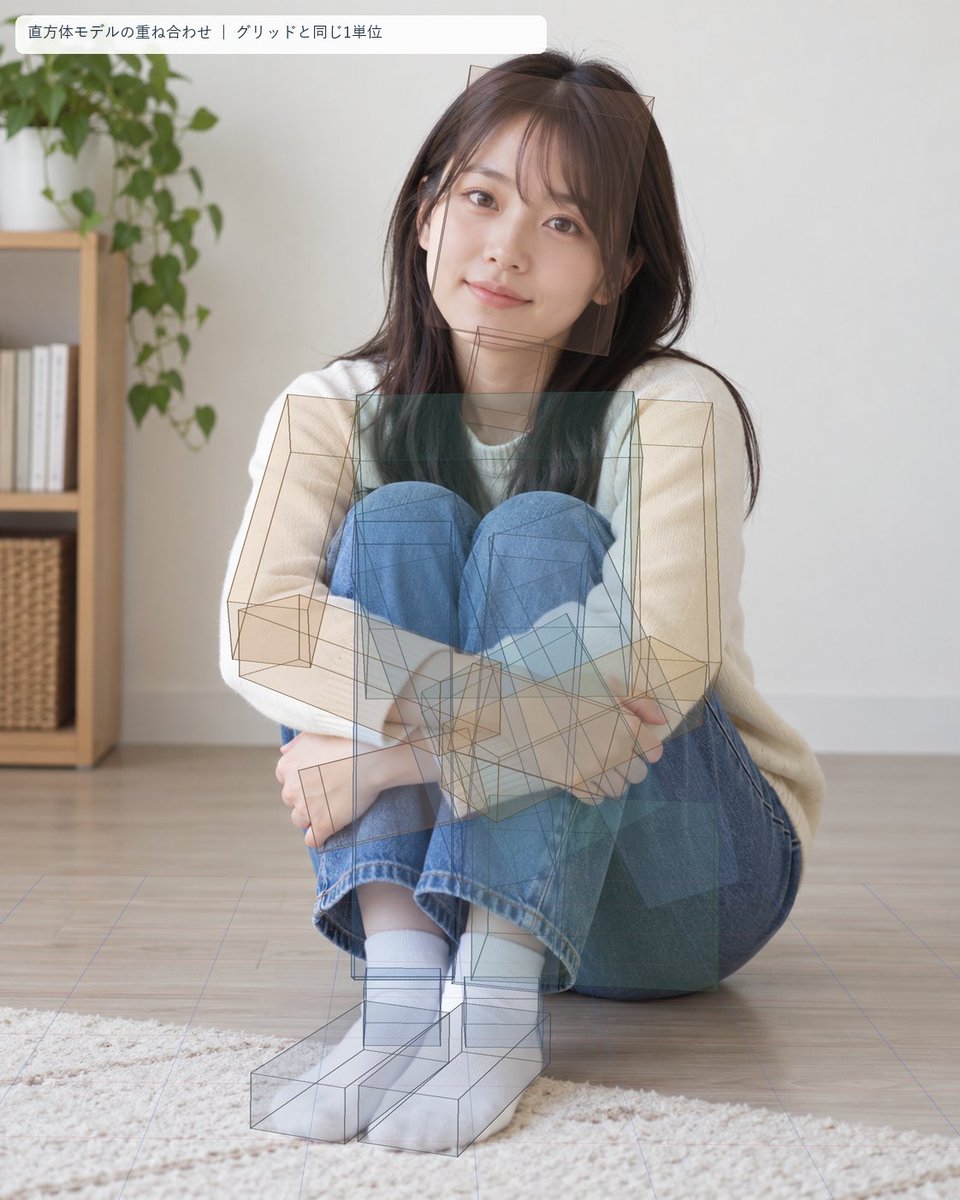
Seated Portrait Pose Estimation Overlay
Creates a realistic indoor portrait of a seated young woman with a semi-transparent cuboid body model and floor grid for pose-analysis visualization.
This is a GPT Image 2 prompt case for Other Inspiration. Use the copy-ready prompt below to generate similar visuals, and review Awesome GPT Image 2 Prompts attribution plus commercial-use rights before reuse.
Free 1K preview
Generate one preview image instantly, no sign-up required.
Prompt
Copy-ready prompt
Goal: Create a photorealistic portrait overlaid with a pose-estimation / 3D block-model visualization, as if analyzing a seated human body with cuboid volumes aligned to a floor grid.

Canvas: Vertical 4:5 image, soft natural daylight, realistic camera photo look. Indoor minimalist living room with pale wall, light wood floor, and a cream rug in the foreground. In the left background, include one wooden shelving unit with white books and woven baskets, plus one leafy green houseplant above it.

Main subject: A young East Asian woman, about early 20s, sitting on the floor facing the camera in a compact curled pose. She has {argument name="hair color" default="dark brown"} long straight hair with wispy bangs, natural makeup, warm eyes, and a gentle slight smile. She wears a loose {argument name="top color" default="cream white"} long-sleeve sweater, blue jeans, white socks, and no shoes. Her knees are pulled up close to her chest, arms wrapped around her shins, feet together near the bottom center, body leaning slightly to one side while maintaining eye contact with the camera.

Overlay: Add a semi-transparent technical 3D pose-estimation diagram over the photograph. Use thin brown-gray wireframe cuboids and translucent teal-blue rectangular prisms to approximate the body volumes. Count and show exactly 13 major cuboid body blocks: 1 head block, 1 neck block, 1 torso block, 1 pelvis/hip block, 2 upper-arm blocks, 2 forearm blocks, 2 thigh blocks, 2 lower-leg blocks, and 2 foot blocks. The blocks should be imperfectly aligned but plausibly matched to the seated pose, with visible perspective lines, overlapping transparent faces, and wireframe edges. Include a faint perspective floor grid in pale blue-purple lines, matching the room floor and receding toward the background.

Label: At the top left, place one rounded white translucent label bar with Japanese text exactly: {argument name="overlay label" default="直方体モデルの重ね合わせ|グリッドと同じ1単位"}. The label should use a small clean sans-serif font, dark gray text, and sit slightly inset from the image edge.

Visual style: realistic high-resolution lifestyle photography blended with analytical AR overlay, soft shadows, shallow depth of field, calm domestic atmosphere, clean composition, no watermark, no extra labels or diagrams beyond the single top-left label and the cuboid/grid overlay.
Prompt variables
Editable argument placeholders found in the prompt, with their default values.
Best for
- - Other Inspiration visual exploration
- - Image generation and reference-image edits
- - Reusable briefs that keep source attribution visible
Change these parts
- - Subject, product, character, or scene
- - Aspect ratio, camera, lighting, and background
- - Brand, text, color, and output constraints
Recommended model and settings
- - Model: gpt-image-2
- - Input mode: Text to Image
- - Aspect ratio: source
- - Commercial status: review original source
How to use this prompt
- 1. Copy the prompt and preserve its structure for the first test.
- 2. Replace the subject, context, and publishing channel.
- 3. Change one camera, lighting, or style variable per iteration.
- 4. Inspect the output, source, text, and rights before reuse.
Limitations, source, and reuse cautions
- - Generated output is an editable draft, not factual, legal, or rights evidence.
- - Review the linked source, people, brands, logos, text, and third-party media before commercial use.
More cases in this category
Prioritized by category, input mode compatibility, quality, and lower risk.


Reuse and source notes
Use this prompt safely after previewing the case.
- 1.Copy the prompt or open it directly in Dovoo with the generation button.
- 2.Adjust variables, aspect ratio, and reference images for your own use case.
- 3.Before publishing or paid usage, verify source rights, attribution requirements, and brand or likeness risks.
Can I use this prompt commercially?
Commercial-use status is allowed. Review the original source, license, brand constraints, and legal requirements before paid usage.
Where does this case come from?
This case is imported from Awesome GPT Image 2 Prompts; keep attribution visible and check the source URL before reuse.