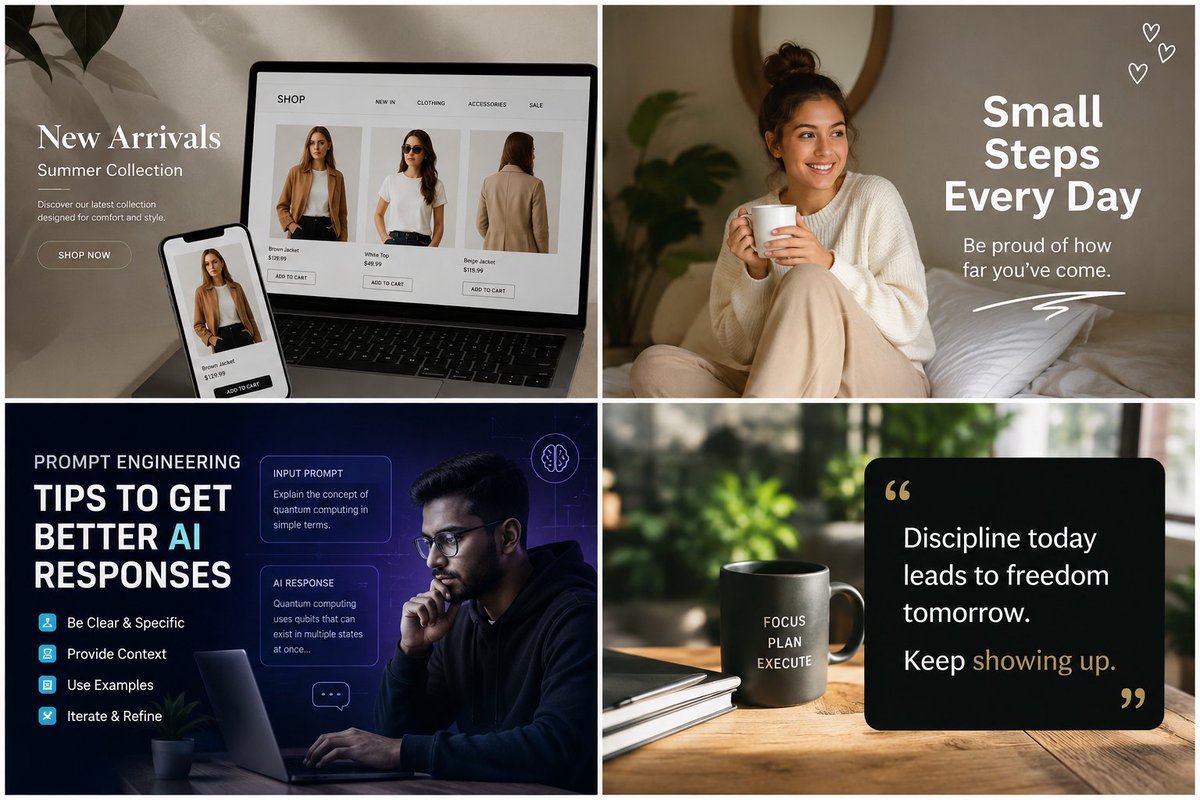
Four-Panel AI Content Showcase
A 2x2 collage of polished ecommerce, lifestyle, AI education, and productivity quote graphics for showcasing generative image content ideas.
This is a GPT Image 2 prompt case for Other Inspiration. Use the copy-ready prompt below to generate similar visuals, and review Awesome GPT Image 2 Prompts attribution plus commercial-use rights before reuse.
Free 1K preview
Generate one preview image instantly, no sign-up required.
Prompt
Copy-ready prompt
Goal: Create a polished 2x2 collage of four social media / marketing graphic examples for an AI image generation platform, separated by thin white gutters, showing the variety of visuals that can be made: ecommerce, motivational lifestyle, AI education, and productivity quote content.

Canvas: Landscape 3:2 aspect ratio, approximately 1200x800, divided into exactly 4 equal rectangular panels in a clean grid with white borders between panels. Use realistic photography blended with crisp overlaid graphic design text.

Panel 1, top left — ecommerce new arrivals: A warm beige desk scene with a laptop and smartphone displaying a fashion shop website. The laptop screen shows a clean online store with exactly 3 product cards: Brown Jacket, White Top, and Beige Jacket, each with a model photo, price, and small “ADD TO CART” button. The phone in front also shows the Brown Jacket product. Add a soft leafy plant shadow in the upper left. Large white serif headline on the left reads “{argument name="fashion headline" default="New Arrivals"}”, smaller line reads “Summer Collection”, body copy reads “Discover our latest collection designed for comfort and style.”, and a rounded outline button reads “SHOP NOW”.

Panel 2, top right — motivational lifestyle post: Cozy warm bedroom photo of a smiling young woman sitting on a bed, wearing a cream knit sweater and beige pants, holding a white mug, with plants and a round wall mirror softly blurred in the background. Overlay bold white sans-serif text on the right reading “{argument name="motivational headline" default="Small Steps Every Day"}”, smaller text underneath reading “Be proud of how far you’ve come.”, a white hand-drawn underline flourish, and exactly 3 small white outline heart doodles in the top-right corner.

Panel 3, bottom left — AI prompt engineering educational graphic: Dark navy futuristic workspace scene with a focused man wearing glasses using a laptop at night, blue-purple neon UI overlays and subtle grid lines. Left side contains a large educational title: “PROMPT ENGINEERING” above “{argument name="AI education title" default="TIPS TO GET BETTER AI RESPONSES"}”, with “AI” highlighted in cyan. Include exactly 4 checklist tips with small cyan square icons: “Be Clear & Specific”, “Provide Context”, “Use Examples”, and “Iterate & Refine”. On the right of the title area place exactly 2 translucent rounded UI cards: one labeled “INPUT PROMPT” with text “Explain the concept of quantum computing in simple terms.” and one labeled “AI RESPONSE” with text “Quantum computing uses qubits that can exist in multiple states at once...”. Add exactly 2 small decorative interface icons: a circular brain icon near the top right and a small chat bubble icon near the lower right.

Panel 4, bottom right — discipline quote card: Sunlit wooden desk scene with blurred green plants outside a window. Place a gray ceramic mug on the left with stacked white text reading “FOCUS PLAN EXECUTE”, next to a closed notebook. On the right place a black rounded rectangle quote card with large typographic quote marks in muted gold. White quote text reads “{argument name="quote text" default="Discipline today leads to freedom tomorrow. Keep showing up."}” with the phrase “showing up” highlighted in muted gold.

Visual style: Premium social media marketing mockup, photorealistic base images, soft natural lighting in the lifestyle and product panels, deep cinematic blue lighting in the AI panel, modern clean typography, realistic shadows, high contrast, sharp readable text, professional content-creator aesthetic.

Constraints: Use exactly 4 panels and the listed repeated elements: 3 ecommerce product cards, 3 heart doodles, 4 checklist tips, 2 translucent UI cards, and 2 decorative AI interface icons. Keep all visible text legible and spelled correctly. No watermarks, no extra panels, no random logos.
Prompt variables
Editable argument placeholders found in the prompt, with their default values.
Best for
- - Other Inspiration visual exploration
- - Image generation and reference-image edits
- - Reusable briefs that keep source attribution visible
Change these parts
- - Subject, product, character, or scene
- - Aspect ratio, camera, lighting, and background
- - Brand, text, color, and output constraints
Recommended model and settings
- - Model: gpt-image-2
- - Input mode: Text to Image
- - Aspect ratio: source
- - Commercial status: review original source
How to use this prompt
- 1. Copy the prompt and preserve its structure for the first test.
- 2. Replace the subject, context, and publishing channel.
- 3. Change one camera, lighting, or style variable per iteration.
- 4. Inspect the output, source, text, and rights before reuse.
Limitations, source, and reuse cautions
- - Generated output is an editable draft, not factual, legal, or rights evidence.
- - Review the linked source, people, brands, logos, text, and third-party media before commercial use.
More cases in this category
Prioritized by category, input mode compatibility, quality, and lower risk.


Reuse and source notes
Use this prompt safely after previewing the case.
- 1.Copy the prompt or open it directly in Dovoo with the generation button.
- 2.Adjust variables, aspect ratio, and reference images for your own use case.
- 3.Before publishing or paid usage, verify source rights, attribution requirements, and brand or likeness risks.
Can I use this prompt commercially?
Commercial-use status is allowed. Review the original source, license, brand constraints, and legal requirements before paid usage.
Where does this case come from?
This case is imported from Awesome GPT Image 2 Prompts; keep attribution visible and check the source URL before reuse.