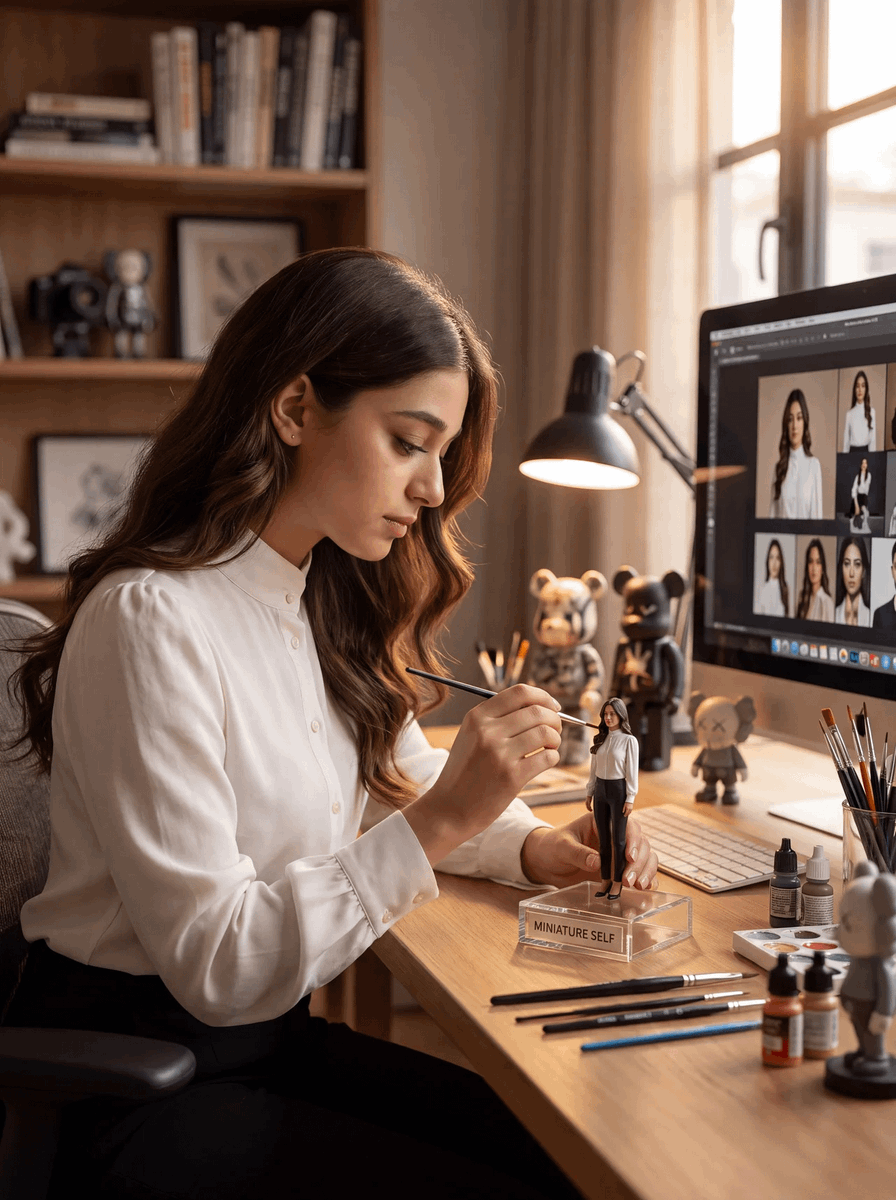
Miniature Painter Studio
A photorealistic studio scene of a woman painting a tiny self-portrait figurine at a detailed artist workstation.
This is a GPT Image 2 prompt case for Other Inspiration. Use the copy-ready prompt below to generate similar visuals, and review Awesome GPT Image 2 Prompts attribution plus commercial-use rights before reuse.
Free 1K preview
Generate one preview image instantly, no sign-up required.
Prompt
Copy-ready prompt
Create a photorealistic vertical image of a miniature painter studio scene featuring {argument name="character name" default="a young woman artist"} seated at a warm wooden desk beside a large sunlit window. She has long wavy chestnut-brown hair, light-to-medium skin, delicate features, and wears a crisp white button-up blouse with black trousers. Show her in left-side profile, calmly focused, holding a very fine paintbrush as she paints the face of a tiny full-body figurine that resembles herself. The figurine stands upright on a clear acrylic display base with a small front label reading {argument name="base label" default="MINIATURE SELF"}; it wears a white top and dark pants. The desktop should be richly detailed with exactly 5 visible painting tools and supply groups: 1) several fine brushes laid horizontally in the foreground, 2) a cup of upright paintbrushes on the right, 3) small paint bottles and dropper bottles near the keyboard, 4) a white paint palette with mixed colors, and 5) a dark desk lamp casting warm light over the miniature. In the background, include exactly 3 collectible toy figures on or near the desk: 1) a tan bear-like art toy, 2) a black bear-like art toy, and 3) a gray small character figure with X eyes. Place a large desktop monitor on the right showing a digital reference board with multiple portrait and full-body photos of the same woman in a white blouse, plus a keyboard beneath it. Behind her, add softly blurred wooden shelves with books, framed artwork, and cameras. Use shallow depth of field, cinematic warm afternoon light, soft bokeh, realistic skin texture, natural posture, high-end editorial photography, 85mm lens look, cozy creative studio atmosphere, precise miniature-painting detail, no fantasy elements, no extra text except the label on the base.Prompt variables
Editable argument placeholders found in the prompt, with their default values.
Best for
- - Other Inspiration visual exploration
- - Image generation and reference-image edits
- - Reusable briefs that keep source attribution visible
Change these parts
- - Subject, product, character, or scene
- - Aspect ratio, camera, lighting, and background
- - Brand, text, color, and output constraints
Recommended model and settings
- - Model: gpt-image-2
- - Input mode: Text to Image
- - Aspect ratio: source
- - Commercial status: review original source
How to use this prompt
- 1. Copy the prompt and preserve its structure for the first test.
- 2. Replace the subject, context, and publishing channel.
- 3. Change one camera, lighting, or style variable per iteration.
- 4. Inspect the output, source, text, and rights before reuse.
Limitations, source, and reuse cautions
- - Generated output is an editable draft, not factual, legal, or rights evidence.
- - Review the linked source, people, brands, logos, text, and third-party media before commercial use.
More cases in this category
Prioritized by category, input mode compatibility, quality, and lower risk.

Reuse and source notes
Use this prompt safely after previewing the case.
- 1.Copy the prompt or open it directly in Dovoo with the generation button.
- 2.Adjust variables, aspect ratio, and reference images for your own use case.
- 3.Before publishing or paid usage, verify source rights, attribution requirements, and brand or likeness risks.
Can I use this prompt commercially?
Commercial-use status is allowed. Review the original source, license, brand constraints, and legal requirements before paid usage.
Where does this case come from?
This case is imported from Awesome GPT Image 2 Prompts; keep attribution visible and check the source URL before reuse.