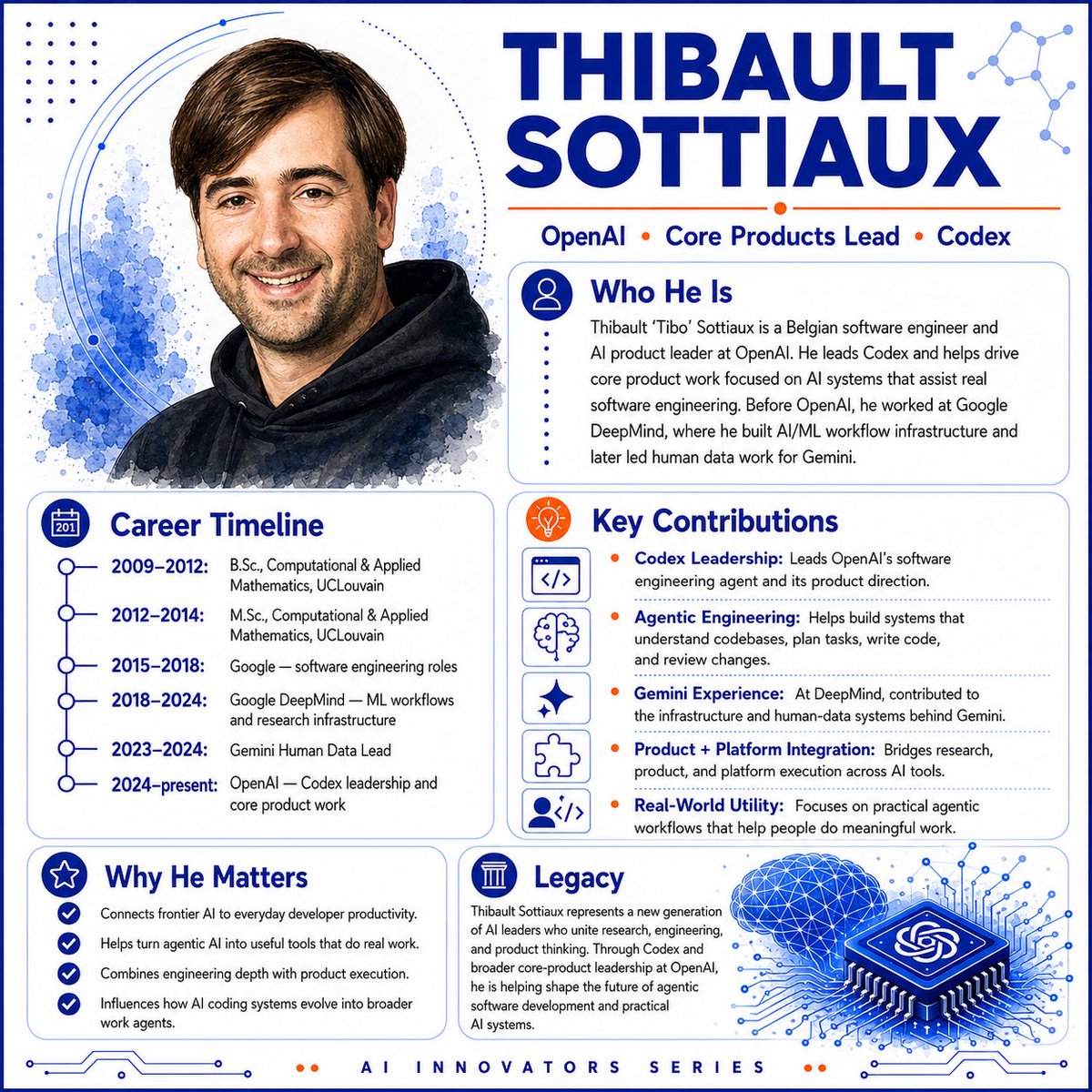
AI Innovator Profile Infographic
Generates a square tech-leader profile infographic with portrait, timeline, contribution cards, and AI-themed visual branding.
This is a GPT Image 2 prompt case for Graphic & Poster. Use the copy-ready prompt below to generate similar visuals, and review Awesome GPT Image 2 Prompts attribution plus commercial-use rights before reuse.
Free 1K preview
Generate one preview image instantly, no sign-up required.
Prompt
Copy-ready prompt
Goal: Create a polished square AI innovator profile infographic about {argument name="character name" default="Thibault Sottiaux"}, styled like a modern tech magazine hero card.

Canvas: Square 1:1 layout, white background, deep cobalt blue and bright orange accent color palette, thin rounded blue border, subtle circuit traces along the bottom edge, dotted decoration and abstract network nodes in the corners. Use crisp vector layout combined with a soft watercolor portrait.

Layout: Two-column composition. The left side contains a large watercolor-style head-and-shoulders portrait at the top and a career timeline card below it. The right side contains the oversized name headline at the top, followed by a short affiliation line, then three rounded information cards stacked in a balanced grid. Add a footer label centered at the bottom.

Hero portrait: On the upper left, show a friendly smiling adult man with short brown side-parted hair, light skin, light stubble, and a black hoodie, rendered as a semi-realistic watercolor illustration with blue ink splashes behind him and thin orbital arc lines around the portrait.

Headline and top text: Large bold uppercase title in dark blue reading {argument name="headline text" default="THIBAULT SOTTIAUX"}. Under it, place a thin orange rule and the affiliation line: “OpenAI • Core Products Lead • Codex”, with orange dot separators.

Cards and content: Use exactly 5 rounded content cards, each with a blue outline, clear icon badge, and dark-blue section heading.

1. “Who He Is” card: icon of a user silhouette in a blue circle. Body text: “Thibault ‘Tibo’ Sottiaux is a Belgian software engineer and AI product leader at OpenAI. He leads Codex and helps drive core product work focused on AI systems that assist real software engineering. Before OpenAI, he worked at Google DeepMind, where he built AI/ML workflow infrastructure and later led human data work for Gemini.”

2. “Career Timeline” card: calendar icon. Include exactly 6 timeline entries with connected blue circles: “2009–2012: B.Sc., Computational & Applied Mathematics, UCLouvain”; “2012–2014: M.Sc., Computational & Applied Mathematics, UCLouvain”; “2015–2018: Google — software engineering roles”; “2018–2024: Google DeepMind — ML workflows and research infrastructure”; “2023–2024: Gemini Human Data Lead”; “2024–present: OpenAI — Codex leadership and core product work”.

3. “Key Contributions” card: orange lightbulb icon. Include exactly 5 contribution rows, each with a small square line icon on the left and an orange bullet before bold blue label text: “Codex Leadership: Leads OpenAI’s software engineering agent and its product direction.”; “Agentic Engineering: Helps build systems that understand codebases, plan tasks, write code, and review changes.”; “Gemini Experience: At DeepMind, contributed to the infrastructure and human-data systems behind Gemini.”; “Product + Platform Integration: Bridges research, product, and platform execution across AI tools.”; “Real-World Utility: Focuses on practical agentic workflows that help people do meaningful work.” The 5 left-side icons are, in order: code brackets, brain, sparkle, puzzle piece, and user-with-code.

4. “Why He Matters” card: star icon. Include exactly 4 checkmark bullets: “Connects frontier AI to everyday developer productivity.”; “Helps turn agentic AI into useful tools that do real work.”; “Combines engineering depth with product execution.”; “Influences how AI coding systems evolve into broader work agents.”

5. “Legacy” card: classical column icon. Include a short paragraph: “Thibault Sottiaux represents a new generation of AI leaders who unite research, engineering, and product thinking. Through Codex and broader core-product leadership at OpenAI, he is helping shape the future of agentic software development and practical AI systems.” Add a decorative blue 3D microchip illustration to the lower right of this card, with the OpenAI knot symbol on the chip, glowing circuit lines radiating outward, and a blue wireframe brain/cloud above it.

Footer: Centered letter-spaced footer text reading “AI INNOVATORS SERIES”, with two small orange dots on each side.

Visual style: Clean editorial infographic, premium SaaS/AI branding, strong hierarchy, rounded cards, thin blue dividers, dark navy typography, orange highlights, minimal shadows, high-resolution print-ready finish.

Constraints: Keep all text legible and spelled correctly. Use exactly 5 cards, exactly 6 timeline entries, exactly 5 key contribution rows, and exactly 4 why-it-matters bullets. Do not add extra people, logos besides the OpenAI knot on the chip, watermarks, or social media UI.
Prompt variables
Editable argument placeholders found in the prompt, with their default values.
Best for
- - Graphic & Poster visual exploration
- - Image generation and reference-image edits
- - Reusable briefs that keep source attribution visible
Change these parts
- - Subject, product, character, or scene
- - Aspect ratio, camera, lighting, and background
- - Brand, text, color, and output constraints
Recommended model and settings
- - Model: gpt-image-2
- - Input mode: Text to Image
- - Aspect ratio: source
- - Commercial status: review original source
How to use this prompt
- 1. Copy the prompt and preserve its structure for the first test.
- 2. Replace the subject, context, and publishing channel.
- 3. Change one camera, lighting, or style variable per iteration.
- 4. Inspect the output, source, text, and rights before reuse.
Limitations, source, and reuse cautions
- - Generated output is an editable draft, not factual, legal, or rights evidence.
- - Review the linked source, people, brands, logos, text, and third-party media before commercial use.
More cases in this category
Prioritized by category, input mode compatibility, quality, and lower risk.





Reuse and source notes
Use this prompt safely after previewing the case.
- 1.Copy the prompt or open it directly in Dovoo with the generation button.
- 2.Adjust variables, aspect ratio, and reference images for your own use case.
- 3.Before publishing or paid usage, verify source rights, attribution requirements, and brand or likeness risks.
Can I use this prompt commercially?
Commercial-use status is allowed. Review the original source, license, brand constraints, and legal requirements before paid usage.
Where does this case come from?
This case is imported from Awesome GPT Image 2 Prompts; keep attribution visible and check the source URL before reuse.