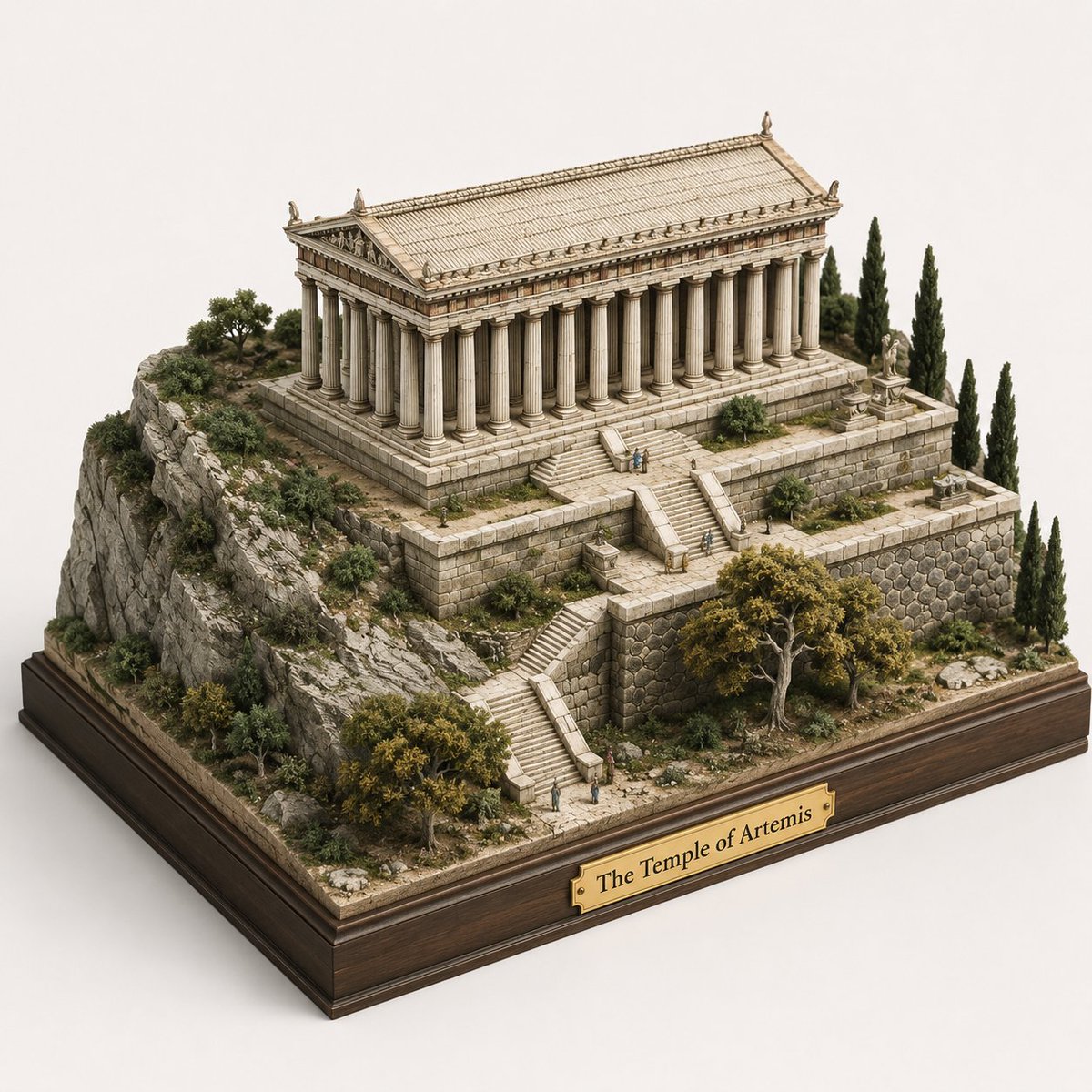
Ancient Temple 3D Diorama
Transforms a historical architectural illustration into a realistic museum-style miniature diorama on a wooden display base.
This is a GPT Image 2 prompt case for Interior & Architecture. Use the copy-ready prompt below to generate similar visuals, and review Awesome GPT Image 2 Prompts attribution plus commercial-use rights before reuse.
Free 1K preview
Generate one preview image instantly, no sign-up required.
Free text preview doesn’t preserve reference-image consistency.
Prompt
Copy-ready prompt
Using REFERENCE_0 as the architectural source, transform the engraved scene into a realistic handcrafted 3D miniature diorama / scale model. Keep the same ancient temple, terraced hillside, stone retaining walls, stairways, trees, and tiny human figures, but convert everything from flat illustration into physical model materials with depth, shadows, and tactile detail. Present it from an elevated three-quarter isometric view on a clean light studio background. Add a polished dark wooden display plinth underneath the whole terrain and attach exactly 1 brass nameplate centered on the front edge reading {argument name="plaque text" default="The Temple of Artemis"}. Make the terrain look like a museum-quality architectural maquette: carved stone blocks, rocky cliff texture, miniature shrubs and cypress trees, weathered ivory temple columns, and subtle natural colors. Preserve the overall layout from the reference while making it feel like a tangible collectible model, not a drawing or painting.Prompt variables
Editable argument placeholders found in the prompt, with their default values.
Best for
- - Interior & Architecture visual exploration
- - Image generation and reference-image edits
- - Reusable briefs that keep source attribution visible
Change these parts
- - Subject, product, character, or scene
- - Aspect ratio, camera, lighting, and background
- - Brand, text, color, and output constraints
Recommended model and settings
- - Model: gpt-image-2
- - Input mode: Image to Image
- - Aspect ratio: source
- - Commercial status: review original source
How to use this prompt
- 1. Copy the prompt and preserve its structure for the first test.
- 2. Replace the subject, context, and publishing channel.
- 3. Change one camera, lighting, or style variable per iteration.
- 4. Inspect the output, source, text, and rights before reuse.
Limitations, source, and reuse cautions
- - Generated output is an editable draft, not factual, legal, or rights evidence.
- - Review the linked source, people, brands, logos, text, and third-party media before commercial use.
More cases in this category
Prioritized by category, input mode compatibility, quality, and lower risk.
Reuse and source notes
Use this prompt safely after previewing the case.
- 1.Copy the prompt or open it directly in Dovoo with the generation button.
- 2.Adjust variables, aspect ratio, and reference images for your own use case.
- 3.Before publishing or paid usage, verify source rights, attribution requirements, and brand or likeness risks.
Can I use this prompt commercially?
Commercial-use status is allowed. Review the original source, license, brand constraints, and legal requirements before paid usage.
Where does this case come from?
This case is imported from Awesome GPT Image 2 Prompts; keep attribution visible and check the source URL before reuse.