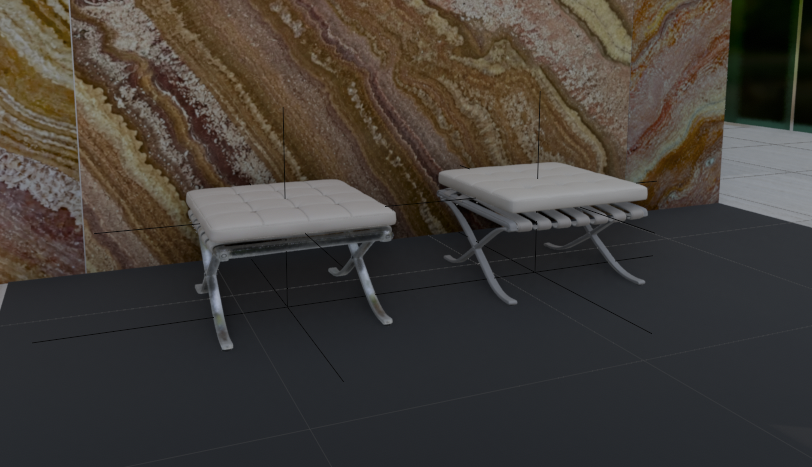
3D Footstool Mesh Comparison
A realistic architectural render showing two white leather footstools side by side in a marble interior for comparing 3D generation quality and materials.
This is a GPT Image 2 prompt case for Interior & Architecture. Use the copy-ready prompt below to generate similar visuals, and review Awesome GPT Image 2 Prompts attribution plus commercial-use rights before reuse.
Free 1K preview
Generate one preview image instantly, no sign-up required.
Prompt
Copy-ready prompt
Create a realistic architectural visualization comparing two 3D-generated ottoman stools in an interior showroom scene. Canvas: wide landscape 16:9 render, camera at low eye level looking slightly downward. Scene: two small Barcelona-style footstools placed side by side on a dark charcoal tiled floor, in front of a tall glossy stone wall with dramatic brown, cream, rust, and gold onyx/marble veining; a narrow strip of green-tinted glass or window appears at the far right edge, with pale exterior floor tiles visible beyond. Subjects: exactly 2 footstools: left stool is the HD version, slightly smaller and lower, with a white tufted square cushion divided into a 4-by-4 grid, rounded soft edges, light gray leather straps underneath, and reflective polished metal X-shaped legs; right stool is the Smart Mesh version, slightly larger and cleaner, with a thicker smooth white cushion, parallel white underside straps, and gray polished X-shaped metal legs. Add thin black 3D viewport guide lines or wireframe axis lines crossing through and around both stools, including vertical and horizontal alignment lines, as if shown in a 3D modeling comparison viewport. Materials: white leather cushions with subtle seams and soft highlights, chrome legs with reflections, dark matte floor tiles with faint grout lines, glossy veined stone wall. Lighting: soft indoor studio lighting, moderate shadows, realistic but slightly CGI-rendered look. Composition: left stool around one-third of the frame, right stool around two-thirds, both facing forward at a slight angle, enough floor visible in front, marble wall filling the background. No people, no labels, no UI panels, no watermark.
Best for
- - Interior & Architecture visual exploration
- - Image generation and reference-image edits
- - Reusable briefs that keep source attribution visible
Change these parts
- - Subject, product, character, or scene
- - Aspect ratio, camera, lighting, and background
- - Brand, text, color, and output constraints
Recommended model and settings
- - Model: gpt-image-2
- - Input mode: Text to Image
- - Aspect ratio: source
- - Commercial status: review original source
How to use this prompt
- 1. Copy the prompt and preserve its structure for the first test.
- 2. Replace the subject, context, and publishing channel.
- 3. Change one camera, lighting, or style variable per iteration.
- 4. Inspect the output, source, text, and rights before reuse.
Limitations, source, and reuse cautions
- - Generated output is an editable draft, not factual, legal, or rights evidence.
- - Review the linked source, people, brands, logos, text, and third-party media before commercial use.
More cases in this category
Prioritized by category, input mode compatibility, quality, and lower risk.

Reuse and source notes
Use this prompt safely after previewing the case.
- 1.Copy the prompt or open it directly in Dovoo with the generation button.
- 2.Adjust variables, aspect ratio, and reference images for your own use case.
- 3.Before publishing or paid usage, verify source rights, attribution requirements, and brand or likeness risks.
Can I use this prompt commercially?
Commercial-use status is allowed. Review the original source, license, brand constraints, and legal requirements before paid usage.
Where does this case come from?
This case is imported from Awesome GPT Image 2 Prompts; keep attribution visible and check the source URL before reuse.