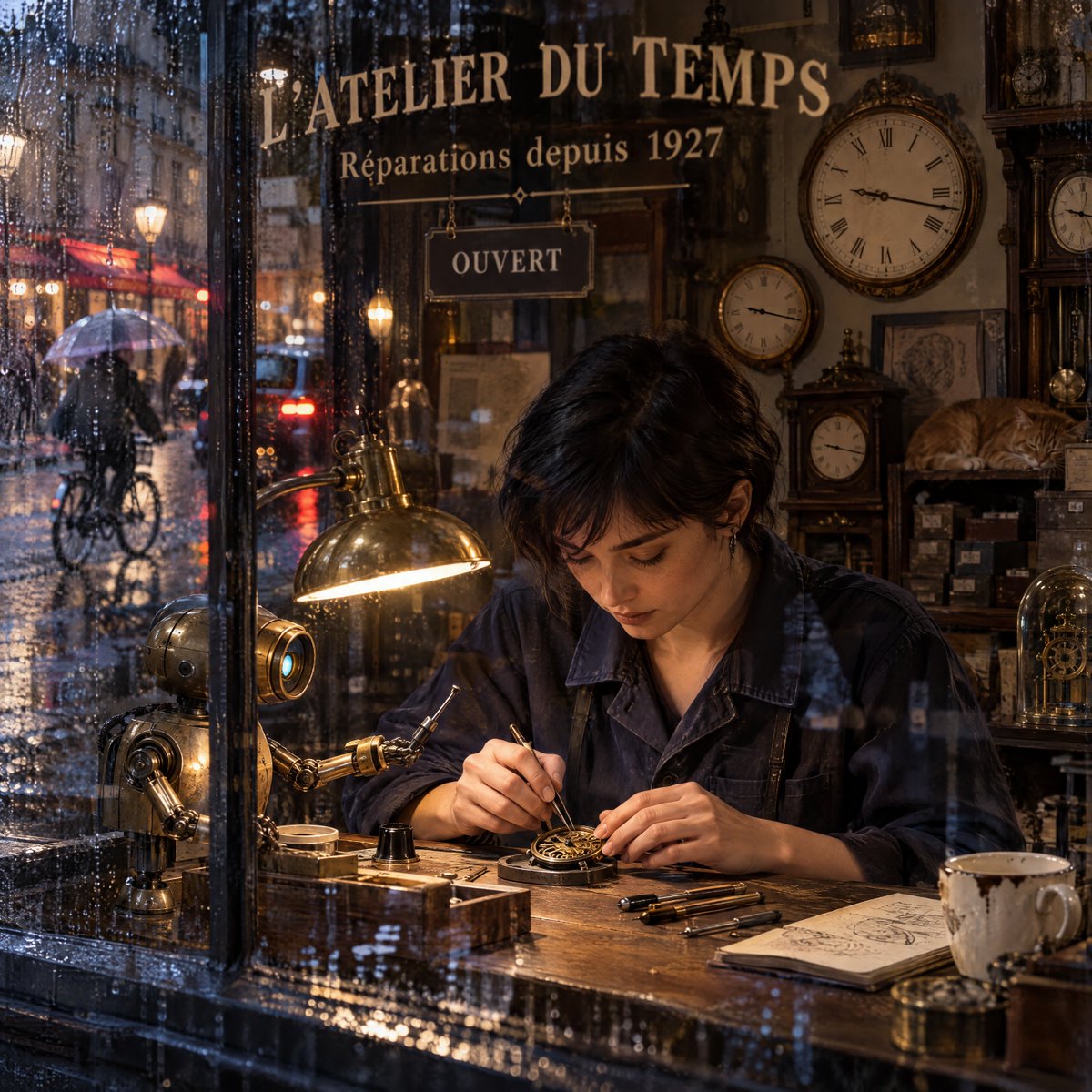
Rainy Paris Watchmaker Recomposition
Transforms a watchmaker shop reference into a cinematic rainy-window editorial scene with clearer signage, richer depth, and retrofuturistic details.
This is a GPT Image 2 prompt case for Interior & Architecture. Use the copy-ready prompt below to generate similar visuals, and review Awesome GPT Image 2 Prompts attribution plus commercial-use rights before reuse.
Free 1K preview
Generate one preview image instantly, no sign-up required.
Free text preview doesn’t preserve reference-image consistency.
Prompt
Copy-ready prompt
Using the provided reference image as the base scene, regenerate it as a more polished hyperrealistic editorial photograph while preserving the same retrofuturistic Paris watchmaker workshop, rainy evening mood, young short-haired watchmaker, brass desk lamp, clock-filled interior, small brass robot assistant, wet shop-window reflections, and French storefront identity.

Transformation: Recompose the scene from a slightly wider, lower, front-window viewpoint, as if looking through rain-streaked glass from just outside the shop. Shift the watchmaker to the lower-right/center, make her hands and the watch mechanism the focal point, and place the robot assistant on the lower-left side of the workbench reaching toward the repair area. Increase the sense of depth by showing more of the Paris street on the left through the window, including exactly 1 cyclist holding an umbrella, wet cobblestones, warm café lights, and blurred car tail lights.

Text and signage: Keep the main storefront text legible and centered high on the glass: {argument name="shop name" default="L’ATELIER DU TEMPS"}. Keep the subtitle below it: {argument name="subtitle text" default="Réparations depuis 1927"}. Move the open sign so it hangs beneath the subtitle inside the window, reading {argument name="open sign text" default="OUVERT"}.

Interior additions and layout: Add more antique wall clocks and shelves in the background, emphasizing a dense old-world horology workshop. Include exactly 5 prominent clock faces visible in the interior: 1 large round wall clock, 1 medium round wall clock, 1 small round wall clock, 1 rectangular mantle clock, and 1 tall cabinet clock. Keep the sleeping orange cat on the right-side shelf. On the workbench, show exactly 4 small watchmaking tools lined up near the watch mechanism, plus an open sketchbook on the right and a chipped white coffee cup at the far right.

Style: Hyperrealistic 4K editorial photography, vertical {argument name="aspect ratio" default="4:5"}, cinematic warm interior light contrasted with cool blue rainy exterior, detailed water droplets on glass, soft bokeh, realistic reflections, shallow depth of field, retrofuturistic brass-and-wood materials, no extra people inside, no logos or watermarks.
Prompt variables
Editable argument placeholders found in the prompt, with their default values.
Best for
- - Interior & Architecture visual exploration
- - Image generation and reference-image edits
- - Reusable briefs that keep source attribution visible
Change these parts
- - Subject, product, character, or scene
- - Aspect ratio, camera, lighting, and background
- - Brand, text, color, and output constraints
Recommended model and settings
- - Model: gpt-image-2
- - Input mode: Image to Image
- - Aspect ratio: source
- - Commercial status: review original source
How to use this prompt
- 1. Copy the prompt and preserve its structure for the first test.
- 2. Replace the subject, context, and publishing channel.
- 3. Change one camera, lighting, or style variable per iteration.
- 4. Inspect the output, source, text, and rights before reuse.
Limitations, source, and reuse cautions
- - Generated output is an editable draft, not factual, legal, or rights evidence.
- - Review the linked source, people, brands, logos, text, and third-party media before commercial use.
More cases in this category
Prioritized by category, input mode compatibility, quality, and lower risk.
Reuse and source notes
Use this prompt safely after previewing the case.
- 1.Copy the prompt or open it directly in Dovoo with the generation button.
- 2.Adjust variables, aspect ratio, and reference images for your own use case.
- 3.Before publishing or paid usage, verify source rights, attribution requirements, and brand or likeness risks.
Can I use this prompt commercially?
Commercial-use status is allowed. Review the original source, license, brand constraints, and legal requirements before paid usage.
Where does this case come from?
This case is imported from Awesome GPT Image 2 Prompts; keep attribution visible and check the source URL before reuse.