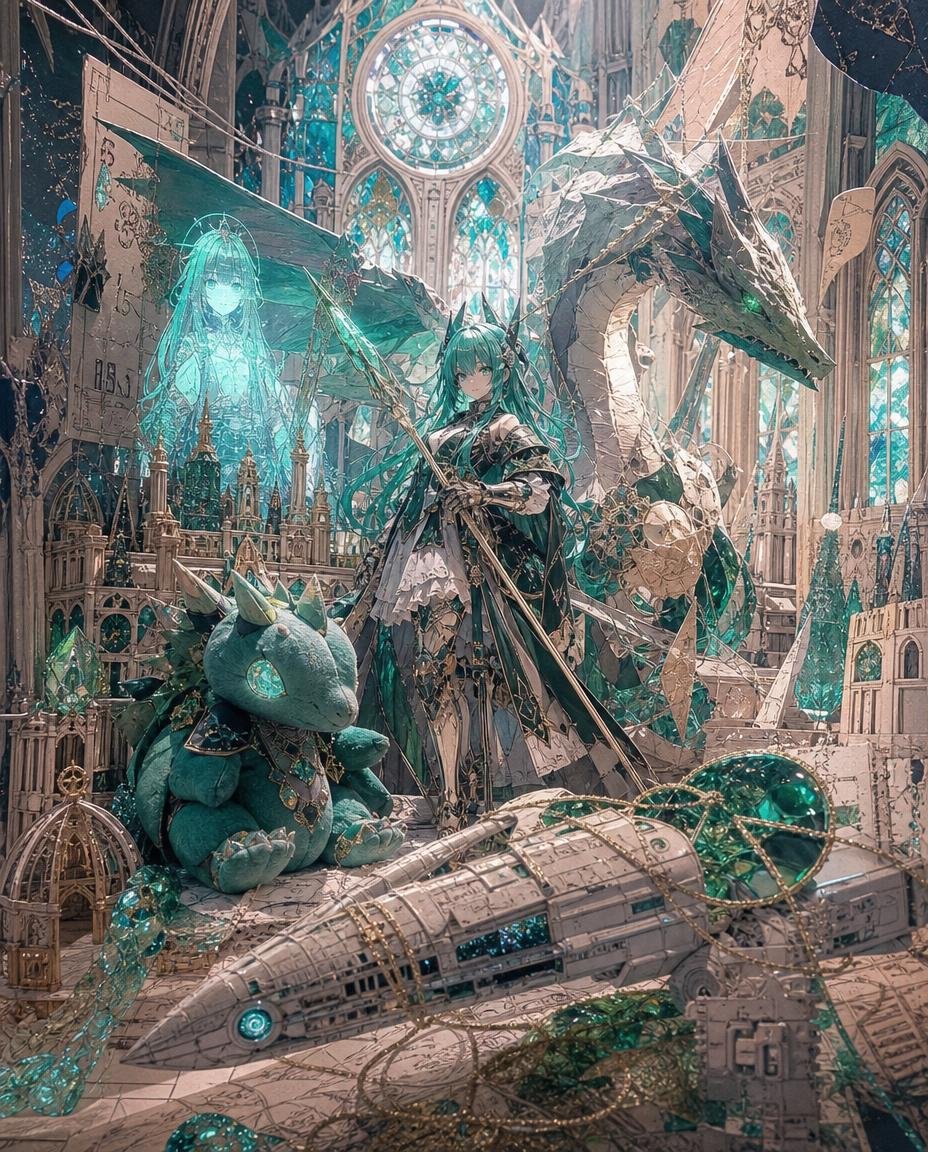
Teal Dragon Knight Cathedral Fantasy
Generates an intricate anime fantasy scene featuring a teal-haired dragon knight, a cute dragon plush, a giant dragon, and magical cathedral workshop details.
This is a GPT Image 2 prompt case for 动漫游戏. Use the copy-ready prompt below to generate similar visuals, and review Awesome GPT Image 2 Prompts attribution plus commercial-use rights before reuse.
Prompt
Copy-ready prompt
目标:创作一幅超精细的奇幻动漫插画,描绘 {argument name="character name" default="一位青色头发的龙骑士公主"} 站在一座废墟般的教堂式工作室中,周围布满纸模、水晶电路和魔法工程遗迹。

画布:竖构图,4:5 比例,从前景到背景细节丰富,电影级光影,无边框,无水印。

主体:一位年轻的动漫女性站在画面中心偏右位置,面朝前方,表情冷静严肃。她拥有非常飘逸的 {argument name="hair color" default="Blue-green"} 长发,佩戴小型角状饰品,皮肤白皙,身着华丽的黑白银配色哥特式奇幻服装,带有层叠的裙摆、盔甲绑带、丝带、链条和宝石细节。她斜持一柄长矛,矛身从画面左下方延伸至左上方,带有精致的金属装饰和青色的魔法光芒。

生物与伙伴数量:包含 3 个主要伙伴角色:1 条巨大的浅石色与青色巨龙,盘踞在女孩身后右侧,头部轮廓分明,双眼闪烁绿光,蛇形颈部弯曲,带有水晶质感的青色点缀;1 个可爱的青色龙形毛绒玩具,坐在左下方前景,四肢圆润柔软,长有小角,眼睛是一颗巨大的发光青绿色宝石,带有小爪子,颈部佩戴华丽珠宝;1 个半透明的青绿色全息灵体女孩,位于左侧毛绒玩具后方,像投影出的魔法蓝图一样发光,有着长发和模糊的裙装轮廓。

前景物体数量:包含 5 个显著的前景遗迹:1 艘大型米色纸模飞船或飞艇,从左至右横跨底部,带有面板线条、青色发光圆形引擎灯和翡翠色花窗玻璃部分;1 个位于左下角的小型华丽鸟笼状金色结构;1 个挂在右下角附近的矩形纸质蓝图标签;1 簇靠近毛绒玩具的青色水晶;1 团缠绕在飞船和地面上的金色链条与花丝金属线。

环境:场景设定在一座宏伟的哥特式大教堂工作室中,拥有高耸的尖拱、雕刻的象牙石、微型尖塔、脚手架般的纸质建筑、悬挂的电线、蓝图纸、破碎的羊皮纸面板和青色水晶簇。在背景上方中心处,放置 1 个发着青绿色和白色光芒的大型圆形玫瑰窗,下方设有 3 个高大的尖拱形花窗玻璃。两侧添加额外的狭窄花窗玻璃,但保持中央玫瑰窗的主导地位。

视觉风格:高度精细的日式奇幻插画,华丽的动漫角色设计,复杂的线条,柔和的绘画渲染,明亮的青绿色和翡翠色高光,温暖的米色石材与羊皮纸色调,空灵的尘埃,层叠的景深,魔法大教堂氛围,优雅的蒸汽朋克纸艺细节,极其精细且和谐。

光影与色彩:使用象牙色、古旧羊皮纸色、银色、深炭色、翡翠色和发光的青色调。通过花窗玻璃进行背光处理,在巨龙、全息影像、水晶、毛绒玩具眼睛和长矛装饰周围添加青色轮廓光。保持梦幻、神秘且奢华的氛围。

约束:无可见文字,无现代物体,除 1 位主角女孩、1 条巨龙、1 个龙形毛绒玩具和 1 个全息灵体女孩外,不包含其他额外角色。龙形毛绒玩具应看起来特别可爱且令人喜爱,同时与精致的奇幻世界保持风格统一。
Prompt variables
Editable argument placeholders found in the prompt, with their default values.
More cases in this category
Prioritized by category, input mode compatibility, quality, and lower risk.
Reuse and source notes
Use this prompt safely after previewing the case.
- 1.Copy the prompt or open it directly in Dovoo with the generation button.
- 2.Adjust variables, aspect ratio, and reference images for your own use case.
- 3.Before publishing or paid usage, verify source rights, attribution requirements, and brand or likeness risks.
Can I use this prompt commercially?
Commercial-use status is allowed. Review the original source, license, brand constraints, and legal requirements before paid usage.
Where does this case come from?
This case is imported from Awesome GPT Image 2 Prompts; keep attribution visible and check the source URL before reuse.