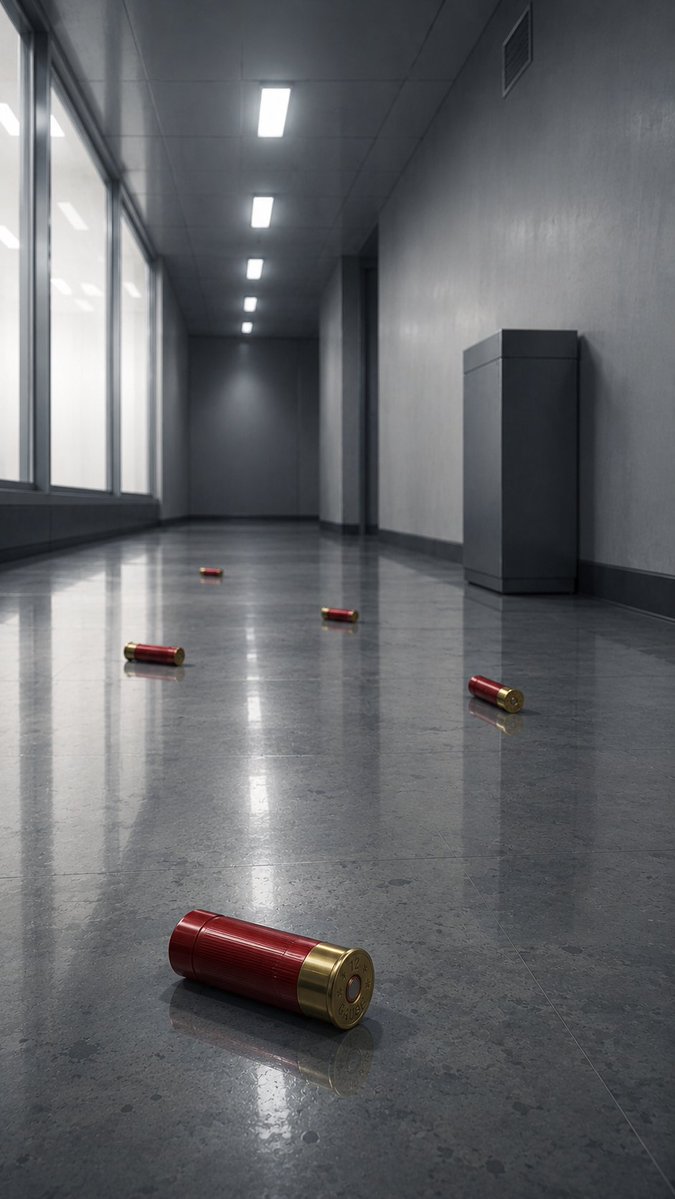
Empty Corridor with Shotgun Shells
A photorealistic cinematic corridor scene with five red shotgun shells on a reflective floor, useful for moody sci-fi or thriller concept art.
This is a GPT Image 2 prompt case for Interior & Architecture. Use the copy-ready prompt below to generate similar visuals, and review Awesome GPT Image 2 Prompts attribution plus commercial-use rights before reuse.
Free 1K preview
Generate one preview image instantly, no sign-up required.
Prompt
Copy-ready prompt
Create a photorealistic cinematic low-angle view down a long, empty {argument name="location" default="modern gray office corridor"} with a cold dystopian atmosphere. The camera is placed near the glossy polished stone floor, using strong one-point perspective toward a dark vanishing point at the far end. On the left side, tall frosted glass windows run along the corridor, glowing with soft overcast white light; on the right side, plain gray concrete-textured walls include a dark doorway recess, a small ventilation grille near the ceiling, and one rectangular gray utility cabinet or pedestal against the wall. The ceiling has exactly five bright rectangular fluorescent light panels receding into the distance. The reflective floor is highly polished, showing elongated reflections of the windows, ceiling lights, walls, and objects. Scatter exactly five red-and-brass {argument name="scattered object" default="shotgun shells"} across the floor: one large sharply focused shell in the extreme foreground near the bottom center-left, lying horizontally with its brass base facing the viewer; one shell on the right midground near the wall; one shell near the center midground; one shell left of center farther back; and one tiny shell near the distant center. Use muted gray-blue tones, realistic materials, subtle dust and floor speckling, shallow depth of field, crisp foreground detail, soft background haze, and dramatic Blade Runner-like reflections without neon. No people, no text, no blood, no action scene, no watermark.Prompt variables
Editable argument placeholders found in the prompt, with their default values.
Best for
- - Interior & Architecture visual exploration
- - Image generation and reference-image edits
- - Reusable briefs that keep source attribution visible
Change these parts
- - Subject, product, character, or scene
- - Aspect ratio, camera, lighting, and background
- - Brand, text, color, and output constraints
Recommended model and settings
- - Model: gpt-image-2
- - Input mode: Text to Image
- - Aspect ratio: source
- - Commercial status: review original source
How to use this prompt
- 1. Copy the prompt and preserve its structure for the first test.
- 2. Replace the subject, context, and publishing channel.
- 3. Change one camera, lighting, or style variable per iteration.
- 4. Inspect the output, source, text, and rights before reuse.
Limitations, source, and reuse cautions
- - Generated output is an editable draft, not factual, legal, or rights evidence.
- - Review the linked source, people, brands, logos, text, and third-party media before commercial use.
Related prompt packs
More cases in this category
Prioritized by category, input mode compatibility, quality, and lower risk.
Reuse and source notes
Use this prompt safely after previewing the case.
- 1.Copy the prompt or open it directly in Dovoo with the generation button.
- 2.Adjust variables, aspect ratio, and reference images for your own use case.
- 3.Before publishing or paid usage, verify source rights, attribution requirements, and brand or likeness risks.
Can I use this prompt commercially?
Commercial-use status is allowed. Review the original source, license, brand constraints, and legal requirements before paid usage.
Where does this case come from?
This case is imported from Awesome GPT Image 2 Prompts; keep attribution visible and check the source URL before reuse.