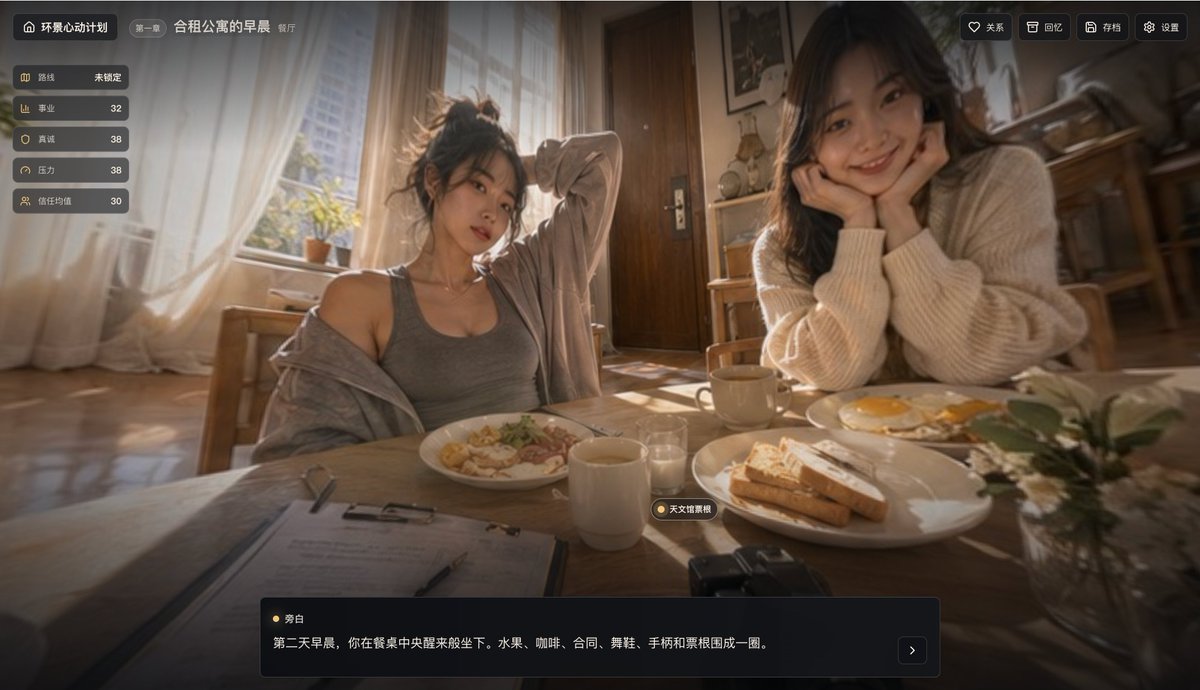
Cinematic Shared Apartment Breakfast UI
A realistic story-game scene of two women having breakfast in a sunlit apartment, designed for visual novel or interactive narrative interface concepts.
This is a GPT Image 2 prompt case for Anime & Game. Use the copy-ready prompt below to generate similar visuals, and review Awesome GPT Image 2 Prompts attribution plus commercial-use rights before reuse.
Free 1K preview
Generate one preview image instantly, no sign-up required.
Prompt
Copy-ready prompt
A cinematic first-person visual novel game interface depicting a warm morning breakfast scene in a shared apartment dining room, shot with a slightly wide-angle lens and shallow depth of field. Two young women are seated opposite each other at a wooden table, with soft golden sunlight streaming in from a large window on the left, illuminating them. The woman on the left has her hair messily tied up and is wearing a gray tank top and a loose cardigan slipping off one shoulder, casually leaning back with one hand behind her head. The woman on the right has long black hair and is wearing an oversized beige knit sweater, resting her chin on her hands and leaning forward towards the table. Show every face clearly with natural, detailed facial features, rectangular blur blocks. There are 2 clearly visible breakfast plates on the table: the plate in front of the woman on the left contains pasta or salad-like food, and the large plate in front of the woman on the right holds several slices of toast; a second breakfast plate with 2 fried eggs is nearby on the right. The scene includes 2 mugs, 1 small glass, a folder with paper and a pen in the lower left foreground, a small black camera in the bottom center-right, and a vase with white flowers in the lower right foreground. The room feels cozy and lived-in, with wooden furniture, a doorway in the central background, kitchen shelving and chairs in the background, and sunlight casting reflections on the floor and tabletop. Add a sophisticated Chinese interactive story game HUD overlay. Top left: a dark rounded cornered title capsule containing a home icon and the text “Panoramic Heartbeat Project”, followed by a small capsule reading “Chapter One”, then the scene title “Morning at the Shared Apartment” and a smaller location tag “Dining Room”. A vertical status panel on the left contains 5 stacked buttons, displaying in order: “Route Unlocked”, “Career 32”, “Sincerity 38”, “Stress 38”, “Trust Value 30”. Top right: 4 compact rounded cornered buttons labeled “Relationships”, “Memories”, “Save”, “Settings”. Near the bottom center of the desktop, add a floating small location tag reading “Planetarium Reverie”. Place a dark semi-transparent dialogue box at the bottom with a speaker tag “Narrator” and the text “On the second morning, you wake up and sit down in the middle of the table. Fruit, coffee, contracts, dancing shoes, a controller, and Jingcheng are arranged in a circle.”, accompanied by a small next page arrow button on the right. Overall style: Realistic cinematic game screenshot, intimate home atmosphere, soft glow effects, soft beige and brown tones, high-end narrative application UI, immersive and emotionally suggestive.
Best for
- - Anime & Game visual exploration
- - Image generation and reference-image edits
- - Reusable briefs that keep source attribution visible
Change these parts
- - Subject, product, character, or scene
- - Aspect ratio, camera, lighting, and background
- - Brand, text, color, and output constraints
Recommended model and settings
- - Model: gpt-image-2
- - Input mode: Text to Image
- - Aspect ratio: source
- - Commercial status: review original source
How to use this prompt
- 1. Copy the prompt and preserve its structure for the first test.
- 2. Replace the subject, context, and publishing channel.
- 3. Change one camera, lighting, or style variable per iteration.
- 4. Inspect the output, source, text, and rights before reuse.
Limitations, source, and reuse cautions
- - Generated output is an editable draft, not factual, legal, or rights evidence.
- - Review the linked source, people, brands, logos, text, and third-party media before commercial use.
More cases in this category
Prioritized by category, input mode compatibility, quality, and lower risk.
Reuse and source notes
Use this prompt safely after previewing the case.
- 1.Copy the prompt or open it directly in Dovoo with the generation button.
- 2.Adjust variables, aspect ratio, and reference images for your own use case.
- 3.Before publishing or paid usage, verify source rights, attribution requirements, and brand or likeness risks.
Can I use this prompt commercially?
Commercial-use status is allowed. Review the original source, license, brand constraints, and legal requirements before paid usage.
Where does this case come from?
This case is imported from Awesome GPT Image 2 Prompts; keep attribution visible and check the source URL before reuse.