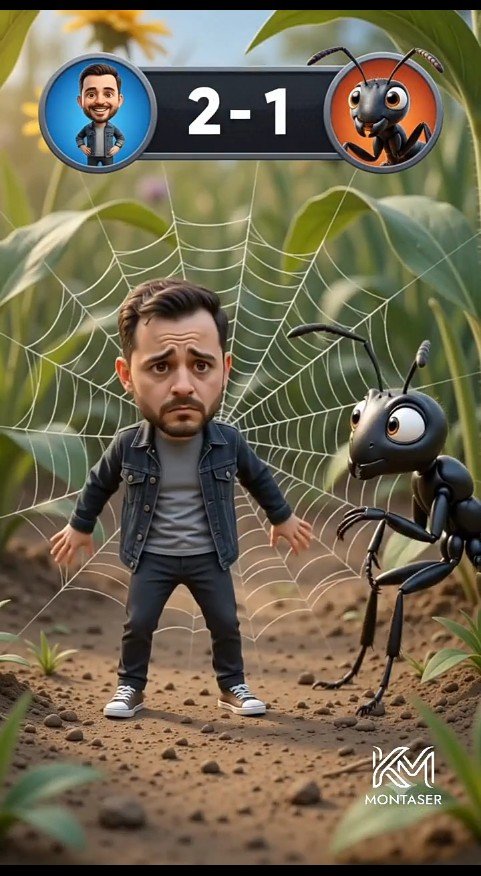
Tiny Man vs Giant Ant Scoreboard Scene
A vertical cinematic 3D cartoon forest-floor scene featuring a worried miniature man trapped in a spider web beside a giant ant with a game scoreboard overlay.
This is a GPT Image 2 prompt case for Anime & Game. Use the copy-ready prompt below to generate similar visuals, and review Awesome GPT Image 2 Prompts attribution plus commercial-use rights before reuse.
Free 1K preview
Generate one preview image instantly, no sign-up required.
Prompt
Copy-ready prompt
Create a cinematic vertical 3D cartoon scene on a realistic forest floor, framed like a mobile video still. In the center foreground, show one cute miniature bearded man, {argument name="character name" default="Montaser"}, with an oversized caricature head and worried expression, standing stiffly with arms slightly out while trapped in a large white spider web behind him. He has short dark brown hair, a trimmed beard, raised sad eyebrows, and big anxious eyes. Dress him in exactly four main outfit pieces: a dark denim jacket, a gray T-shirt, black pants, and white sneakers. To his right, show one giant glossy black cartoon ant with large expressive eyes, two antennae, six thin legs, and bent forearms, leaning toward him with a curious intimidating look. Behind them, the spider web radiates clearly across green leaves and stems. At the top center, add a game-style scoreboard overlay: a dark rounded rectangle with exactly two circular avatar icons, the left icon showing the man on a blue background, the right icon showing the ant on an orange background, and large white score text {argument name="score text" default="2 - 1"} between them. The environment is a macro-scale forest floor with dirt, small pebbles, tiny plants, blurred green foliage, warm daylight, shallow depth of field, and cinematic bokeh. Use polished Pixar-like 3D rendering, soft realistic lighting, detailed textures, playful comedy tension, and a vertical 9:16 composition. Add a small white stylized logo watermark at the bottom right reading {argument name="watermark text" default="MONTASER"}.Prompt variables
Editable argument placeholders found in the prompt, with their default values.
Best for
- - Anime & Game visual exploration
- - Image generation and reference-image edits
- - Reusable briefs that keep source attribution visible
Change these parts
- - Subject, product, character, or scene
- - Aspect ratio, camera, lighting, and background
- - Brand, text, color, and output constraints
Recommended model and settings
- - Model: gpt-image-2
- - Input mode: Text to Image
- - Aspect ratio: source
- - Commercial status: review original source
How to use this prompt
- 1. Copy the prompt and preserve its structure for the first test.
- 2. Replace the subject, context, and publishing channel.
- 3. Change one camera, lighting, or style variable per iteration.
- 4. Inspect the output, source, text, and rights before reuse.
Limitations, source, and reuse cautions
- - Generated output is an editable draft, not factual, legal, or rights evidence.
- - Review the linked source, people, brands, logos, text, and third-party media before commercial use.
More cases in this category
Prioritized by category, input mode compatibility, quality, and lower risk.

Reuse and source notes
Use this prompt safely after previewing the case.
- 1.Copy the prompt or open it directly in Dovoo with the generation button.
- 2.Adjust variables, aspect ratio, and reference images for your own use case.
- 3.Before publishing or paid usage, verify source rights, attribution requirements, and brand or likeness risks.
Can I use this prompt commercially?
Commercial-use status is allowed. Review the original source, license, brand constraints, and legal requirements before paid usage.
Where does this case come from?
This case is imported from Awesome GPT Image 2 Prompts; keep attribution visible and check the source URL before reuse.