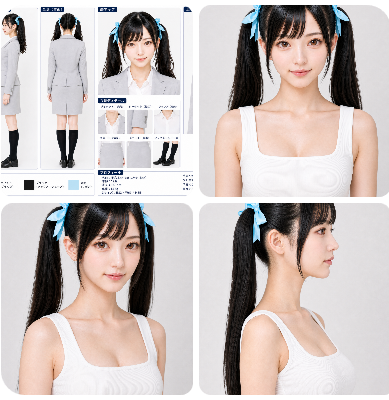
Professional Character Sheet Template
A comprehensive structured prompt for generating professional character reference sheets with multiple angles and close-ups to ensure character consistency.
This is a GPT Image 2 prompt case for 动漫游戏. Use the copy-ready prompt below to generate similar visuals, and review Awesome GPT Image 2 Prompts attribution plus commercial-use rights before reuse.
Prompt
Copy-ready prompt
[布局]
配置为单一、有组织的设定表。白色或极浅灰色的背景。布局整洁,留白易读。每个面板应带有深蓝色或冷静蓝色的标题标签。装饰极简,优先考虑信息清晰度。

[必需的面板配置]
1. 全身(正面)
2. 全身(侧面)
3. 全身(背面)
4. 面部特写(正面)
5. 面部特写(45 度角)
6. 面部特写(侧脸)
7. 上半身特写(正面)

[各面板内容]
- 全身(正面):自然的站立姿势。确保面部、头发、整套服装、裙长、黑色长筒袜和鞋子清晰可见。
- 全身(侧面):侧身站立姿势。确保面部侧影、胸部、腰部、臀部、腿部线条、头发垂落感及双马尾位置清晰可见。
- 全身(背面):背面视图。展示发缝、双马尾的背面效果、夹克背面、裙子背面及腿部线条。
- 面部特写(正面):面部参考图。清晰展示眼睛、鼻子、嘴巴、轮廓、刘海及丝带位置。
- 面部特写(45 度角):展示从侧角观察的面部立体感、脸颊外观、刘海垂落感及一侧双马尾。
- 面部特写(侧脸):清晰展示额头、鼻梁、嘴巴、下巴、耳朵位置、颈部连接处及侧面轮廓。
- 上半身特写(正面):除面部外,展示夹克领口、衬衫领口、肩部形状以及从胸部到上腰部的轮廓。

[风格/质感]
偏向写实的高质量肖像表现。避免过度 AI 风格的皮肤处理;保持 {argument name="subject" default="young people"} 自然的皮肤质感。皮肤应干净光滑,但不能像蜡像。{argument name="hair" default="黑发"} 应具有自然光泽。{argument name="outfit" default="Suit"} 应具有干净、高质量的织物感。整体呈现明亮、清晰且信息量丰富的效果。

[排除项]
无微小的服装细节窗口。无色板栏。无长篇个人资料部分。无过多的说明性文字。无场景、背景或道具布置。

[禁止事项]
更换人物、使其看起来更年轻、量产型动漫脸、大眼睛、不稳定的鼻子或下巴形状、破碎的侧脸轮廓、改变双马尾位置、改变丝带形状、更改发型、改变西装颜色、不必要的配饰、过度美颜、过度阴影或杂乱的布局。
Prompt variables
Editable argument placeholders found in the prompt, with their default values.
More cases in this category
Prioritized by category, input mode compatibility, quality, and lower risk.
Reuse and source notes
Use this prompt safely after previewing the case.
- 1.Copy the prompt or open it directly in Dovoo with the generation button.
- 2.Adjust variables, aspect ratio, and reference images for your own use case.
- 3.Before publishing or paid usage, verify source rights, attribution requirements, and brand or likeness risks.
Can I use this prompt commercially?
Commercial-use status is allowed. Review the original source, license, brand constraints, and legal requirements before paid usage.
Where does this case come from?
This case is imported from Awesome GPT Image 2 Prompts; keep attribution visible and check the source URL before reuse.