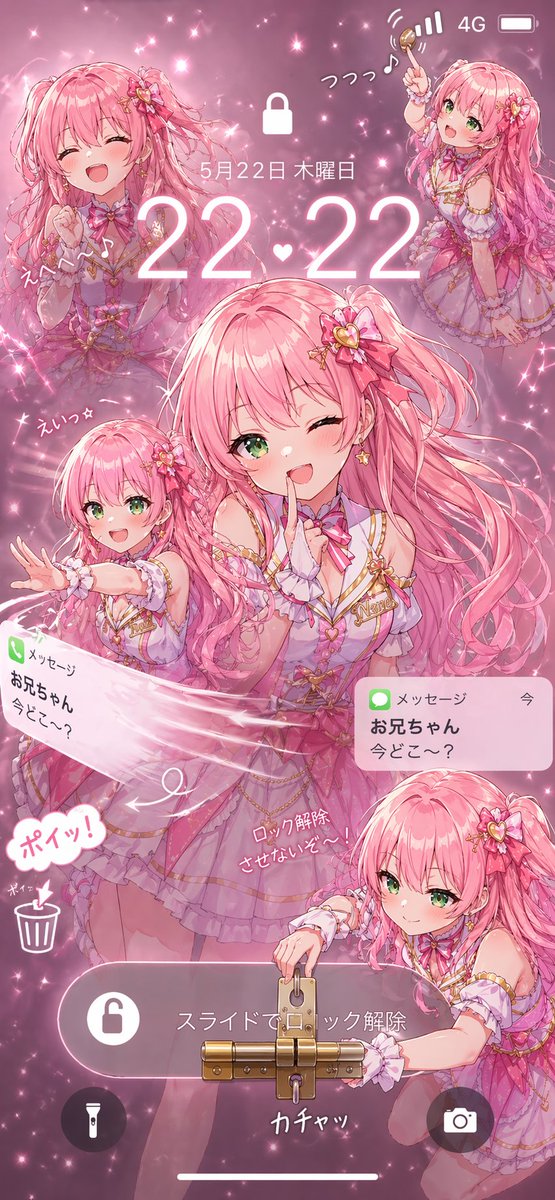
Pink Idol Anime Lock Screen
A glittery anime-style smartphone lock screen wallpaper featuring a pink-haired idol girl in five playful poses with notifications, UI elements, and a literal lock-unlocking gag.
This is a GPT Image 2 prompt case for Anime & Game. Use the copy-ready prompt below to generate similar visuals, and review Awesome GPT Image 2 Prompts attribution plus commercial-use rights before reuse.
Free 1K preview
Generate one preview image instantly, no sign-up required.
Prompt
Copy-ready prompt
A highly detailed anime-style smartphone lock screen wallpaper in a vertical 9:16 composition, themed entirely in sparkling pink idol aesthetics. The scene features {argument name="character name" default="Akari"}, a cheerful teenage magical-idol girl with very long voluminous {argument name="hair color" default="pastel pink"} twin-tail hair, bright green eyes, fair skin, and a playful expressive face. She wears an ornate frilly stage costume in layered pink, lavender, and white with gold trim, ribbons, heart motifs, lace cuffs, a choker bow, star earrings, and floral heart hair accessories. The background is a dreamy glitter-filled pink haze with bokeh, sparkles, and soft glow effects. Design it as a fake phone lock screen with a large white lock icon near the top center, cellular status icons in the upper right, and the date in Japanese reading 5月22日 木曜日 above a large glowing time display reading {argument name="time display" default="22:22"}. Include 5 visible character depictions of the same girl: 1 large central half-body figure winking and holding one finger to her lips in a teasing pose, 1 upper-left bust portrait laughing with eyes closed, 1 upper-right full or three-quarter body pose joyfully raising a small wand or key-like object, 1 lower-left smaller figure partly obscured by a blurred pink rectangle over the face while reaching outward, and 1 lower-right crouching figure with another blurred pink rectangle over the face while interacting with a large physical lock. Add handwritten Japanese sound-effect style text around the figures, including playful exclamations and notes. Show 2 message notification banners styled like iPhone alerts, both from メッセージ and お兄ちゃん with the text 今どこ〜?, one tilted on the left and one upright on the right. Across the lower middle, place a rounded translucent slider bar with Japanese text スライドでロック解除 and a lock icon. Make the unlocking concept literal by attaching an oversized brass padlock and latch mechanism to the slider, with the lower-right character appearing to unlock it using a key; add nearby handwritten Japanese text suggesting lock removal and a metallic click sound. In the lower left, include 2 circular utility icons, a flashlight and a trash can, plus a comic-style speech bubble reading ポイッ!. Add a camera icon in a dark circular button at the lower right and a thin white home indicator at the very bottom. Render everything with polished glossy anime illustration quality, soft lighting, dense sparkles, layered transparency, and a cute mischievous mood, as if an idol character has taken over and physically prevented the phone from being unlocked.Prompt variables
Editable argument placeholders found in the prompt, with their default values.
Best for
- - Anime & Game visual exploration
- - Image generation and reference-image edits
- - Reusable briefs that keep source attribution visible
Change these parts
- - Subject, product, character, or scene
- - Aspect ratio, camera, lighting, and background
- - Brand, text, color, and output constraints
Recommended model and settings
- - Model: gpt-image-2
- - Input mode: Text to Image
- - Aspect ratio: source
- - Commercial status: review original source
How to use this prompt
- 1. Copy the prompt and preserve its structure for the first test.
- 2. Replace the subject, context, and publishing channel.
- 3. Change one camera, lighting, or style variable per iteration.
- 4. Inspect the output, source, text, and rights before reuse.
Limitations, source, and reuse cautions
- - Generated output is an editable draft, not factual, legal, or rights evidence.
- - Review the linked source, people, brands, logos, text, and third-party media before commercial use.
More cases in this category
Prioritized by category, input mode compatibility, quality, and lower risk.

Reuse and source notes
Use this prompt safely after previewing the case.
- 1.Copy the prompt or open it directly in Dovoo with the generation button.
- 2.Adjust variables, aspect ratio, and reference images for your own use case.
- 3.Before publishing or paid usage, verify source rights, attribution requirements, and brand or likeness risks.
Can I use this prompt commercially?
Commercial-use status is allowed. Review the original source, license, brand constraints, and legal requirements before paid usage.
Where does this case come from?
This case is imported from Awesome GPT Image 2 Prompts; keep attribution visible and check the source URL before reuse.