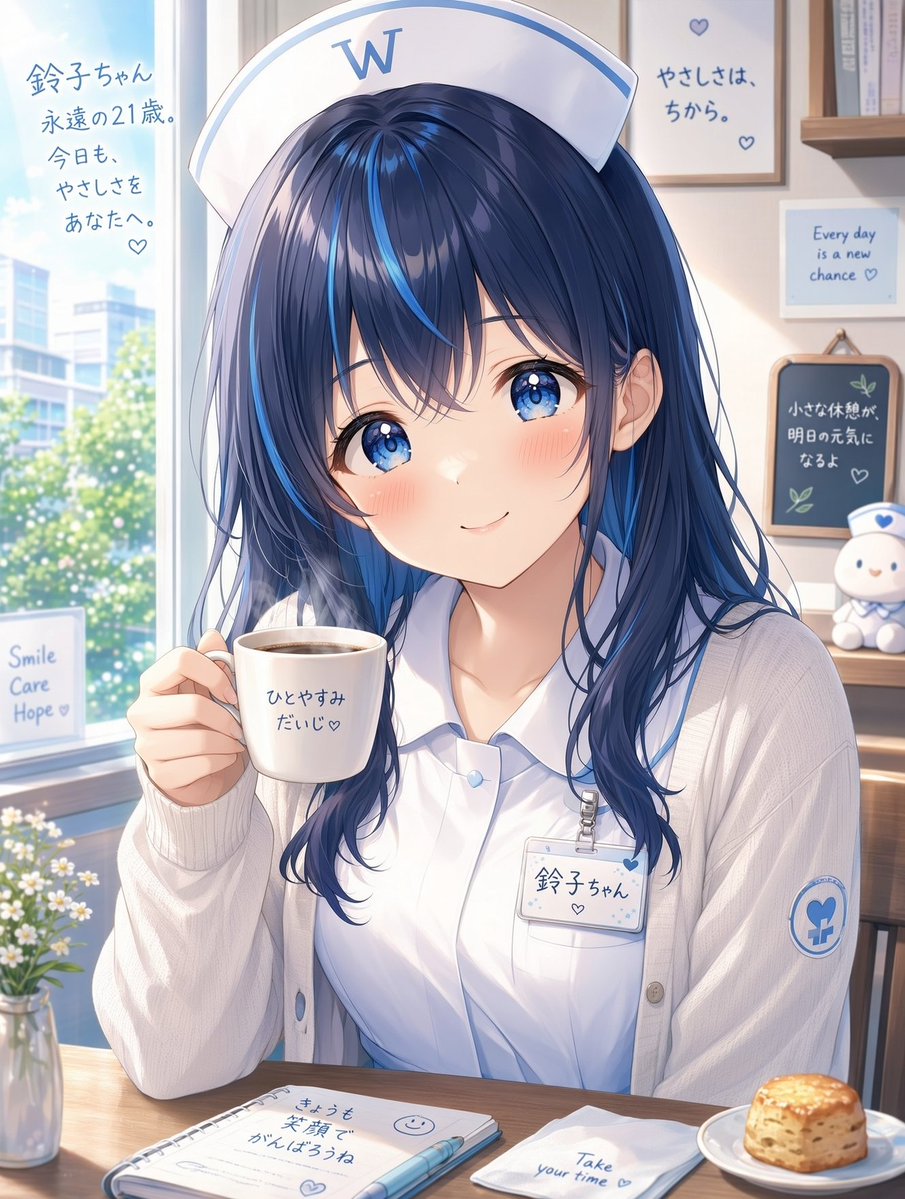
White Wing Nurse Cafe Portrait
Generates a soft anime portrait of an adult nurse mascot relaxing with coffee in a bright fictional hospital lounge, suitable for character branding or poster art.
This is a GPT Image 2 prompt case for Anime & Game. Use the copy-ready prompt below to generate similar visuals, and review Awesome GPT Image 2 Prompts attribution plus commercial-use rights before reuse.
Free 1K preview
Generate one preview image instantly, no sign-up required.
Prompt
Copy-ready prompt
Goal: Create a polished anime-style portrait poster of {argument name="character name" default="Suzuko-chan"}, an eternally 21-year-old nurse character from the fictional White Wing hospital, relaxing during a gentle break in a bright hospital cafe or staff lounge.

Canvas: Vertical 3:4 illustration, close-up waist-up composition, soft daylight, high-resolution commercial anime rendering with delicate linework, glossy eyes, warm blush, and a clean white-and-blue medical brand palette.

Subject details: Show one adult young woman nurse seated at a wooden table, facing the viewer with a calm, kind smile. She has long navy-blue hair with vivid cyan-blue highlights, loose layered bangs, soft wavy strands over her shoulders, large sparkling blue eyes, rosy cheeks, and a gentle expression. She wears a white nurse cap with a blue border and a large blue “W” logo, a crisp white collared blouse, a pale cream cardigan, and a clipped name badge. On her sleeve is a circular blue White Wing-style medical emblem. Her right hand holds a white coffee mug near her face.

Layout and environment: Place her slightly right of center beside a large sunny window on the left, with blurred hospital buildings, green trees, and bokeh sunlight outside. The interior background should include light wood shelves, framed motivational posters, a small chalkboard, and a cute white nurse mascot plush on the right. Use soft morning light, airy highlights, and a comforting hospital-lounge atmosphere.

Discrete visible text elements: Include exactly 10 readable text elements: 1) left window handwritten Japanese message: 「鈴子ちゃん 永遠の21歳。今日も、やさしさをあなたへ。♡」; 2) nurse cap letter: “W”; 3) upper-right framed Japanese poster: 「やさしさは、ちから。♡」; 4) small blue English card: “Every day is a new chance ♡”; 5) small chalkboard Japanese text: 「小さな休憩が 明日の元気になるよ ♡」; 6) lower-left window card: “Smile Care Hope ♡”; 7) mug text: 「ひとやすみ だいじ♡」; 8) name badge text: 「鈴子ちゃん」 with a small heart; 9) notebook text on the table: 「きょうも 笑顔で がんばろうね」 with a smiley and heart doodle; 10) napkin text: “Take your time ♡”. Keep all text neat, handwritten or softly printed, and legible.

Tabletop objects: Include exactly 5 foreground objects: the white coffee mug, a spiral notebook, a blue pen, a folded white napkin, and a plate with one golden scone or biscuit. Add one small glass vase of white flowers at the far left edge of the table.

Visual style: Soft pastel anime illustration, refined Japanese character art, gentle hospital branding, luminous blue-and-white palette, realistic fabric folds, subtle skin shading, sparkling highlights in the eyes and hair, cozy healing mood.

Constraints: The character must look adult and wholesome, not childlike. Do not add extra characters. Do not add extra text beyond the 10 specified text elements. Avoid distorted hands, unreadable lettering, misspelled English, warped logos, or cluttered background details.
Prompt variables
Editable argument placeholders found in the prompt, with their default values.
Best for
- - Anime & Game visual exploration
- - Image generation and reference-image edits
- - Reusable briefs that keep source attribution visible
Change these parts
- - Subject, product, character, or scene
- - Aspect ratio, camera, lighting, and background
- - Brand, text, color, and output constraints
Recommended model and settings
- - Model: gpt-image-2
- - Input mode: Text to Image
- - Aspect ratio: source
- - Commercial status: review original source
How to use this prompt
- 1. Copy the prompt and preserve its structure for the first test.
- 2. Replace the subject, context, and publishing channel.
- 3. Change one camera, lighting, or style variable per iteration.
- 4. Inspect the output, source, text, and rights before reuse.
Limitations, source, and reuse cautions
- - Generated output is an editable draft, not factual, legal, or rights evidence.
- - Review the linked source, people, brands, logos, text, and third-party media before commercial use.
More cases in this category
Prioritized by category, input mode compatibility, quality, and lower risk.


Reuse and source notes
Use this prompt safely after previewing the case.
- 1.Copy the prompt or open it directly in Dovoo with the generation button.
- 2.Adjust variables, aspect ratio, and reference images for your own use case.
- 3.Before publishing or paid usage, verify source rights, attribution requirements, and brand or likeness risks.
Can I use this prompt commercially?
Commercial-use status is allowed. Review the original source, license, brand constraints, and legal requirements before paid usage.
Where does this case come from?
This case is imported from Awesome GPT Image 2 Prompts; keep attribution visible and check the source URL before reuse.