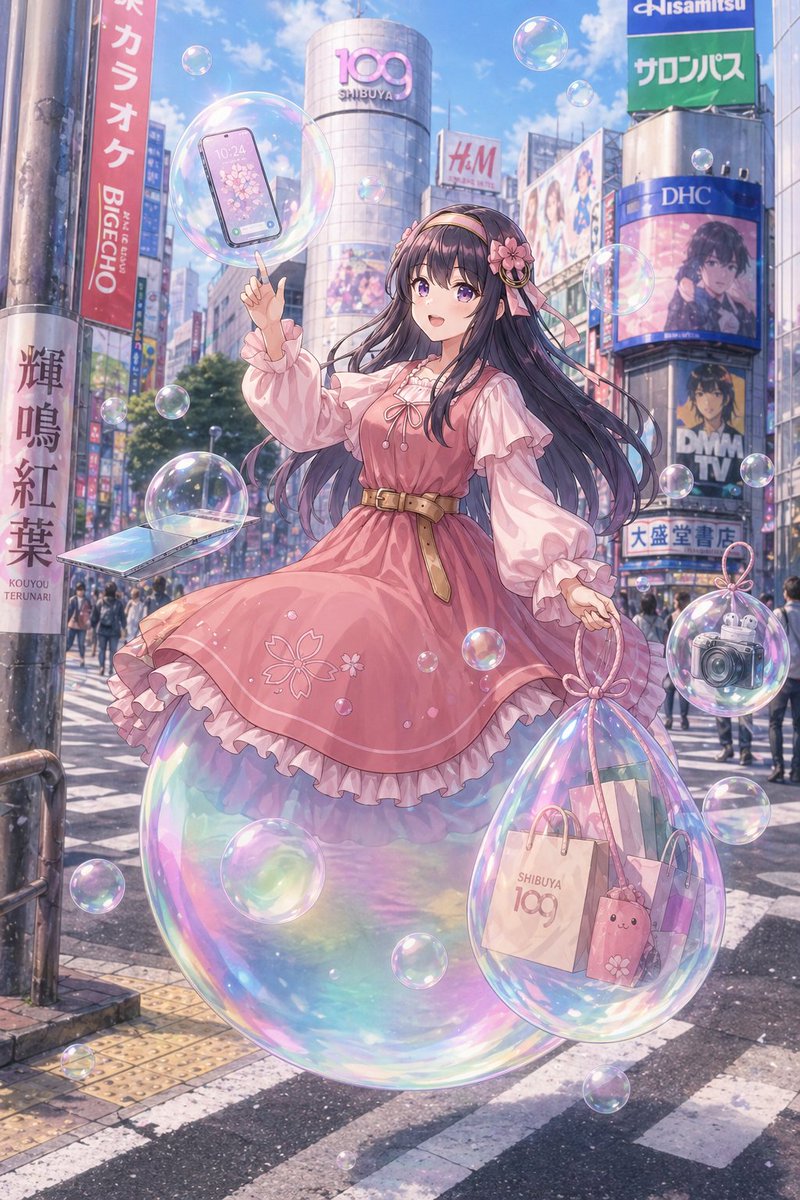
Pastel Anime Girl at Shibuya Crossing
This prompt generates a polished anime-style fantasy city portrait of a stylish girl floating through Shibuya amid iridescent bubbles, ideal for social-media-ready AI art with a magical Tokyo vibe.
This is a GPT Image 2 prompt case for Anime & Game. Use the copy-ready prompt below to generate similar visuals, and review Awesome GPT Image 2 Prompts attribution plus commercial-use rights before reuse.
Free 1K preview
Generate one preview image instantly, no sign-up required.
Prompt
Copy-ready prompt
A dreamy anime-style illustration of a fashionable young woman floating through the famous Shibuya Scramble Crossing in Tokyo on a bright spring day, with a soft pastel palette, glowing light, and whimsical urban fantasy mood. She is centered full-body, hovering slightly above the crosswalk while standing on a giant iridescent soap bubble. She has very long flowing dark indigo-black hair with a slight violet sheen, a pink floral headband with ribbons, and a sweet elegant outfit: a dusty pink knee-length dress with puffed long sleeves, layered ruffles, ribbon lacing at the chest, sakura flower embroidery near the hem, and a tan belt at the waist. Her expression should feel gentle and dreamy, her pose graceful and balanced, with one hand raised and pointing upward. Around her are many transparent rainbow soap bubbles of different sizes, about 16 visible bubbles total, drifting through the air. One large bubble near her raised hand contains a modern smartphone with a cherry blossom wallpaper. One medium bubble at lower left contains an open slim laptop angled toward the viewer. One large teardrop-shaped bubble hanging from her other hand contains 3 shopping items: a paper shopping bag printed with “SHIBUYA 109”, a second pastel shopping bag, and a pink bunny-shaped pouch or plush accessory. One medium bubble on the lower right contains a silver compact camera. The setting is a lively, recognizable Shibuya streetscape with the cylindrical SHIBUYA 109 building in the center background and multiple Japanese commercial billboards and signs surrounding the crossing, including visible signage such as “DHC,” “H&M,” “DMM TV,” and colorful vertical Japanese signs. Include pedestrians in the distance, crosswalk stripes, city poles, and realistic urban depth, but keep the girl as the clear focal point. The atmosphere should feel airy, magical, glossy, and slightly nostalgic, combining detailed city realism with highly polished anime character art, soft bloom lighting, shimmering reflections, translucent materials, and delicate springtime romance.
Best for
- - Anime & Game visual exploration
- - Image generation and reference-image edits
- - Reusable briefs that keep source attribution visible
Change these parts
- - Subject, product, character, or scene
- - Aspect ratio, camera, lighting, and background
- - Brand, text, color, and output constraints
Recommended model and settings
- - Model: gpt-image-2
- - Input mode: Text to Image
- - Aspect ratio: source
- - Commercial status: review original source
How to use this prompt
- 1. Copy the prompt and preserve its structure for the first test.
- 2. Replace the subject, context, and publishing channel.
- 3. Change one camera, lighting, or style variable per iteration.
- 4. Inspect the output, source, text, and rights before reuse.
Limitations, source, and reuse cautions
- - Generated output is an editable draft, not factual, legal, or rights evidence.
- - Review the linked source, people, brands, logos, text, and third-party media before commercial use.
More cases in this category
Prioritized by category, input mode compatibility, quality, and lower risk.

Reuse and source notes
Use this prompt safely after previewing the case.
- 1.Copy the prompt or open it directly in Dovoo with the generation button.
- 2.Adjust variables, aspect ratio, and reference images for your own use case.
- 3.Before publishing or paid usage, verify source rights, attribution requirements, and brand or likeness risks.
Can I use this prompt commercially?
Commercial-use status is allowed. Review the original source, license, brand constraints, and legal requirements before paid usage.
Where does this case come from?
This case is imported from Awesome GPT Image 2 Prompts; keep attribution visible and check the source URL before reuse.