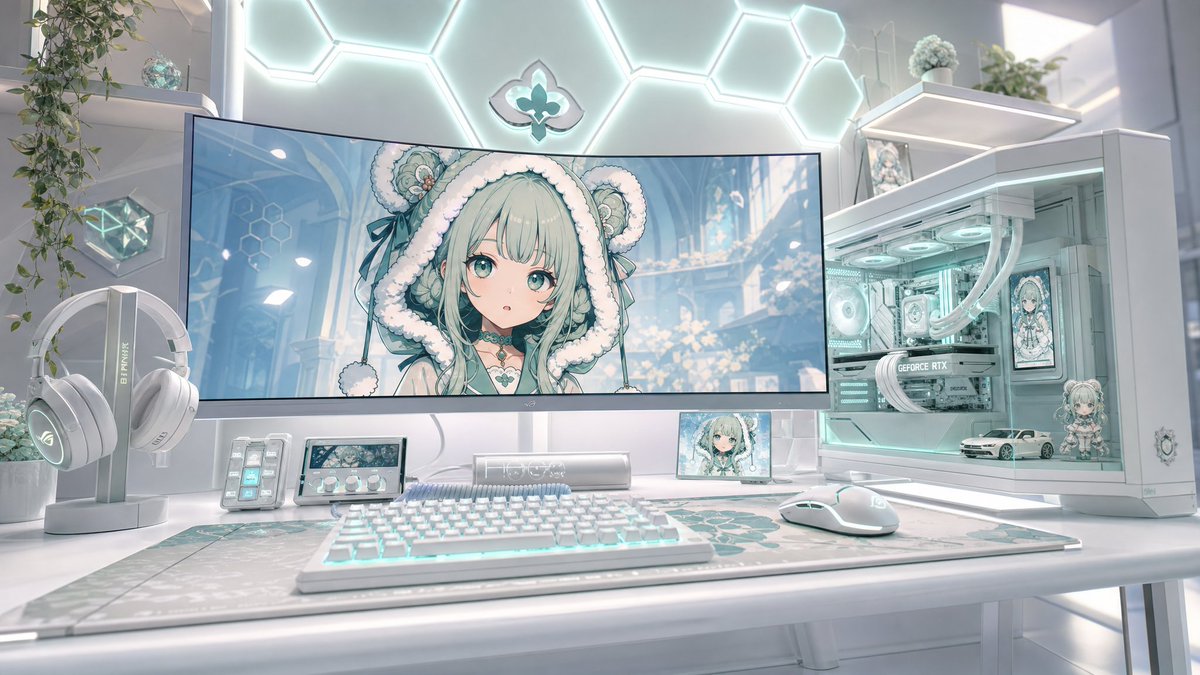
Pastel Anime Gaming Desk Setup
Generates a glossy white and mint futuristic anime-themed gaming battlestation for wallpapers, social posts, or setup inspiration.
This is a GPT Image 2 prompt case for Interior & Architecture. Use the copy-ready prompt below to generate similar visuals, and review Awesome GPT Image 2 Prompts attribution plus commercial-use rights before reuse.
Free 1K preview
Generate one preview image instantly, no sign-up required.
Prompt
Copy-ready prompt
Create an ultra-detailed futuristic pastel gaming desk setup in a bright white room, styled like a kawaii anime PC battlestation. Use a wide 16:9 cinematic composition, eye-level view, soft daylight, glossy white surfaces, mint-aqua RGB glow, shallow depth of field, and photorealistic 3D rendering with anime-themed decorative elements. Center the scene on one large curved ultrawide monitor displaying a cute anime girl wallpaper: {argument name="character name" default="mint-haired bear-hood anime girl"}, with very pale mint hair, fluffy white bear-eared hood, teal ribbons, delicate fantasy accessories, and a softly blurred square censor-like patch over the center of the face. On the desk include exactly 7 main desk objects: 1 large curved monitor, 1 white RGB mechanical keyboard, 1 white gaming mouse, 1 large patterned desk mat with mint geometric/floral motifs, 1 white headphone stand with white over-ear gaming headphones, 1 small stream deck with lit buttons, and 1 compact control panel with a small display and three knobs. To the right, place exactly 1 white glass-sided gaming PC tower with aqua internal lighting, visible fans, white liquid-cooling tubes, a graphics card, and anime character art displayed inside the case. Inside the PC display area include exactly 3 decorative items: 1 small anime figurine, 1 miniature white sports car model, and 1 framed anime panel. Add exactly 2 small screens besides the main monitor: 1 tiny landscape screen under the monitor showing the anime character and 1 small portrait-like anime display near the PC. Background details: a glowing hexagonal wall-light pattern behind the monitor, a small teal fleur-de-lis-like emblem centered on the wall, white floating shelves on both sides, trailing green plants, small glass/crystal decor, and soft sci-fi room lighting. Color palette: {argument name="color palette" default="white, pearl gray, mint aqua, pale teal, soft cyan"}. Mood: {argument name="mood" default="clean, dreamy, luxurious, cozy, high-end gamer aesthetic"}. Keep the image highly polished, symmetrical but naturally lived-in, with no people physically present, no visible watermark, no readable extra text except subtle hardware branding, and no clutter beyond the listed objects.Prompt variables
Editable argument placeholders found in the prompt, with their default values.
Best for
- - Interior & Architecture visual exploration
- - Image generation and reference-image edits
- - Reusable briefs that keep source attribution visible
Change these parts
- - Subject, product, character, or scene
- - Aspect ratio, camera, lighting, and background
- - Brand, text, color, and output constraints
Recommended model and settings
- - Model: gpt-image-2
- - Input mode: Text to Image
- - Aspect ratio: source
- - Commercial status: review original source
How to use this prompt
- 1. Copy the prompt and preserve its structure for the first test.
- 2. Replace the subject, context, and publishing channel.
- 3. Change one camera, lighting, or style variable per iteration.
- 4. Inspect the output, source, text, and rights before reuse.
Limitations, source, and reuse cautions
- - Generated output is an editable draft, not factual, legal, or rights evidence.
- - Review the linked source, people, brands, logos, text, and third-party media before commercial use.
More cases in this category
Prioritized by category, input mode compatibility, quality, and lower risk.
Reuse and source notes
Use this prompt safely after previewing the case.
- 1.Copy the prompt or open it directly in Dovoo with the generation button.
- 2.Adjust variables, aspect ratio, and reference images for your own use case.
- 3.Before publishing or paid usage, verify source rights, attribution requirements, and brand or likeness risks.
Can I use this prompt commercially?
Commercial-use status is allowed. Review the original source, license, brand constraints, and legal requirements before paid usage.
Where does this case come from?
This case is imported from Awesome GPT Image 2 Prompts; keep attribution visible and check the source URL before reuse.