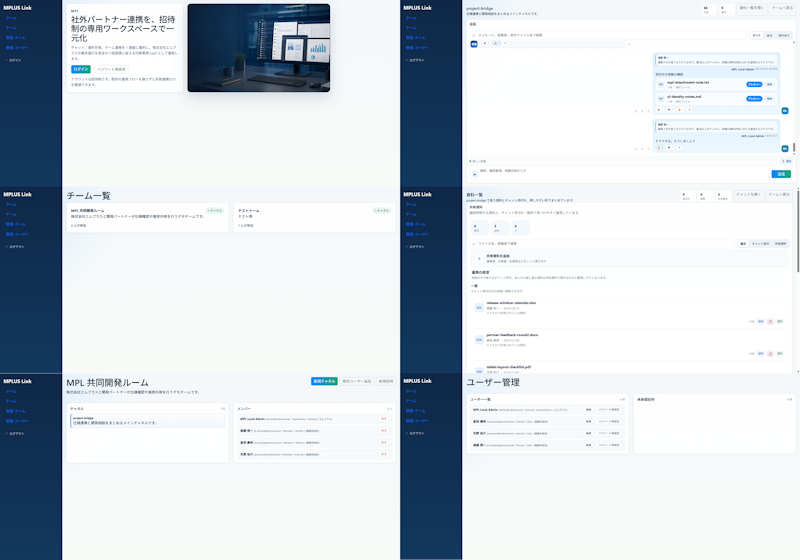
Modern MPLUS Link UI Redesign
Transforms an existing dense Japanese collaboration SaaS UI into a clean six-screen modern mockup for design improvement presentations.
This is a GPT Image 2 prompt case for 其他灵感. Use the copy-ready prompt below to generate similar visuals, and review Awesome GPT Image 2 Prompts attribution plus commercial-use rights before reuse.
Prompt
Copy-ready prompt
Using REFERENCE_0 as the source UI, the Teams-like internal/external collaboration system was redesigned into a simpler, more modern product model, while retaining the MPLUS Link brand, the dark blue left-side navigation bar, and the overall application functionality. A sophisticated 2-column, 3-row demo was created, showcasing six redesigned screens: 1) featuring a large main visual card and Japanese titles.{argument name="headline text" default="We centralize collaboration with external partners through an invitation-only, dedicated workspace."} 1) A welcome/login landing page with a login tab/button and a realistic desktop monitor main visual image; 2) A project bridging chat screen with right-aligned chat cards, action chips, and a message editor; 3) A team list screen simplified into two concise team cards; 4) A resource/document list screen with upload controls, search/filter areas, and file rows; 5) Titled{argument name="room title" default="MPI Collaborative Development Room"} The shared collaboration room screen includes project overview cards and a compact member/status list; 6) Titled{argument name="admin title" default="User Management"} The user management screen includes user rows and a blank details panel. The new model is more spacious than the reference image: fewer table rows, increased margins, softer separator lines, a light blue-gray background, white rounded-corner cards, subtle shadows, and small blue/green accent buttons. It maintains the feel and virtual data attributes of Japanese enterprise SaaS, but removes dense and cumbersome tables, replacing them with a simplified, aesthetically pleasing UI model suitable for design improvements and comparisons. The brand name is used in the sidebar.{argument name="brand name" default="MPLUS Link"} Ensure the sidebar remains consistent across all screens and avoid adding irrelevant features, watermarks, or decorative clutter.Prompt variables
Editable argument placeholders found in the prompt, with their default values.
More cases in this category
Prioritized by category, input mode compatibility, quality, and lower risk.

Reuse and source notes
Use this prompt safely after previewing the case.
- 1.Copy the prompt or open it directly in Dovoo with the generation button.
- 2.Adjust variables, aspect ratio, and reference images for your own use case.
- 3.Before publishing or paid usage, verify source rights, attribution requirements, and brand or likeness risks.
Can I use this prompt commercially?
Commercial-use status is allowed. Review the original source, license, brand constraints, and legal requirements before paid usage.
Where does this case come from?
This case is imported from Awesome GPT Image 2 Prompts; keep attribution visible and check the source URL before reuse.