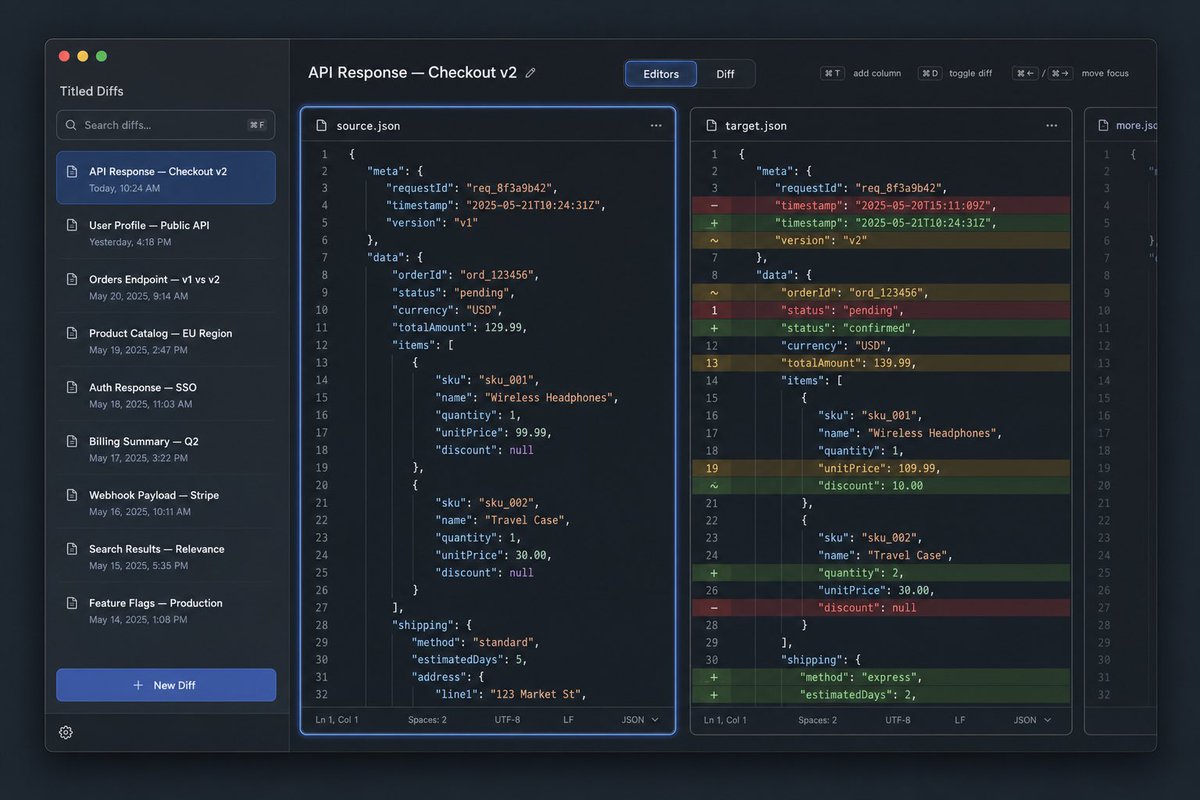
Dark JSON Diff Tool UI Mockup
Generates a polished dark-mode desktop UI mockup for a JSON API diff and code comparison tool.
This is a GPT Image 2 prompt case for 其他灵感. Use the copy-ready prompt below to generate similar visuals, and review Awesome GPT Image 2 Prompts attribution plus commercial-use rights before reuse.
Need the full prompt set? Use the 其他灵感 topic hub for more related examples, or open the GPT Image 2 prompt library for the full example index, reusable structures, and source attribution.
Prompt
Copy-ready prompt
目标:创建一个深色模式的桌面应用 UI 原型,用于名为 {argument name="app name" default="Tilted Diffs"} 的 JSON diff 工具,展示标题为 {argument name="diff title" default="API Response — Checkout v2"} 的 API 响应对比。

画布:16:10 宽屏桌面截图,约 1152×768,带有 macOS 风格的应用窗口,悬浮在深蓝色渐变背景上。使用细微阴影、圆角、细边框和精致的开发者工具美学。

布局:应用包含 4 个主要区域:1 个左侧边栏,1 个横跨编辑器区域的顶部工具栏,3 个垂直代码编辑器面板。第一个编辑器面板被选中,并带有明亮的蓝色焦点光晕。中间面板显示带颜色的行内 diff 高亮。最右侧面板较窄且部分可见,类似于额外的文件标签或第三个对比列。

左侧边栏:左上角显示 macOS 交通灯按钮:3 个圆圈,分别为红色、黄色、绿色。在应用名称下方,包含 1 个搜索框,占位符文本为“Search diffs…”,并带有键盘提示。下方显示 8 个已保存的 diff 列表项,带有小文档图标和时间戳:1) “API Response — Checkout v2”,显示“Today, 10:24 AM”,以蓝色高亮显示为选中项;2) “User Profile — Public API”,显示“Yesterday, 4:18 PM”;3) “Orders Endpoint — v1 vs v2”,显示“May 20, 2025, 9:14 AM”;4) “Product Catalog — EU Region”,显示“May 19, 2025, 2:47 PM”;5) “Auth Response — SSO”,显示“May 18, 2025, 11:03 AM”;6) “Billing Summary — Q2”,显示“May 17, 2025, 3:22 PM”;7) “Webhook Payload — Stripe”,显示“May 16, 2025, 10:11 AM”;8) “Search Results — Relevance”,显示“May 15, 2025, 5:35 PM”。底部包含 1 个显眼的蓝色“+ New Diff”按钮和 1 个小型齿轮图标。

顶部工具栏:左侧显示标题“API Response — Checkout v2”,带有一个微小的编辑铅笔图标。中间放置一个分段控件,包含 2 个标签:选中蓝色的“Editors”和未选中的“Diff”。右侧包含 4 个紧凑的快捷键控件,标注为“⌘T add column”、“⌘D toggle diff”、“⌘← / ⌘→ move focus”,组间留有小间距。

编辑器面板:使用等宽代码字体、行号、JSON 语法高亮、深海军蓝面板和细圆角边框。左侧面板标题为“source.json”,带有文档图标和三点菜单。中间面板标题为“target.json”,带有文档图标和三点菜单。狭窄的右侧面板标题为“more.json”,仅显示代码的左侧部分,暗示溢出。每个完整编辑器面板底部都有一个状态栏,显示“Ln 1, Col 1”、“Spaces: 2”、“UTF-8”、“LF”和“JSON”。

代码内容:显示订单结账响应的 JSON。使用 requestId “req_8f3a9b42”、orderId “ord_123456”、货币 USD,以及无线耳机和旅行收纳包的商品信息和配送信息。左侧源版本应包含时间戳“2025-05-21T10:24:31Z”、版本“v1”、状态“pending”、totalAmount 129.99、无线耳机 unitPrice 99.99(折扣为 null)、旅行收纳包数量 1、unitPrice 30.00(折扣为 null)、配送方式“standard”、estimatedDays 5 以及地址“123 Market St”。中间目标版本应在左侧装订线显示 diff 标记,并使用彩色行高亮:红色为删除行,绿色为新增行,黄色为修改行。它应包含时间戳从“2025-05-20T15:11:09Z”更改为“2025-05-21T10:24:31Z”、版本更改为 v2、状态从 pending 更改为 confirmed、totalAmount 更改为 139.99、无线耳机 unitPrice 更改为 109.99 并添加了折扣 10.00、旅行收纳包数量更改为 2、配送方式更改为 express 且 estimatedDays 更改为 2。每个完整编辑器中显示约 32 行编号代码。

视觉风格:高级 SaaS 开发者工具界面,清晰的矢量级渲染,深色主题,钴蓝色强调色,柔和的灰色文本,真实但整洁的 UI 截图,无人像,无水印,应用窗口外无浏览器边框。保持所有文本清晰且对齐网格。
Prompt variables
Editable argument placeholders found in the prompt, with their default values.
Variable
app name
Default
Tilted Diffs
Variable
diff title
Default
API Response — Checkout v2
More cases in this category
Prioritized by category, input mode compatibility, quality, and lower risk.

Reuse and source notes
Use this prompt safely after previewing the case.
- 1.Copy the prompt or open it directly in Dovoo with the generation button.
- 2.Adjust variables, aspect ratio, and reference images for your own use case.
- 3.Before publishing or paid usage, verify source rights, attribution requirements, and brand or likeness risks.
Can I use this prompt commercially?
Commercial-use status is allowed. Review the original source, license, brand constraints, and legal requirements before paid usage.
Where does this case come from?
This case is imported from Awesome GPT Image 2 Prompts; keep attribution visible and check the source URL before reuse.