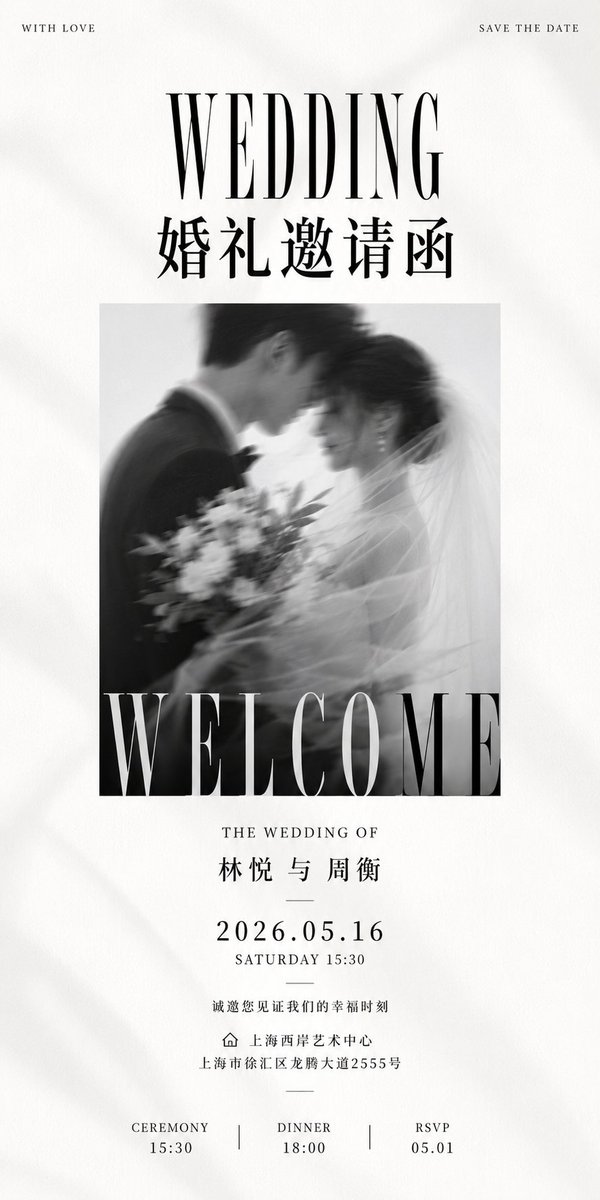
Luxury Monochrome Wedding Invitation
Creates a tall editorial black-and-white wedding invitation poster with Chinese and English typography for elegant wedding stationery.
This is a GPT Image 2 prompt case for Graphic & Poster. Use the copy-ready prompt below to generate similar visuals, and review Awesome GPT Image 2 Prompts attribution plus commercial-use rights before reuse.
Free 1K preview
Generate one preview image instantly, no sign-up required.
Prompt
Copy-ready prompt
Objective: Create a tall, minimalist, black and white luxury wedding invitation poster, presented in a magazine editorial style, with a delicate paper texture and soft, romantic monochrome photography.

Canvas: Ultra-tall vertical 1:2 aspect ratio invitation, approximately 600 x 1200 pixels in size. Warm white paper background with subtle texture, faint creases, and soft shadows near the edges. Centered symmetrical layout with generous white margins.

Layout: Tiny text line at the top, large title area, centered photo block, event details, and a three-column footer. Use 9 main text groups: 1) Tiny text in the upper left corner, 2) Tiny text in the upper right corner, 3) Huge English title, 4) Large Chinese title, 5) Text overlaid on the photo, 6) Wedding name and names of the couple, 7) Date/Time block, 8) Invitation wording and venue/address, 9) Three-column footer.

Typography: English should use high-contrast Didot/Bodoni style serif fonts, tall and elegant in form, with wide letter spacing for lowercase letters. Chinese text should use refined Songti/Mingti style fonts. All text should be black or dark charcoal gray, except for the text on the photo, which should be white and have a slight transparency when passing through dark areas.

Text Content: Small-cap, widely spaced "WITH LOVE" in the upper left corner. Small-cap, widely spaced "SAVE THE DATE" in the upper right corner. The main title is a huge, tall, serif, all-caps "WEDDING". Below it, place {argument name="Chinese invitation title" default="Wedding Invitation"} using a large Chinese serif font. Overlay a huge, white, tall, serif, all-caps "WELCOME" at the bottom of the photo, slightly cropped by the photo's bottom edge. Below the photo: "THE WEDDING OF", followed by {argument name="couple names" default="2026.05.16"}. Then a short, thin dividing line. The main date line: {argument name="wedding date" default="2026.05.16"}. Below: "SATURDAY 15:30". Then another thin dividing line. The invitation line: {argument name="invitation sentence" default="You are cordially invited to witness our happy moment"}. A small, simple house outline icon precedes the venue line: {argument name="venue and address" default="Shanghai West Bund Art Center\nNo. 2555 Longteng Road, Xuhui District, Shanghai"}. Followed by a short dividing line. The footer contains 3 columns, separated by 2 thin vertical lines: Left column "CEREMONY" below "15:30", middle column "DINNER" below "18:00", right column "RSVP" below "05.01".

Photo Details: Centered rectangular black and white wedding photo, approximately two-thirds the width of the canvas and 40% of the canvas height. The image shows the groom and bride in soft motion blur, close together, foreheads touching or kissing. The groom is on the left, wearing a dark suit and bow tie; the bride is on the right, wearing a veil, with a bouquet of flowers positioned in the lower left/center. Romantic high-key lighting, shallow depth of field, and a dreamy, blurred veil sweeping across the right side. The photo should present an elegant, candid film look, rather than a sharp studio portrait.

Spacing and Constraints: Maintain a monochrome, clean, high-end, and editorial design. All major elements should be centered. Use thin dividing lines sparingly. Do not add borders, colorful decorations, floral illustrations, QR codes, logos, watermarks, or additional text. Strictly maintain the three items in the footer and the two separators.
Prompt variables
Editable argument placeholders found in the prompt, with their default values.
Best for
- - Graphic & Poster visual exploration
- - Image generation and reference-image edits
- - Reusable briefs that keep source attribution visible
Change these parts
- - Subject, product, character, or scene
- - Aspect ratio, camera, lighting, and background
- - Brand, text, color, and output constraints
Recommended model and settings
- - Model: gpt-image-2
- - Input mode: Text to Image
- - Aspect ratio: source
- - Commercial status: review original source
How to use this prompt
- 1. Copy the prompt and preserve its structure for the first test.
- 2. Replace the subject, context, and publishing channel.
- 3. Change one camera, lighting, or style variable per iteration.
- 4. Inspect the output, source, text, and rights before reuse.
Limitations, source, and reuse cautions
- - Generated output is an editable draft, not factual, legal, or rights evidence.
- - Review the linked source, people, brands, logos, text, and third-party media before commercial use.
More cases in this category
Prioritized by category, input mode compatibility, quality, and lower risk.





Reuse and source notes
Use this prompt safely after previewing the case.
- 1.Copy the prompt or open it directly in Dovoo with the generation button.
- 2.Adjust variables, aspect ratio, and reference images for your own use case.
- 3.Before publishing or paid usage, verify source rights, attribution requirements, and brand or likeness risks.
Can I use this prompt commercially?
Commercial-use status is allowed. Review the original source, license, brand constraints, and legal requirements before paid usage.
Where does this case come from?
This case is imported from Awesome GPT Image 2 Prompts; keep attribution visible and check the source URL before reuse.