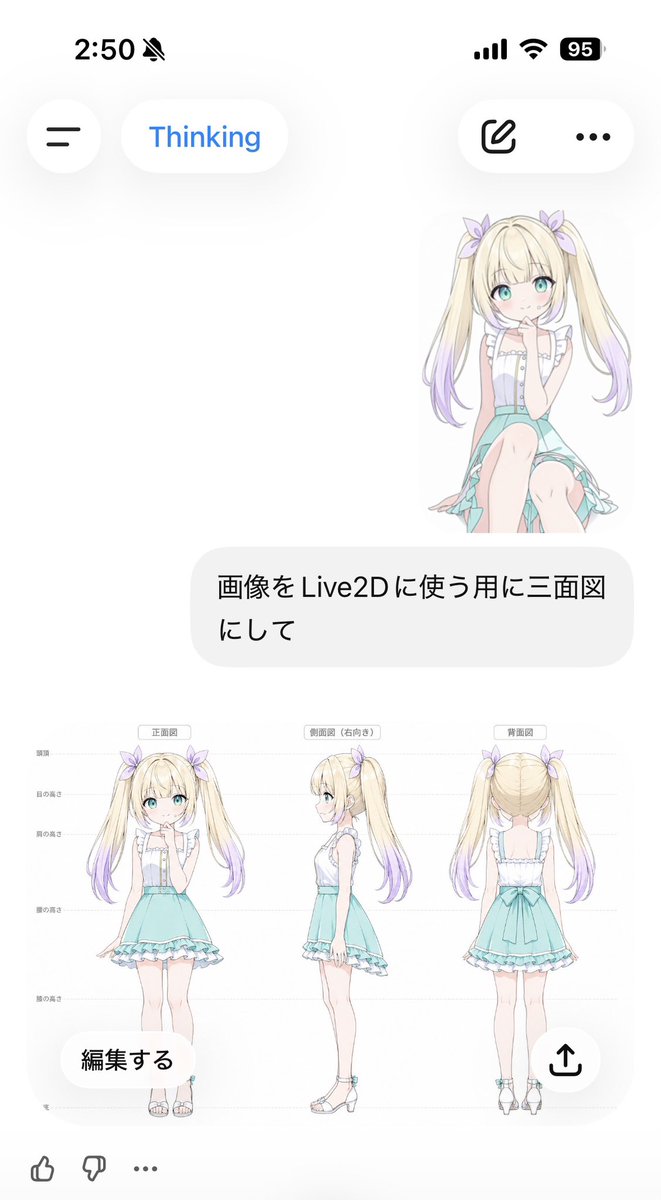
Anime Live2D Turnaround Chat Screenshot
Creates a mobile AI chat screenshot featuring a pastel anime girl converted into a three-view Live2D character reference sheet.
This is a GPT Image 2 prompt case for 动漫游戏. Use the copy-ready prompt below to generate similar visuals, and review Awesome GPT Image 2 Prompts attribution plus commercial-use rights before reuse.
Prompt
Copy-ready prompt
Objective: Create a vertical screenshot of a smartphone chat interface showcasing an anime character model generated for Live2D use. Canvas: 691 × 1024 vertical mobile screenshot, white background, soft iOS-style UI with ample white space and semi-transparent rounded controls. Top Status Bar: The top left corner displays the time "2:50" next to a mute bell icon; the top right corner displays three status indicators: signal bars, Wi-Fi, and a black battery icon displaying "95". Top UI: Below the status bar, place four floating rounded controls: a circular hamburger menu button on the left, a white capsule button labeled "Thinking" in blue in the middle, a white capsule button containing an outline editing/pencil icon on the right, and a menu button with three dots. Chat content: A small full-body anime girl sticker is displayed in the upper right corner. She is seated/kneeling, facing forward, with long, golden twin tails that fade to light purple at the ends. She has light blue eyes, fair skin, a light purple headband, and wears a white ruffled sleeveless blouse and a mint-green skirt. Below her is a large, rounded, light gray user message bubble containing Japanese text:{argument name="user message" default="Convert the image into a three-view drawing for use with Live2D."} The generated image card displays a large, embedded character reference image below the message bubble, with a white background. The image contains three full-body views of the same character, evenly arranged from left to right: 1) labeled {argument name="front label" default="Front view"} The front view, 2) marked with{argument name="side label" default="Side view (facing right)"} The right-side view, and 3) marked with{argument name="back label" default="Rear view"} The back view. Add subtle horizontal guidelines and small Japanese height markings on the left, similar to a three-view model. The character is a cute anime girl named {argument name="character name" default="unnamed blonde twin-tail girl"} Long, golden twin ponytails with a light purple gradient at the ends, adorned with light purple bows; turquoise eyes; a rosy complexion; wearing a white sleeveless top with ruffles and vertical buttons; a mint turquoise high-waisted skirt with ruffles and an asymmetrical train; long, slender legs; and white ankle-strap sandals with turquoise embellishments. Ensure consistent proportions across all three views; the art style is delicate, simple, and pastel-inspired. Overlay controls on image cards: Two floating buttons are added to the bottom of the image cards: a circular white "Edit" button in the lower left corner and a circular white share button with an upward arrow icon in the lower right corner. Bottom reaction bar: Three small icons are displayed at the bottom edge: like, dislike, and ellipsis. Visual style: Clear mobile screenshots, minimalist white interface, soft shadows, Japanese chat app aesthetics, pastel anime illustrations, clean lines, no watermark, no extra panels, and no other characters.Prompt variables
Editable argument placeholders found in the prompt, with their default values.
More cases in this category
Prioritized by category, input mode compatibility, quality, and lower risk.


Reuse and source notes
Use this prompt safely after previewing the case.
- 1.Copy the prompt or open it directly in Dovoo with the generation button.
- 2.Adjust variables, aspect ratio, and reference images for your own use case.
- 3.Before publishing or paid usage, verify source rights, attribution requirements, and brand or likeness risks.
Can I use this prompt commercially?
Commercial-use status is allowed. Review the original source, license, brand constraints, and legal requirements before paid usage.
Where does this case come from?
This case is imported from Awesome GPT Image 2 Prompts; keep attribution visible and check the source URL before reuse.