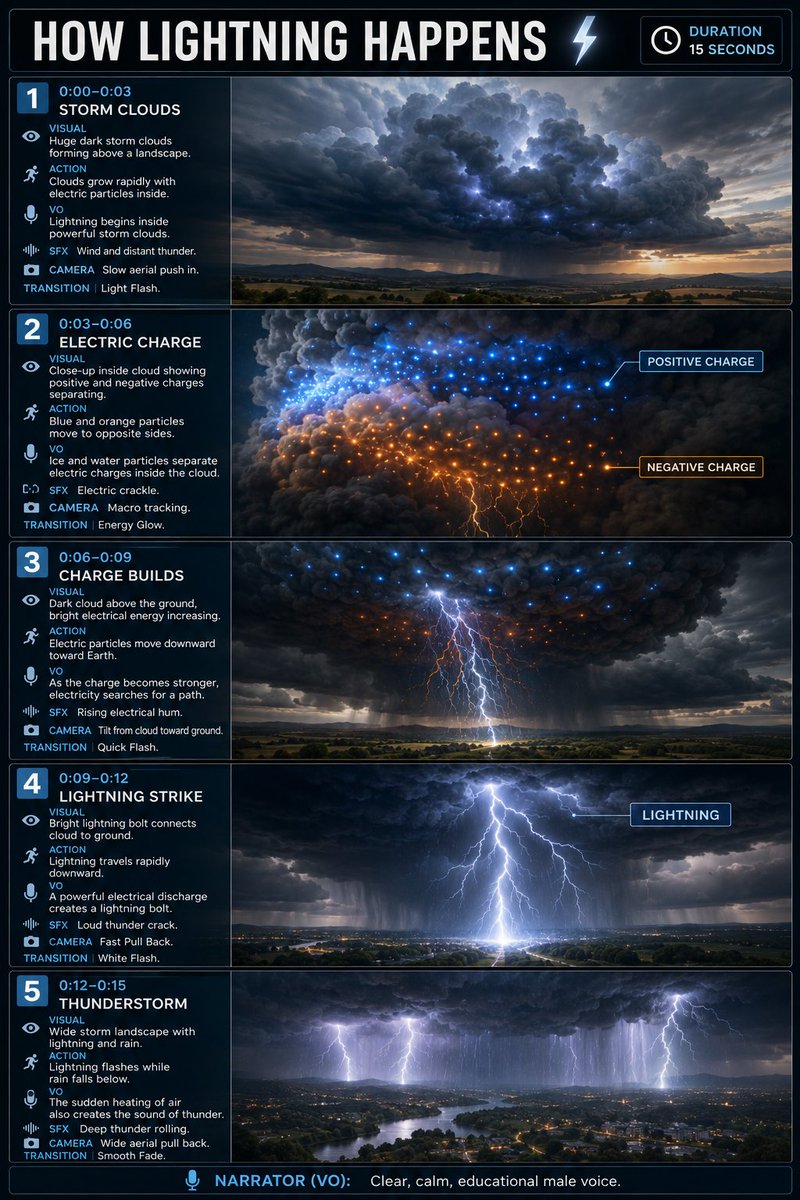
Educational Lightning Storyboard Infographic
A detailed storyboard prompt for creating professional educational infographics about lightning, featuring multiple scenes with visual descriptions, camera angles, and voiceover instructions.
This is a GPT Image 2 prompt case for Graphic & Poster. Use the copy-ready prompt below to generate similar visuals, and review Awesome GPT Image 2 Prompts attribution plus commercial-use rights before reuse.
Free 1K preview
Generate one preview image instantly, no sign-up required.
Prompt
Copy-ready prompt
Create a vertical 2:3 educational storyboard infographic, 5 horizontal scenes, cinematic realistic 3D science visualization, exactly like a professional educational video storyboard.

TOPIC: HOW LIGHTNING HAPPENS
Duration: 15 seconds

1 | 0:00–0:03 — STORM CLOUDS
Visual: Huge dark storm clouds forming above a landscape.
Action: Clouds grow rapidly with electric particles inside.
VO: “Lightning begins inside powerful storm clouds.”
SFX: Wind and distant thunder.
Camera: Slow aerial push in.
Transition: Light Flash.

2 | 0:03–0:06 — ELECTRIC CHARGE
Visual: Close-up inside cloud showing positive and negative charges separating.
Action: Blue and orange particles move to opposite sides.
Labels: POSITIVE CHARGE, NEGATIVE CHARGE.
VO: “Ice and water particles separate electric charges inside the cloud.”
SFX: Electric crackle.
Camera: Macro tracking.
Transition: Energy Glow.

3 | 0:06–0:09 — CHARGE BUILDS
Visual: Dark cloud above the ground, bright electrical energy increasing.
Action: Electric particles move downward toward Earth.
VO: “As the charge becomes stronger, electricity searches for a path.”
SFX: Rising electrical hum.
Camera: Tilt from cloud toward ground.
Transition: Quick Flash.

4 | 0:09–0:12 — LIGHTNING STRIKE
Visual: Bright lightning bolt connects cloud to ground.
Action: Lightning travels rapidly downward.
Label: LIGHTNING.
VO: “A powerful electrical discharge creates a lightning bolt.”
SFX: Loud thunder crack.
Camera: Fast Pull Back.
Transition: White Flash.

5 | 0:12–0:15 — THUNDERSTORM
Visual: Wide storm landscape with lightning and rain.
Action: Lightning flashes while rain falls below.
VO: “The sudden heating of air also creates the sound of thunder.”
SFX: Deep thunder rolling.
Camera: Wide aerial pull back.
Transition: Smooth Fade.

Bottom: NARRATOR (VO): Clear, calm, educational male voice.
Best for
- - Graphic & Poster visual exploration
- - Image generation and reference-image edits
- - Reusable briefs that keep source attribution visible
Change these parts
- - Subject, product, character, or scene
- - Aspect ratio, camera, lighting, and background
- - Brand, text, color, and output constraints
Recommended model and settings
- - Model: gpt-image-2
- - Input mode: Text to Image
- - Aspect ratio: source
- - Commercial status: review original source
How to use this prompt
- 1. Copy the prompt and preserve its structure for the first test.
- 2. Replace the subject, context, and publishing channel.
- 3. Change one camera, lighting, or style variable per iteration.
- 4. Inspect the output, source, text, and rights before reuse.
Limitations, source, and reuse cautions
- - Generated output is an editable draft, not factual, legal, or rights evidence.
- - Review the linked source, people, brands, logos, text, and third-party media before commercial use.
More cases in this category
Prioritized by category, input mode compatibility, quality, and lower risk.


Reuse and source notes
Use this prompt safely after previewing the case.
- 1.Copy the prompt or open it directly in Dovoo with the generation button.
- 2.Adjust variables, aspect ratio, and reference images for your own use case.
- 3.Before publishing or paid usage, verify source rights, attribution requirements, and brand or likeness risks.
Can I use this prompt commercially?
Commercial-use status is allowed. Review the original source, license, brand constraints, and legal requirements before paid usage.
Where does this case come from?
This case is imported from Awesome GPT Image 2 Prompts; keep attribution visible and check the source URL before reuse.