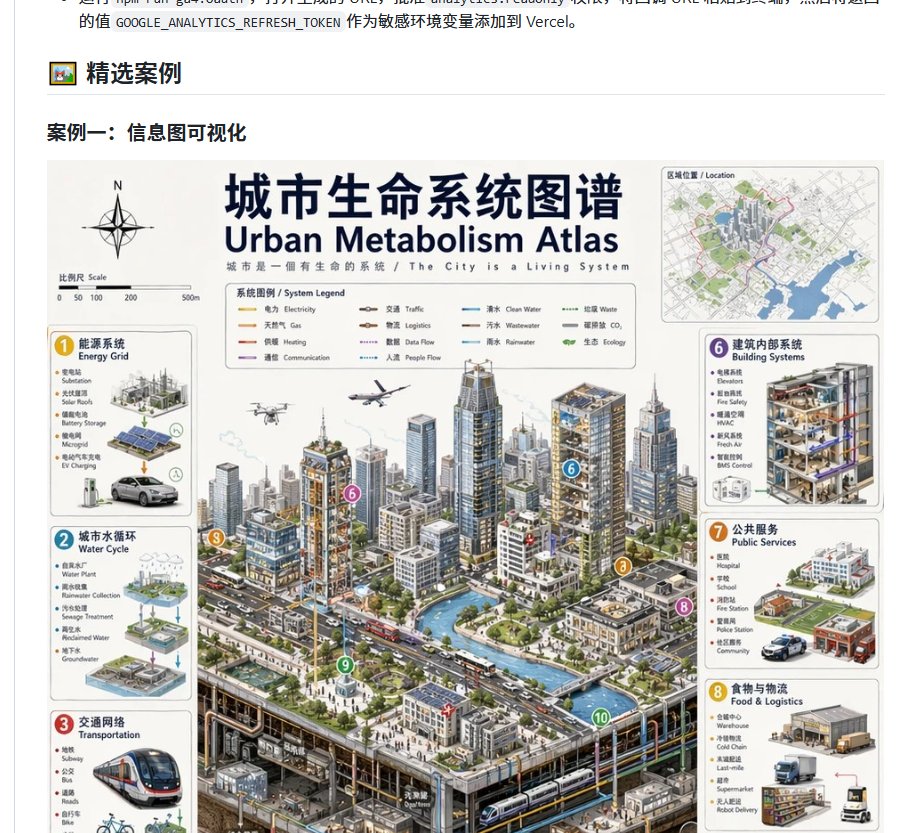
Urban Metabolism Atlas Webpage Screenshot
Generates a Chinese webpage screenshot featuring a detailed bilingual urban metabolism atlas infographic for showcasing information visualization examples.
This is a GPT Image 2 prompt case for Graphic & Poster. Use the copy-ready prompt below to generate similar visuals, and review Awesome GPT Image 2 Prompts attribution plus commercial-use rights before reuse.
Free 1K preview
Generate one preview image instantly, no sign-up required.
Prompt
Copy-ready prompt
Goal: Create a simple browser page screenshot showcasing a Chinese case study section, featuring a large bilingual infographic poster about a city system map.

Canvas: Horizontal screenshot, approximately 917x833 pixels, white webpage background, cropped to show the end of a Chinese paragraph at the top and truncate the poster at the bottom. Render with a clean UI style, without a full browser border.

Webpage Layout: In the visible area, at the top-left, display a small framed emoji/icon, followed by a bold Chinese title “精选案例” (Featured Cases), and a thin gray horizontal line spanning most of the width. Below that, display a bold subtitle: “案例一:信息图可视化” (Case One: Infographic Visualization). Center a large infographic poster below this title, leaving a narrow margin.

Main Poster: Design a data-dense bilingual map poster titled “{argument name="main title" default="City Life System Atlas"}”, with the English subtitle “{argument name="English subtitle" default="Urban Metabolism Atlas"}”. Add a short bilingual slogan below the title: “城市是一個有生命的系統 / The City is a Living System”. The poster should present a professional architectural/urban planning infographic style: off-white background, navy blue title text, thin gray panel borders, small bilingual labels, illustrative icons, and a largely central isometric city sectional illustration.

Poster Top Elements: Include a compass rose labeled N in the upper-left, and a scale bar labeled “Scale” with graduations of 0, 50, 100, 200, 500 meters. Near the top center, include a framed “System Legend” listing 10 colored line samples, labeled as: Electricity, Gas, Heating, Communication, Traffic, Logistics, Data Flow, People Flow, Clean Water, Wastewater. In the upper-right corner, include a small illustration card labeled “Location”, showing a simplified city map with green parks, blue waterways, gray streets, and a red boundary.

City Center Illustration: Showcase a dense isometric smart city containing numerous high-rise towers, mid-rise blocks, roads with cars and buses, blue canals or rivers, bridges, street trees, plazas, and underground subway tunnels and utility conduits visible in the bottom section. Include details like drones, airplanes, rooftop solar panels, transit stations, pedestrians, and service vehicles. Use thin colored network lines running through the city to suggest flows of water, energy, data, logistics, and traffic. Add 5 visible circular numbered annotation markers in the central scene: 6 on a building, 3 near a road/traffic corridor, 8 near the edge of a street on the right, 9 within a green plaza, and 10 near the edge of an underground tunnel/canal.

Side Information Cards: Place 6 visible rounded-rectangle system cards around the city, each with a colored numbered badge, bilingual title, small bullet-point labels, and miniature charts. On the left side, include 3 cards: 1 “能源系统 / Energy Grid”, featuring solar panels, battery storage, EV charging, and cars; 2 “城市水循环 / Water Cycle”, featuring water plants, rainwater harvesting, wastewater treatment, reclaimed water, and a groundwater chart; 3 “交通网络 / Transportation”, featuring subway trains, buses, roads, bicycle icons, and route maps. On the right side, include 3 cards: 6 “建筑内部系统 / Building Systems”, featuring a building section showing floors, HVAC, fire safety, building management system (BMS) controls, and plumbing; 7 “公共服务 / Public Services”, featuring hospital, school, fire station, police station, and community service icons; 8 “食物与物流 / Food & Logistics”, featuring warehouses, cold chain, last-mile delivery, trucks, containers, and robotic delivery. Allow the bottom of both left and right columns to be slightly cropped by the screenshot edge to match a realistic page view.

Visual Style: Highly detailed semi-realistic isometric illustration combined with technical infographic design, using soft grays and whites with navy blue fonts, and accent colors of yellow, cyan, red, purple, orange, and green. Title-level text should be clear and readable, but many small labels can be very fine. Maintain the texture of a realistic Chinese webpage article example image.

Constraints: Do not add browser address bars, watermarks, floating toolbars, or extra social media UI. Preserve the Chinese titles on the webpage and the title hierarchy of the bilingual poster. The image should look like a generative infographic screenshot embedded in a document page.
Prompt variables
Editable argument placeholders found in the prompt, with their default values.
Best for
- - Graphic & Poster visual exploration
- - Image generation and reference-image edits
- - Reusable briefs that keep source attribution visible
Change these parts
- - Subject, product, character, or scene
- - Aspect ratio, camera, lighting, and background
- - Brand, text, color, and output constraints
Recommended model and settings
- - Model: gpt-image-2
- - Input mode: Text to Image
- - Aspect ratio: source
- - Commercial status: review original source
How to use this prompt
- 1. Copy the prompt and preserve its structure for the first test.
- 2. Replace the subject, context, and publishing channel.
- 3. Change one camera, lighting, or style variable per iteration.
- 4. Inspect the output, source, text, and rights before reuse.
Limitations, source, and reuse cautions
- - Generated output is an editable draft, not factual, legal, or rights evidence.
- - Review the linked source, people, brands, logos, text, and third-party media before commercial use.
More cases in this category
Prioritized by category, input mode compatibility, quality, and lower risk.




Reuse and source notes
Use this prompt safely after previewing the case.
- 1.Copy the prompt or open it directly in Dovoo with the generation button.
- 2.Adjust variables, aspect ratio, and reference images for your own use case.
- 3.Before publishing or paid usage, verify source rights, attribution requirements, and brand or likeness risks.
Can I use this prompt commercially?
Commercial-use status is allowed. Review the original source, license, brand constraints, and legal requirements before paid usage.
Where does this case come from?
This case is imported from Awesome GPT Image 2 Prompts; keep attribution visible and check the source URL before reuse.