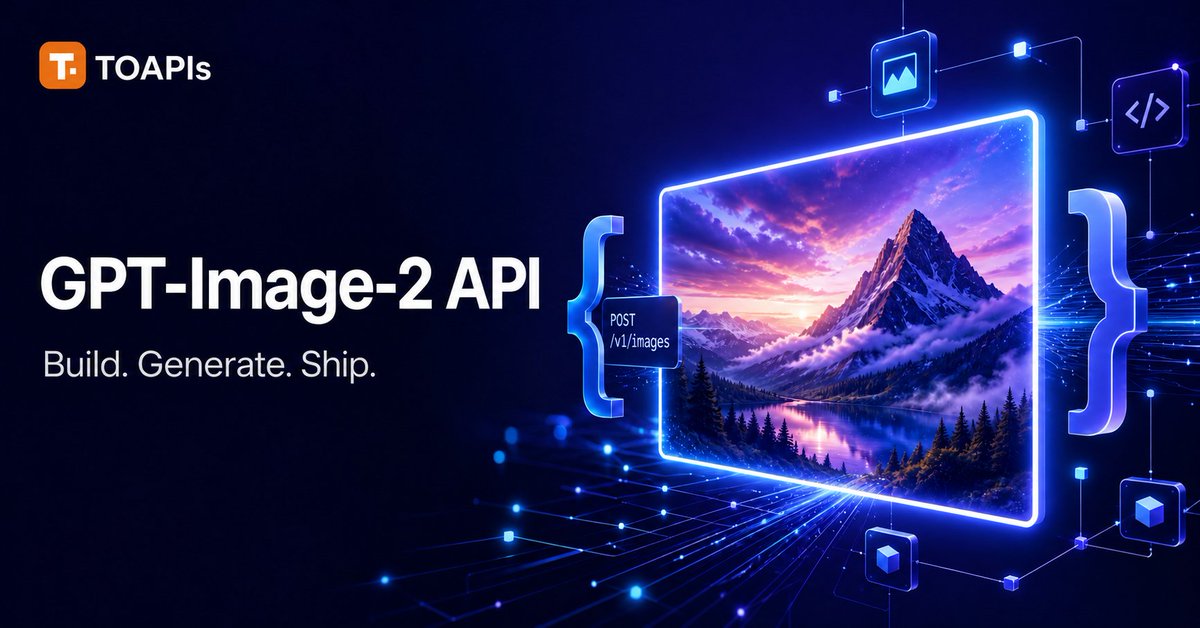
GPT-Image-2 API Hero Banner
A futuristic neon SaaS hero banner promoting the GPT-Image-2 API with TOAPIs branding and a glowing image-generation workflow visual.
This is a GPT Image 2 prompt case for Graphic & Poster. Use the copy-ready prompt below to generate similar visuals, and review Awesome GPT Image 2 Prompts attribution plus commercial-use rights before reuse.
Free 1K preview
Generate one preview image instantly, no sign-up required.
Prompt
Copy-ready prompt
Goal: Create a futuristic SaaS developer hero banner advertising {argument name="product name" default="GPT-Image-2 API"} for TOAPIs, emphasizing image generation through an API.

Canvas: Wide 16:9 social media banner, approximately 1200×675, dark navy-to-black gradient background with electric blue and violet glow effects, high contrast, polished tech-marketing style.

Layout: Left side contains branding and headline text; right side contains a glowing API/image-generation visualization. Keep the composition spacious with the main text aligned left and the visual system occupying the right two-thirds.

Text content: Top-left logo row shows an orange rounded-square icon with a white “T.” followed by “TOAPIs” in white. Large bold headline reads “{argument name="headline text" default="GPT-Image-2 API"}”. Smaller subheadline below reads “{argument name="subheadline text" default="Build. Generate. Ship."}”. On a small dark floating API label near the image frame, include exactly two lines: “POST” and “/v1/images”.

Right-side visual elements: Show exactly 1 large glowing rectangular image preview frame with rounded corners, tilted very slightly in perspective, bordered by bright neon blue light. Inside the frame is exactly 1 vivid AI-generated landscape image: dramatic snow-covered mountain peak, purple-orange sunset sky, clouds wrapping the mountain, evergreen forest, and reflective alpine lake. Place exactly 2 oversized translucent curly braces around the image/API area: 1 left brace in cyan-blue and 1 right brace in pale blue-white. Add exactly 1 small dark API endpoint tag attached to the left side of the frame. Add exactly 4 floating rounded-square technology icons connected by thin glowing circuit lines: 1 image icon above the frame, 1 code brackets icon in the upper-right, 1 cube icon lower-right, and 1 small cube/data icon near the bottom center-right.

Background details: Add fine luminous circuit traces, small glowing nodes, data streams, and perspective grid lines radiating from the lower center toward the right, using blue and purple light. Include subtle bokeh dots and tiny square connection nodes, but do not add extra readable text.

Visual style: Premium AI developer platform advertisement, cinematic neon lighting, glossy glassmorphism UI panels, crisp typography, realistic-yet-stylized generated landscape, sharp edges, strong blue glow, professional SaaS launch graphic.

Constraints: Use English text only. Preserve exactly the visible text strings and the counted major elements. No people, no watermark, no extra logos beyond TOAPIs, no cluttered paragraphs, and no misspelled API text.
Prompt variables
Editable argument placeholders found in the prompt, with their default values.
Best for
- - Graphic & Poster visual exploration
- - Image generation and reference-image edits
- - Reusable briefs that keep source attribution visible
Change these parts
- - Subject, product, character, or scene
- - Aspect ratio, camera, lighting, and background
- - Brand, text, color, and output constraints
Recommended model and settings
- - Model: gpt-image-2
- - Input mode: Text to Image
- - Aspect ratio: source
- - Commercial status: review original source
How to use this prompt
- 1. Copy the prompt and preserve its structure for the first test.
- 2. Replace the subject, context, and publishing channel.
- 3. Change one camera, lighting, or style variable per iteration.
- 4. Inspect the output, source, text, and rights before reuse.
Limitations, source, and reuse cautions
- - Generated output is an editable draft, not factual, legal, or rights evidence.
- - Review the linked source, people, brands, logos, text, and third-party media before commercial use.
More cases in this category
Prioritized by category, input mode compatibility, quality, and lower risk.
Reuse and source notes
Use this prompt safely after previewing the case.
- 1.Copy the prompt or open it directly in Dovoo with the generation button.
- 2.Adjust variables, aspect ratio, and reference images for your own use case.
- 3.Before publishing or paid usage, verify source rights, attribution requirements, and brand or likeness risks.
Can I use this prompt commercially?
Commercial-use status is allowed. Review the original source, license, brand constraints, and legal requirements before paid usage.
Where does this case come from?
This case is imported from Awesome GPT Image 2 Prompts; keep attribution visible and check the source URL before reuse.