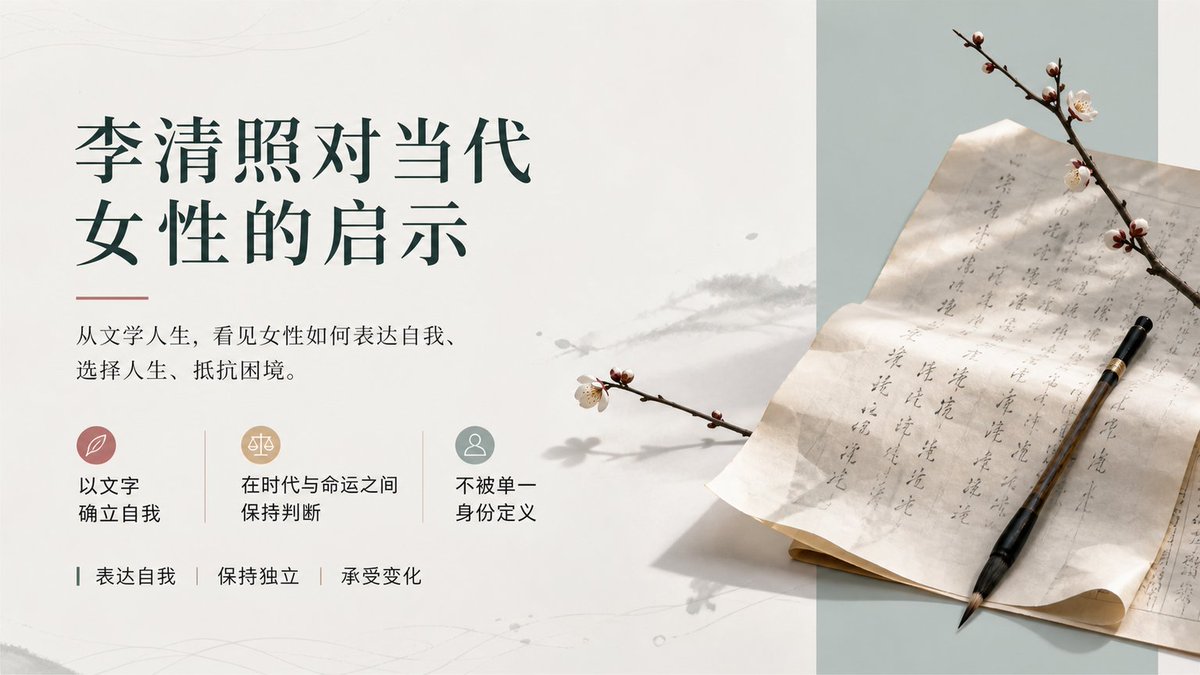
Li Qingzhao Literary Slide
Creates an elegant Chinese literature cover slide with refined typography, icon cards, and a poetic plum-blossom manuscript still life.
This is a GPT Image 2 prompt case for Graphic & Poster. Use the copy-ready prompt below to generate similar visuals, and review Awesome GPT Image 2 Prompts attribution plus commercial-use rights before reuse.
Free 1K preview
Generate one preview image instantly, no sign-up required.
Prompt
Copy-ready prompt
Objective: Create an elegant Chinese literature presentation cover slide about {argument name="topic" default="Li Qingzhao's inspiration for contemporary women"}, combining the poetic atmosphere of the Song Dynasty with modern editing design.

Canvas: 16:9 horizontal slides, clean off-white background, with a pale sage green vertical panel on the right third. Use a lot of white space, exquisite margins, soft paper texture, faint ink stains, and subtle gray plant shadows spanning the middle.

Layout: The left two-thirds is the text area; the right one-third is the still life photography area. Place the main title in the upper left corner, formatted in two lines of dark forest green Chinese font: the first line “Li Qingzhao to Contemporary”, and the second line “Inspiration for Women”. Add a thin soft red horizontal decorative line below the title. Place a smaller black Chinese serif font subtitle below the title: {argument name="subtitle text" default="From literary life, see how women express themselves, choose their lives, and resist adversity."}

Middle-left function row: Contains 3 horizontally arranged small icon cards, separated by two thin vertical lines. Card 1 has a soft rose-colored circular icon containing a white leaf symbol, labeled “Establish oneself with literature”. Card 2 has a warm beige circular icon containing a white balance symbol, labeled “Maintain judgment between era and fate”. Card 3 has a low-saturation cyan circular icon containing a white figure silhouette, labeled “Not defined by a single identity”.

Bottom-left keyword row: Contains 3 keywords separated by vertical lines, with small dark green guide marks: “Express oneself | Maintain independence | Endure change”.

Right-side still life details: Display an ancient Chinese letter or manuscript paper placed diagonally on a desk, with vertical Chinese calligraphy visible in gray ink on the paper. A black-brown calligraphy brush is placed diagonally on the paper, with the tip pointing to the lower right. Add 2 branches of plum blossoms: one spanning the upper right corner, with several pale pink-white flowers and buds; and a smaller one extending from the middle left to the right, casting a soft shadow. The right panel background is pale sage green; the paper is warm ivory, with slightly curled edges and soft creases.

Visual style: Elegant, literary, minimalist in the style of a museum catalog; serene Song Dynasty aesthetics; natural light from the upper left; soft shadows; soft tones of ivory, forest green, sage green, rose, beige, and ink gray; high-resolution editing composition, combining realistic still life photography with concise graphic layout.

Constraints: Keep all visible text in Chinese, completely consistent with the specified content, and do not add any additional explanations or watermarks. Strictly retain the 3 icon cards and 3 bottom keywords. Avoid clutter, bright colors, cartoon styles, or modern technology UI effects.
Prompt variables
Editable argument placeholders found in the prompt, with their default values.
Best for
- - Graphic & Poster visual exploration
- - Image generation and reference-image edits
- - Reusable briefs that keep source attribution visible
Change these parts
- - Subject, product, character, or scene
- - Aspect ratio, camera, lighting, and background
- - Brand, text, color, and output constraints
Recommended model and settings
- - Model: gpt-image-2
- - Input mode: Text to Image
- - Aspect ratio: source
- - Commercial status: review original source
How to use this prompt
- 1. Copy the prompt and preserve its structure for the first test.
- 2. Replace the subject, context, and publishing channel.
- 3. Change one camera, lighting, or style variable per iteration.
- 4. Inspect the output, source, text, and rights before reuse.
Limitations, source, and reuse cautions
- - Generated output is an editable draft, not factual, legal, or rights evidence.
- - Review the linked source, people, brands, logos, text, and third-party media before commercial use.
More cases in this category
Prioritized by category, input mode compatibility, quality, and lower risk.


Reuse and source notes
Use this prompt safely after previewing the case.
- 1.Copy the prompt or open it directly in Dovoo with the generation button.
- 2.Adjust variables, aspect ratio, and reference images for your own use case.
- 3.Before publishing or paid usage, verify source rights, attribution requirements, and brand or likeness risks.
Can I use this prompt commercially?
Commercial-use status is allowed. Review the original source, license, brand constraints, and legal requirements before paid usage.
Where does this case come from?
This case is imported from Awesome GPT Image 2 Prompts; keep attribution visible and check the source URL before reuse.