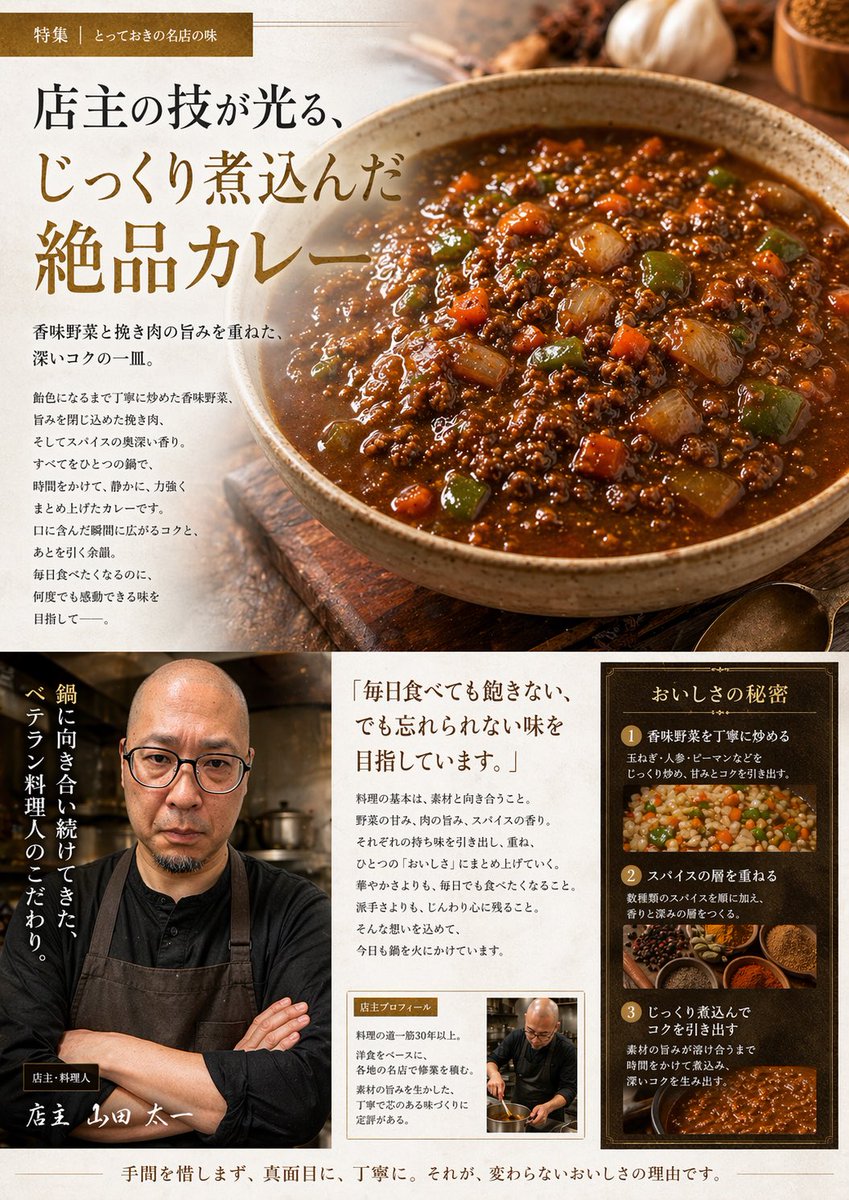
Japanese Gourmet Curry Ad Layout
This prompt turns a reference photo of homemade curry into a premium Japanese restaurant-style editorial advertisement page for menus, promos, or social posts.
This is a GPT Image 2 prompt case for Food & Beverage. Use the copy-ready prompt below to generate similar visuals, and review Awesome GPT Image 2 Prompts attribution plus commercial-use rights before reuse.
Free 1K preview
Generate one preview image instantly, no sign-up required.
Free text preview doesn’t preserve reference-image consistency.
Prompt
Copy-ready prompt
Using the provided reference image of the curry in the pan, transform it into a polished Japanese gourmet magazine advertisement page for {argument name="dish name" default="キーマカレー"}. Keep the curry recognizable as the same dish, but restyle it as a premium food photograph served in a rustic ceramic bowl on a wooden tabletop, with richer gloss, deeper color contrast, and more appetizing texture. Create a full editorial layout with 3 main content areas: 1) a large hero section at the top featuring the plated curry on the right and Japanese promotional copy on the left, including a small top banner label and a large headline; 2) a bottom-left chef profile area with 1 portrait of a chef in dark workwear and apron, arms crossed in a restaurant kitchen, plus vertical Japanese copy and a handwritten-style name caption; 3) a bottom-right information area containing 1 quote block and 1 framed “secret of deliciousness” panel with exactly 3 numbered steps, each paired with a food or cooking image. Add warm ambient lighting, shallow depth of field, spices and garlic props around the hero dish, and an upscale traditional restaurant branding feel. Include Japanese text throughout, with the main headline emphasizing slow-cooked, exquisite curry, and use elegant Mincho-style typography in brown, cream, and gold tones. The final composition should look like a high-end restaurant feature article or promotional brochure page.Prompt variables
Editable argument placeholders found in the prompt, with their default values.
Best for
- - Food & Beverage visual exploration
- - Image generation and reference-image edits
- - Reusable briefs that keep source attribution visible
Change these parts
- - Subject, product, character, or scene
- - Aspect ratio, camera, lighting, and background
- - Brand, text, color, and output constraints
Recommended model and settings
- - Model: gpt-image-2
- - Input mode: Image to Image
- - Aspect ratio: source
- - Commercial status: review original source
How to use this prompt
- 1. Copy the prompt and preserve its structure for the first test.
- 2. Replace the subject, context, and publishing channel.
- 3. Change one camera, lighting, or style variable per iteration.
- 4. Inspect the output, source, text, and rights before reuse.
Limitations, source, and reuse cautions
- - Generated output is an editable draft, not factual, legal, or rights evidence.
- - Review the linked source, people, brands, logos, text, and third-party media before commercial use.
More cases in this category
Prioritized by category, input mode compatibility, quality, and lower risk.
Reuse and source notes
Use this prompt safely after previewing the case.
- 1.Copy the prompt or open it directly in Dovoo with the generation button.
- 2.Adjust variables, aspect ratio, and reference images for your own use case.
- 3.Before publishing or paid usage, verify source rights, attribution requirements, and brand or likeness risks.
Can I use this prompt commercially?
Commercial-use status is allowed. Review the original source, license, brand constraints, and legal requirements before paid usage.
Where does this case come from?
This case is imported from Awesome GPT Image 2 Prompts; keep attribution visible and check the source URL before reuse.