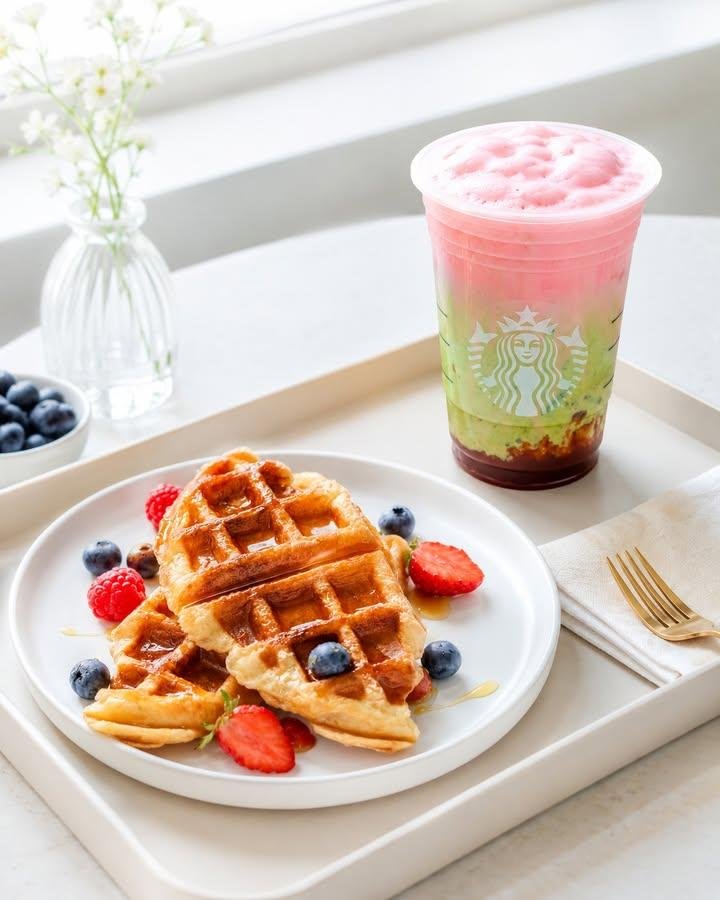
Modern Cafe Food Product Tray Photography
An image-to-image prompt to transform a product photo into a clean, modern cafe-style tray presentation, preserving original product textures and colors.
This is a GPT Image 2 prompt case for Food & Beverage. Use the copy-ready prompt below to generate similar visuals, and review Awesome GPT Image 2 Prompts attribution plus commercial-use rights before reuse.
Free 1K preview
Generate one preview image instantly, no sign-up required.
Free text preview doesn’t preserve reference-image consistency.
Prompt
Copy-ready prompt
BRIGHT CAFE TRAY SETUP
Clean Lifestyle Food Photography

Use the {argument name="reference source" default="uploaded photo"} as the primary visual reference.

Transform the exact {argument name="subject" default="food or beverage product"} shown in the image into a bright, clean, cafe-style tray setup photograph.

First, visually analyze the uploaded image and understand the product’s real appearance, textures, colors, portion, serving style, and distinctive characteristics.

Preserve the original product identity.

Do not redesign the recipe, replace the product, or turn it into a generic AI-generated version.

━━━━━━━━━━━━━━━━━━
CREATIVE DIRECTION
━━━━━━━━━━━━━━━━━━

Create a bright, clean, modern cafe-style product photo with a tray-based presentation.

The final result should feel:
- bright
- clean
- fresh
- modern
- realistic
- appetizing
- professionally photographed
- commercial
- social-media ready

This is a food photography visual first.

The product must remain the clear hero.

━━━━━━━━━━━━━━━━━━
SCENE CONCEPT
━━━━━━━━━━━━━━━━━━

Create a refined cafe-style scene where the product is presented on a {argument name="tray style" default="light wood tray"} or structured serving base.

The tray should help organize the composition and make the setup feel neat, intentional, and premium.

The overall scene should feel like a bright modern cafe photoshoot.

Preferred vibe:
- bright morning or daytime cafe
- airy and clean
- simple but polished
- visually calm
- premium but approachable

━━━━━━━━━━━━━━━━━━
TRAY & PRESENTATION
━━━━━━━━━━━━━━━━━━

Use a tray, serving board, or structured cafe-style serving base as a key composition element.

You may improve or replace the original plate, bowl, cup, paper liner, tray, or serving vessel if needed.

Choose a setup that feels:
- clean
- modern
- realistic
- premium
- cafe-appropriate
- visually balanced

━━━━━━━━━━━━━━━━━━
SUPPORTING ELEMENTS
━━━━━━━━━━━━━━━━━━

Add only a few subtle supporting elements when appropriate.

Possible supporting elements:
- a clean glass of water
- simple cup or small drink pairing
- napkin
- small cutlery
- tiny sauce dish
- minimal bakery paper
- subtle ingredient cue
- small side item if it naturally fits the product

Keep all supporting elements minimal and secondary.

Do not overcrowd the tray.

Do not create a busy breakfast spread.

━━━━━━━━━━━━━━━━━━
BACKGROUND & ENVIRONMENT
━━━━━━━━━━━━━━━━━━

Create a bright, clean, visually calm background.

Preferred visual direction:
- white
- soft off-white
- light cream
- pale beige
- bright neutral cafe interior feel
- clean table near natural light
- soft minimal background blur

Choose the most suitable bright environment automatically based on the uploaded product.

Avoid:
- dark or moody scene
- cluttered cafe background
- heavy rustic styling
- strong busy patterns
- loud decorative props

━━━━━━━━━━━━━━━━━━
LIGHTING
━━━━━━━━━━━━━━━━━━

Us
Prompt variables
Editable argument placeholders found in the prompt, with their default values.
Best for
- - Food & Beverage visual exploration
- - Image generation and reference-image edits
- - Reusable briefs that keep source attribution visible
Change these parts
- - Subject, product, character, or scene
- - Aspect ratio, camera, lighting, and background
- - Brand, text, color, and output constraints
Recommended model and settings
- - Model: gpt-image-2
- - Input mode: Image to Image
- - Aspect ratio: source
- - Commercial status: review original source
How to use this prompt
- 1. Copy the prompt and preserve its structure for the first test.
- 2. Replace the subject, context, and publishing channel.
- 3. Change one camera, lighting, or style variable per iteration.
- 4. Inspect the output, source, text, and rights before reuse.
Limitations, source, and reuse cautions
- - Generated output is an editable draft, not factual, legal, or rights evidence.
- - Review the linked source, people, brands, logos, text, and third-party media before commercial use.
More cases in this category
Prioritized by category, input mode compatibility, quality, and lower risk.
Reuse and source notes
Use this prompt safely after previewing the case.
- 1.Copy the prompt or open it directly in Dovoo with the generation button.
- 2.Adjust variables, aspect ratio, and reference images for your own use case.
- 3.Before publishing or paid usage, verify source rights, attribution requirements, and brand or likeness risks.
Can I use this prompt commercially?
Commercial-use status is allowed. Review the original source, license, brand constraints, and legal requirements before paid usage.
Where does this case come from?
This case is imported from Awesome GPT Image 2 Prompts; keep attribution visible and check the source URL before reuse.