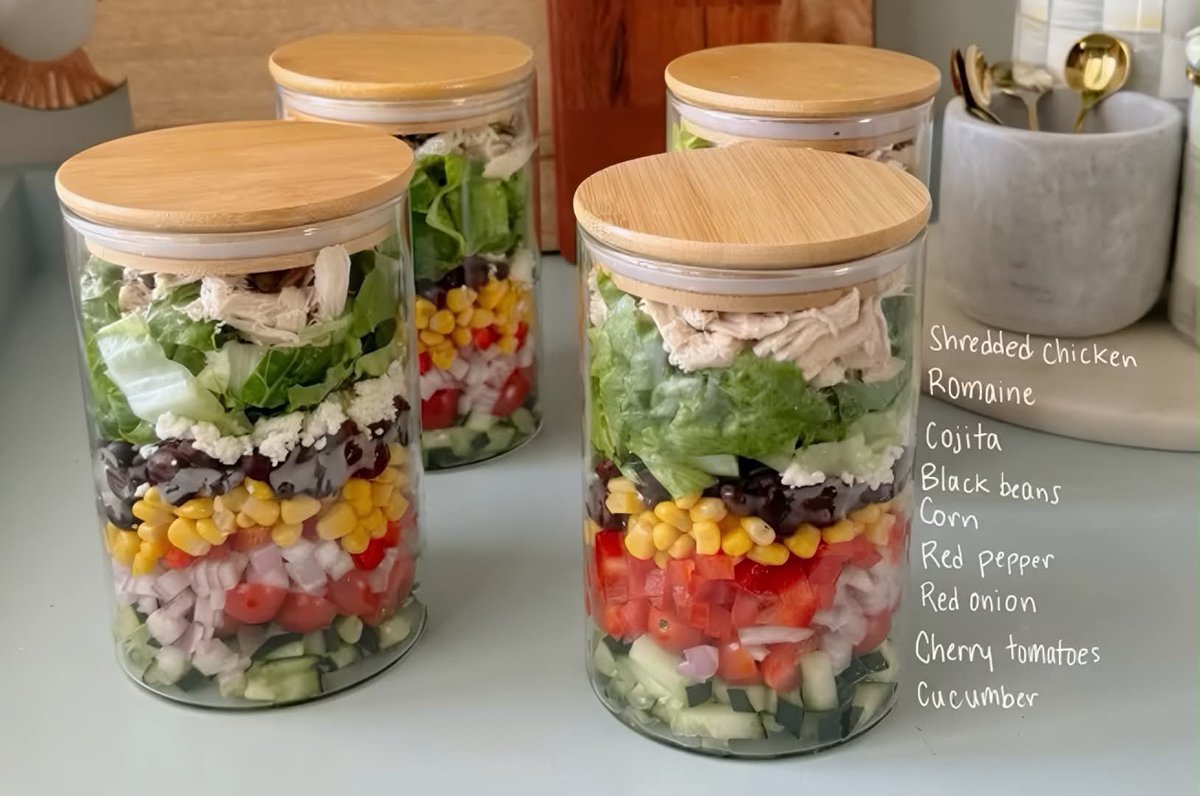
Photorealistic Meal Prep Jars with Ingredient List
A prompt for generating a photorealistic food photography scene featuring layered Mexican-inspired chicken salads in glass jars, including a handwritten ingredient list overlay.
This is a GPT Image 2 prompt case for Food & Beverage. Use the copy-ready prompt below to generate similar visuals, and review Awesome GPT Image 2 Prompts attribution plus commercial-use rights before reuse.
Free 1K preview
Generate one preview image instantly, no sign-up required.
Prompt
Copy-ready prompt
Create a realistic lifestyle food photography scene showcasing four clear glass meal prep containers neatly arranged on a clean, light-colored kitchen countertop. Each container should have a natural bamboo lid and a white sealing ring.

The containers are filled with beautifully layered {argument name="dish type" default="Mexican-style Chicken Salad"}, with distinct, colorful layers clearly separated from bottom to top: diced cucumber, cherry tomatoes, red onion, red bell pepper, sweet corn, black beans, crumbled Cotija cheese, fresh chopped romaine lettuce leaves, and shredded cooked chicken. Maintain the freshness, vibrancy, and crispness of each ingredient, making them clearly visible through the clear glass.

Position two containers in the foreground and the other two slightly behind to create depth and composition. The background is a warm, modern kitchen with subtle wood cabinetry, soft natural light streaming in from a window, shallow depth of field, realistic reflections on the glass, soft shadows, high-end food photography, natural colors, high detail, realistic textures, 4K, editorial-level meal prep aesthetics.

On the right side, include a neatly handwritten-style ingredient list that reads:
“Shredded Chicken
Romaine
Cojita
Black beans
Corn
Red pepper
Red onion
Cherry tomatoes
Cucumber”

Vertical composition, realistic proportions, clean and appealing plating, professional commercial food photography.
Prompt variables
Editable argument placeholders found in the prompt, with their default values.
Best for
- - Food & Beverage visual exploration
- - Image generation and reference-image edits
- - Reusable briefs that keep source attribution visible
Change these parts
- - Subject, product, character, or scene
- - Aspect ratio, camera, lighting, and background
- - Brand, text, color, and output constraints
Recommended model and settings
- - Model: gpt-image-2
- - Input mode: Text to Image
- - Aspect ratio: source
- - Commercial status: review original source
How to use this prompt
- 1. Copy the prompt and preserve its structure for the first test.
- 2. Replace the subject, context, and publishing channel.
- 3. Change one camera, lighting, or style variable per iteration.
- 4. Inspect the output, source, text, and rights before reuse.
Limitations, source, and reuse cautions
- - Generated output is an editable draft, not factual, legal, or rights evidence.
- - Review the linked source, people, brands, logos, text, and third-party media before commercial use.
More cases in this category
Prioritized by category, input mode compatibility, quality, and lower risk.
Reuse and source notes
Use this prompt safely after previewing the case.
- 1.Copy the prompt or open it directly in Dovoo with the generation button.
- 2.Adjust variables, aspect ratio, and reference images for your own use case.
- 3.Before publishing or paid usage, verify source rights, attribution requirements, and brand or likeness risks.
Can I use this prompt commercially?
Commercial-use status is allowed. Review the original source, license, brand constraints, and legal requirements before paid usage.
Where does this case come from?
This case is imported from Awesome GPT Image 2 Prompts; keep attribution visible and check the source URL before reuse.