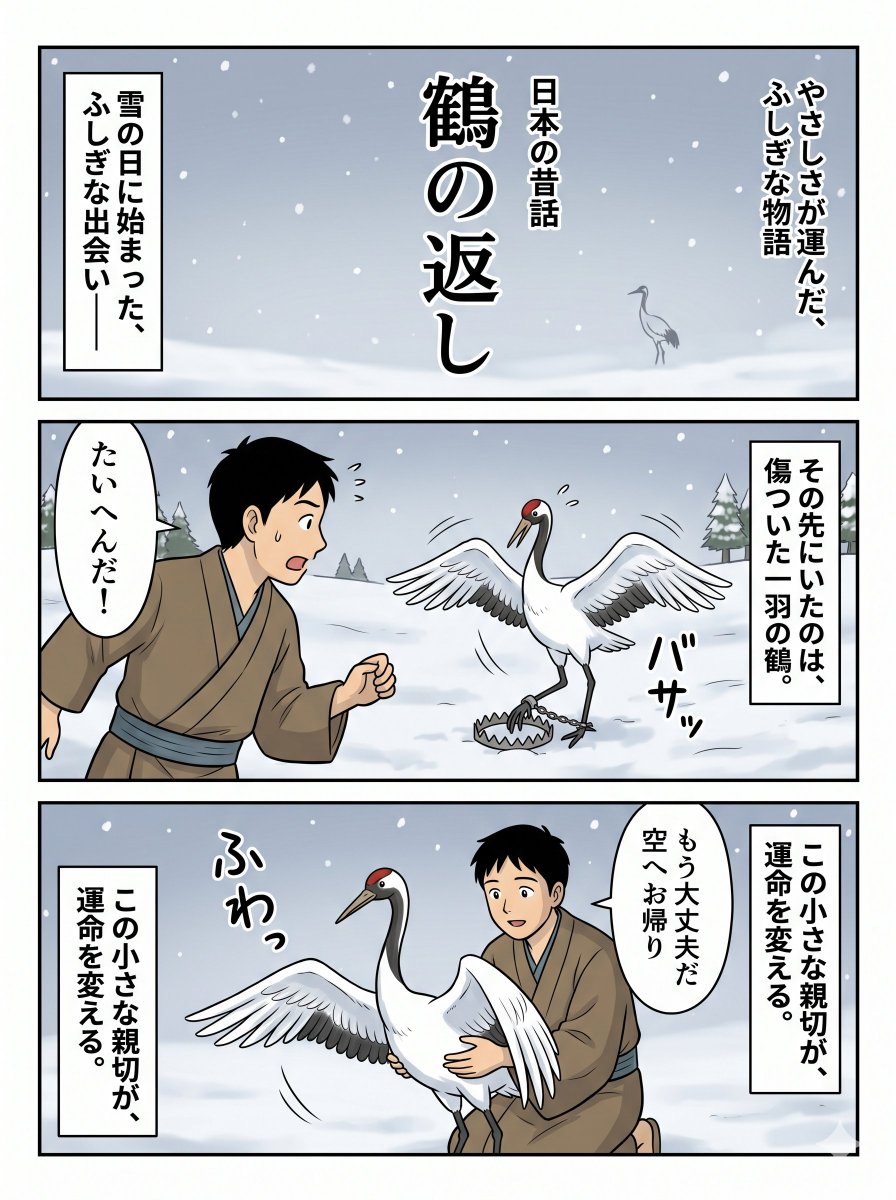
Japanese Folktale Crane Manga Page
A three-panel Japanese manga-style folktale page showing a snowy encounter between a young man and an injured crane, suitable for storybook comics and social media storytelling visuals.
This is a GPT Image 2 prompt case for Anime & Game. Use the copy-ready prompt below to generate similar visuals, and review Awesome GPT Image 2 Prompts attribution plus commercial-use rights before reuse.
Free 1K preview
Generate one preview image instantly, no sign-up required.
Prompt
Copy-ready prompt
{
  "characters": [
    {
      "appearance": "short black hair, simple brown kimono tied with a muted blue sash, kneeling or leaning forward in concern",
      "face": "Show every face clearly with natural, detailed facial features",
      "role": "young man"
    },
    {
      "appearance": "white body, black neck and tail accents, red crown patch, long beak, expressive wings",
      "role": "red-crowned crane"
    }
  ],
  "composition": {
    "background_detail": "minimal but atmospheric snowy gradients and a few trees to keep focus on the characters",
    "focus": "clear emotional progression from mystery to danger to kindness",
    "reading_direction": "right-to-left manga feel with vertical captions and speech balloons"
  },
  "format": "single page with 3 horizontal panels stacked vertically",
  "generation_notes": "Create a full comic page, not a single illustration. Keep all visible Japanese text exactly as written. Use vertical title typography in the top panel, rectangular narration boxes, one speech balloon from the man in the middle panel and one in the bottom panel, plus hand-drawn sound effects. Show every face clearly with natural, detailed facial features.",
  "layout": {
    "panel_count": 3,
    "panels": [
      {
        "position": "top",
        "scene": "wide establishing shot of a snowy plain under a pale gray-blue sky with falling snow. A small crane stands far in the distance on the right side.",
        "text_count": 4,
        "texts": [
          "日本の昔話",
          "鶴の返し",
          "やさしさが運んだ、ふしぎな物語",
          "雪の日に始まった、ふしぎな出会い――"
        ]
      },
      {
        "position": "middle",
        "scene": "the young man discovers an injured crane in the snow. The crane stands with both wings spread in distress, one leg caught in a metal trap on the ground. The man is on the left, startled and rushing toward it.",
        "text_count": 3,
        "texts": [
          "その先にいたのは、傷ついた一羽の鶴。",
          "たいへんだ!",
          "バサッ"
        ]
      },
      {
        "position": "bottom",
        "scene": "the young man kneels in the snow and gently helps the crane, supporting its body with both hands as it relaxes and lifts its wings slightly.",
        "text_count": 4,
        "texts": [
          "この小さな親切が、運命を変える。",
          "もう大丈夫だ 空へお帰り",
          "この小さな親切が、運命を変える。",
          "ふわっ"
        ]
      }
    ]
  },
  "setting": {
    "atmosphere": "quiet, mysterious, compassionate",
    "location": "open snowy field with a few distant evergreen trees",
    "time": "daytime",
    "weather": "light snowfall"
  },
  "style": "clean modern manga illustration with soft cel shading, crisp black panel borders, readable vertical Japanese text, gentle winter palette, storybook tone",
  "text": {
    "intro_box": "雪の日に始まった、ふしぎな出会い――",
    "language": "Japanese",
    "title_main": "鶴の返し",
    "title_side_left": "日本の昔話",
    "title_side_right": "やさしさが運んだ、ふしぎな物語"
  },
  "type": "Japanese folktale manga page"
}
Best for
- - Anime & Game visual exploration
- - Image generation and reference-image edits
- - Reusable briefs that keep source attribution visible
Change these parts
- - Subject, product, character, or scene
- - Aspect ratio, camera, lighting, and background
- - Brand, text, color, and output constraints
Recommended model and settings
- - Model: gpt-image-2
- - Input mode: Text to Image
- - Aspect ratio: source
- - Commercial status: review original source
How to use this prompt
- 1. Copy the prompt and preserve its structure for the first test.
- 2. Replace the subject, context, and publishing channel.
- 3. Change one camera, lighting, or style variable per iteration.
- 4. Inspect the output, source, text, and rights before reuse.
Limitations, source, and reuse cautions
- - Generated output is an editable draft, not factual, legal, or rights evidence.
- - Review the linked source, people, brands, logos, text, and third-party media before commercial use.
More cases in this category
Prioritized by category, input mode compatibility, quality, and lower risk.


Reuse and source notes
Use this prompt safely after previewing the case.
- 1.Copy the prompt or open it directly in Dovoo with the generation button.
- 2.Adjust variables, aspect ratio, and reference images for your own use case.
- 3.Before publishing or paid usage, verify source rights, attribution requirements, and brand or likeness risks.
Can I use this prompt commercially?
Commercial-use status is allowed. Review the original source, license, brand constraints, and legal requirements before paid usage.
Where does this case come from?
This case is imported from Awesome GPT Image 2 Prompts; keep attribution visible and check the source URL before reuse.