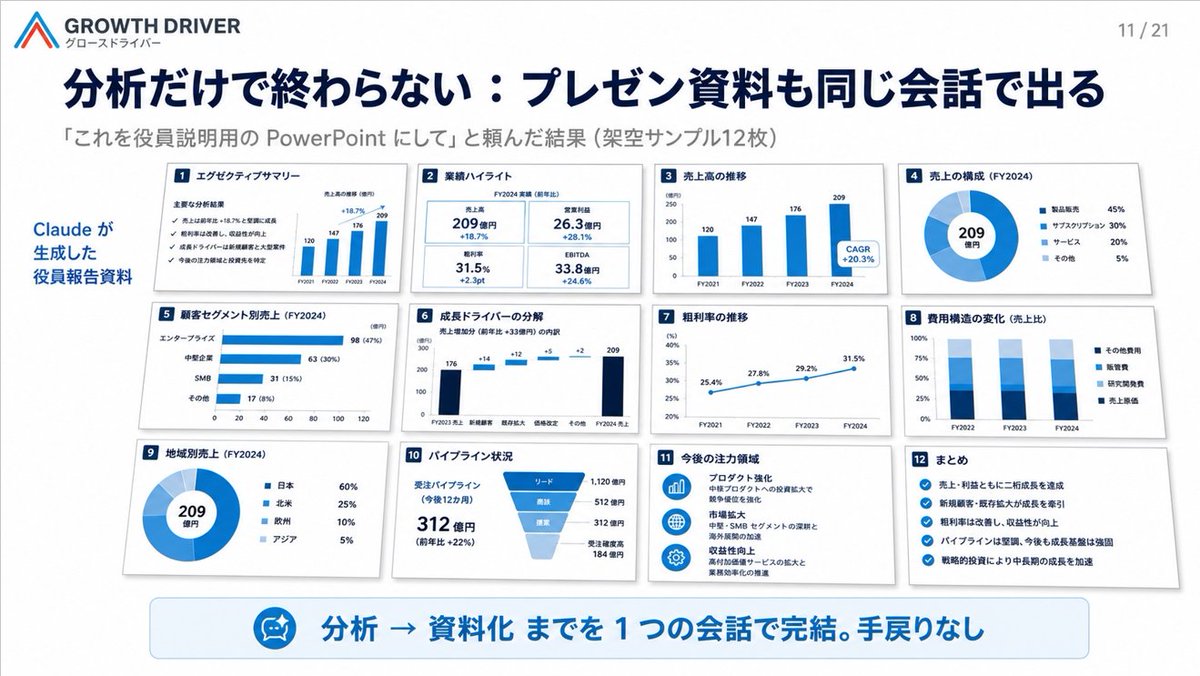
AI-Generated Board Report Slide
A polished Japanese corporate presentation slide showing twelve AI-created executive report thumbnails in a clean consulting-deck layout.
This is a GPT Image 2 prompt case for 平面海报. Use the copy-ready prompt below to generate similar visuals, and review Awesome GPT Image 2 Prompts attribution plus commercial-use rights before reuse.
Prompt
Copy-ready prompt
目标:为 {argument name="company name" default="GROWTH DRIVER"} 创建一张简洁的日式企业演示 Slides,展示 AI 工具如何通过一次对话将分析结果转化为项目/执行层 PowerPoint 材料。

画布:16:9 宽屏 Slides,白色背景,精致的咨询风格,配有海军蓝和亮蓝色点缀,带有柔和阴影、精确的网格对齐、清晰的矢量图表以及逼真的微缩 Slides 缩略图。

页眉:左上角包含一个简单的红蓝角标 Logo,品牌文字“GROWTH DRIVER”及小型日文副标题“グロースドライバー”。右上角显示页码“11 / 21”。左侧为醒目的海军蓝日文大标题:{argument name="headline text" default="分析だけで終わらない:プレゼン資料も同じ会話で出る"}。下方为较小的灰色副标题:{argument name="subheading text" default="「これを役員説明用の PowerPoint にして」と頼んだ結果(架空サンプル12枚)"}。

布局:左侧有一条蓝色竖向标注,写着“Claude が生成した 役員報告資料”。主要区域包含 12 张排列整齐的白色 Slides 卡片(4 列 3 行),每张卡片的左上角都有一个海军蓝色的数字方块、日文标题、图表内容及浅灰色投影。使用统一的蓝色图表样式,呈现密集但易读的项目报告视觉效果。

12 张 Slides 卡片,精确计数并标注如下:
1. “エグゼクティブサマリー” — 清单式执行摘要,包含四个勾选标记,以及一个显示 FY2021–FY2024 数值(120, 147, 176, 209)的小型柱状图。
2. “業績ハイライト” — 四个 KPI 磁贴:売上高 209 億円 +18.7%, 営業利益 26.3 億円 +28.1%, 粗利率 31.5% +2.3pt, EBITDA 33.8 億円 +24.6%。
3. “売上高の推移” — 蓝色垂直柱状图,FY2021 120, FY2022 147, FY2023 176, FY2024 209,并附有标注“CAGR +20.3%”。
4. “売上の構成(FY2024)” — 环形图,中心显示“209 億円”,图例:製品販売 45%, サブスクリプション 30%, サービス 20%, その他 5%。
5. “顧客セグメント別売上(FY2024)” — 水平柱状图:エンタープライズ 98 (47%), 中堅企業 63 (30%), SMB 31 (15%), その他 17 (8%)。
6. “成長ドライバーの分解” — 瀑布图,从 FY2023 売上 176 经过 +14, +12, +5, +2 的增量,达到 FY2024 売上 209。
7. “粗利率の推移” — 折线图,从 FY2021 25.4%, FY2022 27.8%, FY2023 29.2%, FY2024 31.5%。
8. “費用構造の変化(売上比)” — FY2022, FY2023, FY2024 的堆叠柱状图,图例:その他費用, 販管費, 研究開発費, 売上原価。
9. “地域別売上(FY2024)” — 环形图,中心显示“209 億円”,图例:日本 60%, 北米 25%, 欧州 10%, アジア 5%。
10. “パイプライン状況” — 漏斗图及文字:受注パイプライン(今後12カ月)312 億円(前年比 +22%),阶段包括:リード 1,120 億円, 商談 512 億円, 提案 312 億円, 受注確度高 184 億円。
11. “今後の注力領域” — 三个蓝色圆形图标,配有简短的日文战略说明:プロダクト強化, 市場拡大, 収益性向上。
12. “まとめ” — 带有五个蓝色勾选图标的清单,总结了增长、新客户、利润率提升、强劲的管道及战略投资。

底部标注:一个宽大的圆角浅蓝色横幅横跨 Slides 底部。横幅左侧是一个类似 AI Agent/机器人脸部的小型圆形蓝色图标。醒目的蓝色日文大字写着:{argument name="bottom message" default="分析 → 資料化 までを 1 つの会話で完結。手戻りなし"}。

视觉风格:执行级 SaaS/咨询演示美学,极简,高信息密度,强层级感,海军蓝排版,白色卡片,蓝色图表,细微的灰色边框和阴影。保持所有 12 张卡片可见且间距均匀。无人物,无照片,无装饰性杂乱元素,无水印。
Prompt variables
Editable argument placeholders found in the prompt, with their default values.
More cases in this category
Prioritized by category, input mode compatibility, quality, and lower risk.



Reuse and source notes
Use this prompt safely after previewing the case.
- 1.Copy the prompt or open it directly in Dovoo with the generation button.
- 2.Adjust variables, aspect ratio, and reference images for your own use case.
- 3.Before publishing or paid usage, verify source rights, attribution requirements, and brand or likeness risks.
Can I use this prompt commercially?
Commercial-use status is allowed. Review the original source, license, brand constraints, and legal requirements before paid usage.
Where does this case come from?
This case is imported from Awesome GPT Image 2 Prompts; keep attribution visible and check the source URL before reuse.