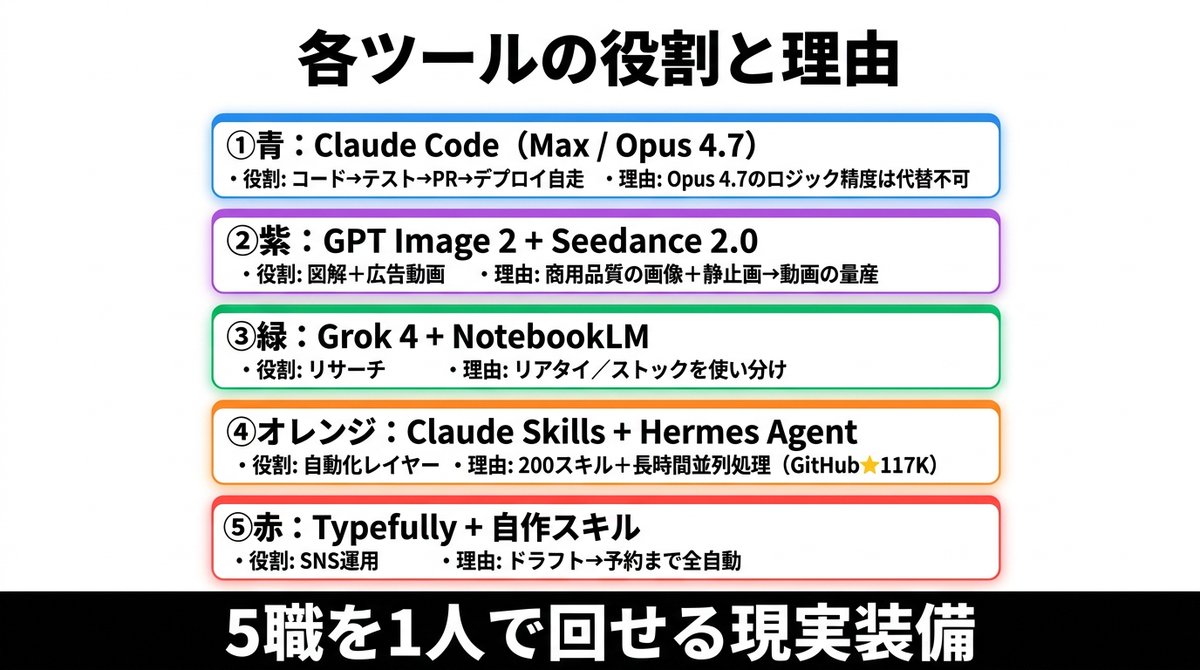
Japanese AI Tools Role Infographic
A clean Japanese infographic slide showing five color-coded AI tool stacks with their roles and reasons, ideal for social posts, presentations, and business commentary.
This is a GPT Image 2 prompt case for Graphic & Poster. Use the copy-ready prompt below to generate similar visuals, and review Awesome GPT Image 2 Prompts attribution plus commercial-use rights before reuse.
Free 1K preview
Generate one preview image instantly, no sign-up required.
Prompt
Copy-ready prompt
{
  "type": "Japanese infographic poster",
  "style": "clean business presentation slide, minimalist flat design, crisp vector-like typography, white background with subtle light gray tone, centered composition, high contrast, social-media-friendly landscape layout",
  "canvas": {
    "aspect_ratio": "2:1",
    "size": "wide horizontal"
  },
  "headline": {
    "text": "{argument name=\"headline text\" default=\"各ツールの役割と理由\"}",
    "position": "top center",
    "font": "bold Japanese sans-serif",
    "color": "black",
    "size": "very large"
  },
  "layout": {
    "sections": [
      {
        "title": "① Blue: Claude Code (Max / Opus 4.7)",
        "position": "upper middle",
        "count": 2,
        "labels": [
          "・役割: コード→テスト→PR→デプロイ自走",
          "・理由: Opus 4.7のロジック精度は代替不可"
        ],
        "container": "rounded white rectangle with blue outline, faint blue glow, soft drop shadow"
      },
      {
        "title": "② Purple: GPT Image 2 + Seedance 2.0",
        "position": "upper mid-lower",
        "count": 2,
        "labels": [
          "・役割: 図解+広告動画",
          "・理由: 商用品質の画像+静止画→動画の量産"
        ],
        "container": "rounded white rectangle with purple outline, faint purple glow, soft drop shadow"
      },
      {
        "title": "③ Green: Grok 4 + NotebookLM",
        "position": "center",
        "count": 2,
        "labels": [
          "・役割: リサーチ",
          "・理由: リアタイ/ストックを使い分け"
        ],
        "container": "rounded white rectangle with green outline, faint green glow, soft drop shadow"
      },
      {
        "title": "④オレンジ:Claude Skills + Hermes Agent",
        "position": "lower mid-upper",
        "count": 2,
        "labels": [
          "・役割: 自動化レイヤー",
          "・理由: 200スキル+長時間並列処理(GitHub★117K)"
        ],
        "container": "rounded white rectangle with orange outline, faint orange glow, soft drop shadow"
      },
      {
        "title": "⑤赤:Typefully + 自作スキル",
        "position": "lower middle",
        "count": 2,
        "labels": [
          "・役割: SNS運用",
          "・理由: ドラフト→予約まで全自動"
        ],
        "container": "rounded white rectangle with red outline, faint red glow, soft drop shadow"
      }
    ],
    "section_count": 5,
    "arrangement": "five evenly spaced horizontal cards stacked vertically in the center, all same width, each with rounded corners and colored border matching the numbered color name"
  },
  "footer": {
    "text": "{argument name=\"footer text\" default=\"5職を1人で回せる現実装備\"}",
    "position": "bottom full width",
    "background": "solid black bar",
    "font": "extra bold Japanese sans-serif",
    "color": "white",
    "size": "very large"
  },
  "typography": {
    "body_font": "bold Japanese sans-serif",
    "body_color": "black",
    "emphasis": "tool names in heavier bold, compact spacing, left-aligned inside each card"
  },
  "colors": {
    "card_borders": [
      "blue",
      "purple",
      "green",
      "orange",
      "red"
    ],
    "background": "white to very light gray",
    "text": "black",
    "footer_bg": "black",
    "footer_text": "white"
  },
  "customization": {
    "item_1_tool": "{argument name=\"first tool line\" default=\"Claude Code(Max / Opus 4.7)\"}",
    "item_2_tool": "{argument name=\"second tool line\" default=\"GPT Image 2 + Seedance 2.0\"}",
    "item_3_tool": "{argument name=\"third tool line\" default=\"Grok 4 + NotebookLM\"}"
  }
}
Prompt variables
Editable argument placeholders found in the prompt, with their default values.
Best for
- - Graphic & Poster visual exploration
- - Image generation and reference-image edits
- - Reusable briefs that keep source attribution visible
Change these parts
- - Subject, product, character, or scene
- - Aspect ratio, camera, lighting, and background
- - Brand, text, color, and output constraints
Recommended model and settings
- - Model: gpt-image-2
- - Input mode: Text to Image
- - Aspect ratio: source
- - Commercial status: review original source
How to use this prompt
- 1. Copy the prompt and preserve its structure for the first test.
- 2. Replace the subject, context, and publishing channel.
- 3. Change one camera, lighting, or style variable per iteration.
- 4. Inspect the output, source, text, and rights before reuse.
Limitations, source, and reuse cautions
- - Generated output is an editable draft, not factual, legal, or rights evidence.
- - Review the linked source, people, brands, logos, text, and third-party media before commercial use.
More cases in this category
Prioritized by category, input mode compatibility, quality, and lower risk.

Reuse and source notes
Use this prompt safely after previewing the case.
- 1.Copy the prompt or open it directly in Dovoo with the generation button.
- 2.Adjust variables, aspect ratio, and reference images for your own use case.
- 3.Before publishing or paid usage, verify source rights, attribution requirements, and brand or likeness risks.
Can I use this prompt commercially?
Commercial-use status is allowed. Review the original source, license, brand constraints, and legal requirements before paid usage.
Where does this case come from?
This case is imported from Awesome GPT Image 2 Prompts; keep attribution visible and check the source URL before reuse.