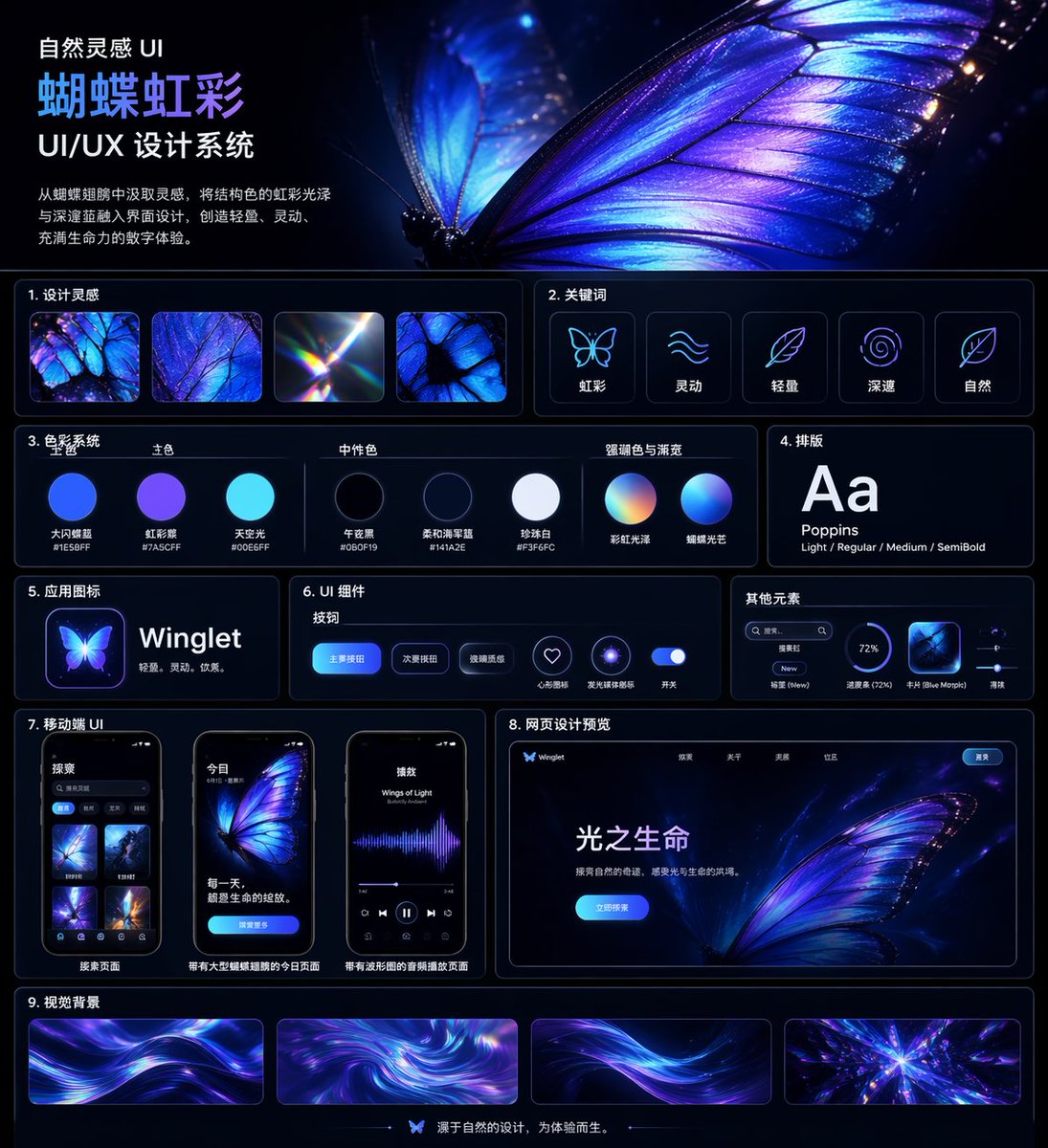
Iridescent Butterfly UI System Board
A polished dark-mode Chinese UI/UX design system presentation board featuring a glowing butterfly theme, suitable for design case studies, portfolio covers, and style-system showcases.
This is a GPT Image 2 prompt case for Other Inspiration. Use the copy-ready prompt below to generate similar visuals, and review Awesome GPT Image 2 Prompts attribution plus commercial-use rights before reuse.
Free 1K preview
Generate one preview image instantly, no sign-up required.
Prompt
Copy-ready prompt
{
  "type": "UI/UX design system showcase board",
  "theme": "dark mode, nature-inspired, luminous iridescent aesthetic",
  "language": "Chinese",
  "canvas": {
    "aspect_ratio": "square poster",
    "background": "deep midnight navy to black with subtle glow",
    "style": "premium futuristic presentation board with thin neon-blue panel outlines, glossy highlights, soft bloom, and high contrast"
  },
  "header": {
    "title": "Natural Inspiration UI\n{argument name=\"system title\" default=\"Butterfly Iridescence\"}\nUI/UX Design System",
    "description": "{argument name=\"chinese description\" default=\"Inspired by butterfly wings, incorporate structural color iridescence with deep blues into the interface design, creating a light, dynamic, and vibrant digital experience.\"}",
    "hero_image": "an oversized, ultra-detailed glowing butterfly wing in electric blue, violet, and iridescent cyan filling the upper-right half, with visible vein structure, translucent edges, spark-like particles, and a second blurred wing behind it"
  },
  "layout": {
    "sections": [
      {
        "title": "1. Design inspiration",
        "position": "upper left below header",
        "count": 4,
        "labels": [
          "iridescent butterfly wing macro",
          "blue-purple wing texture close-up",
          "light refraction prism flare",
          "butterfly wing cell pattern"
        ]
      },
      {
        "title": "2. Keywords",
        "position": "upper right below hero",
        "count": 5,
        "labels": [
          "Iridescent",
          "Dynamic",
          "Lightweight",
          "profound",
          "Natural"
        ],
        "icon_style": "simple glowing line icons inside rounded dark cards"
      },
      {
        "title": "3. Color System",
        "position": "mid left",
        "subsections": [
          {
            "title": "Primary Color",
            "count": 3,
            "labels": [
              "Big Flash Butterfly Blue #1E5BFF",
              "Iridescent Purple #7A5CFF",
              "Sky Light #00E6FF"
            ]
          },
          {
            "title": "Neutral Color",
            "count": 3,
            "labels": [
              "Midnight Black #060F19",
              "Soft Navy Blue #141A2E",
              "Pearl White #F3F6FC"
            ]
          },
          {
            "title": "Accent Color & Gradient",
            "count": 2,
            "labels": [
              "Rainbow Iridescence",
              "Butterfly Lighting"
            ]
          }
        ],
        "visual": "circular color swatches and gradient spheres with Chinese labels beneath"
      },
      {
        "title": "4. Typography",
        "position": "mid right",
        "count": 1,
        "labels": [
          "Aa Poppins Light / Regular / Medium / SemiBold"
        ],
        "visual": "large white Aa on dark card"
      },
      {
        "title": "5. App Icons",
        "position": "left center",
        "count": 1,
        "text": "{argument name=\"app name\" default=\"Winglet\"} Lightweight. Agile. Elegant.",
        "visual": "glowing butterfly app icon beside app name"
      },
      {
        "title": "6. UI Components",
        "position": "center",
        "subsections": [
          {
            "title": "Button",
            "count": 3,
            "labels": [
              "Primary Button",
              "Secondary Button",
              "Glass texture"
            ]
          },
          {
            "title": "Icon",
            "count": 2,
            "labels": [
              "Heart-shaped collection",
              "Glowing ring"
            ]
          },
          {
            "title": "Switch",
            "count": 1,
            "labels": [
              "Switch"
            ]
          }
        ],
        "visual": "rounded blue buttons, neon icon buttons, and a glowing toggle on a dark panel"
      },
      {
        "title": "Other elements",
        "position": "right center",
        "count": 4,
        "labels": [
          "Search box",
          "Label New",
          "Progress bar (72%)",
          "Card Blue Morpho"
        ],
        "visual": "small utility UI widgets in a compact horizontal card"
      },
      {
        "title": "7. Mobile UI",
        "position": "lower left",
        "count": 3,
        "labels": [
          "Search Page",
          "Today page with a large butterfly illustration",
          "Audio playback page with a waveform"
        ],
        "visual": "three smartphone mockups with rounded corners, dark interface, blue-violet butterfly visuals"
      },
      {
        "title": "8. Web design preview",
        "position": "lower right",
        "count": 1,
        "labels": [
          "Light of Life"
        ],
        "visual": "desktop landing page mockup with butterfly hero image, top navigation, bright blue call-to-action button, and Chinese body text"
      },
      {
        "title": "9. Visual Background",
        "position": "bottom full width",
        "count": 4,
        "labels": [
          "flowing light ribbon background 1",
          "swirling iridescent vortex",
          "flowing light ribbon background 2",
          "radiant crystalline burst"
        ],
        "visual": "four elongated rectangular background samples in purple, blue, and cyan"
      }
    ],
    "footer": {
      "count": 1,
      "text": "Designs originating from nature, created for experience.",
      "center_icon": "small butterfly icon"
    }
  },
  "art_direction": {
    "materials": "glassmorphism, neon edge lighting, smooth gradients, subtle reflections",
    "colors": "electric blue, indigo, violet, cyan, white",
    "composition": "clean grid with 9 numbered content sections, generous spacing, thin rounded borders, and a dominant butterfly hero image",
    "render_quality": "highly polished, crisp typography, premium Behance-style design system board"
  }
}
Prompt variables
Editable argument placeholders found in the prompt, with their default values.
Best for
- - Other Inspiration visual exploration
- - Image generation and reference-image edits
- - Reusable briefs that keep source attribution visible
Change these parts
- - Subject, product, character, or scene
- - Aspect ratio, camera, lighting, and background
- - Brand, text, color, and output constraints
Recommended model and settings
- - Model: gpt-image-2
- - Input mode: Text to Image
- - Aspect ratio: source
- - Commercial status: review original source
How to use this prompt
- 1. Copy the prompt and preserve its structure for the first test.
- 2. Replace the subject, context, and publishing channel.
- 3. Change one camera, lighting, or style variable per iteration.
- 4. Inspect the output, source, text, and rights before reuse.
Limitations, source, and reuse cautions
- - Generated output is an editable draft, not factual, legal, or rights evidence.
- - Review the linked source, people, brands, logos, text, and third-party media before commercial use.
More cases in this category
Prioritized by category, input mode compatibility, quality, and lower risk.

Reuse and source notes
Use this prompt safely after previewing the case.
- 1.Copy the prompt or open it directly in Dovoo with the generation button.
- 2.Adjust variables, aspect ratio, and reference images for your own use case.
- 3.Before publishing or paid usage, verify source rights, attribution requirements, and brand or likeness risks.
Can I use this prompt commercially?
Commercial-use status is allowed. Review the original source, license, brand constraints, and legal requirements before paid usage.
Where does this case come from?
This case is imported from Awesome GPT Image 2 Prompts; keep attribution visible and check the source URL before reuse.