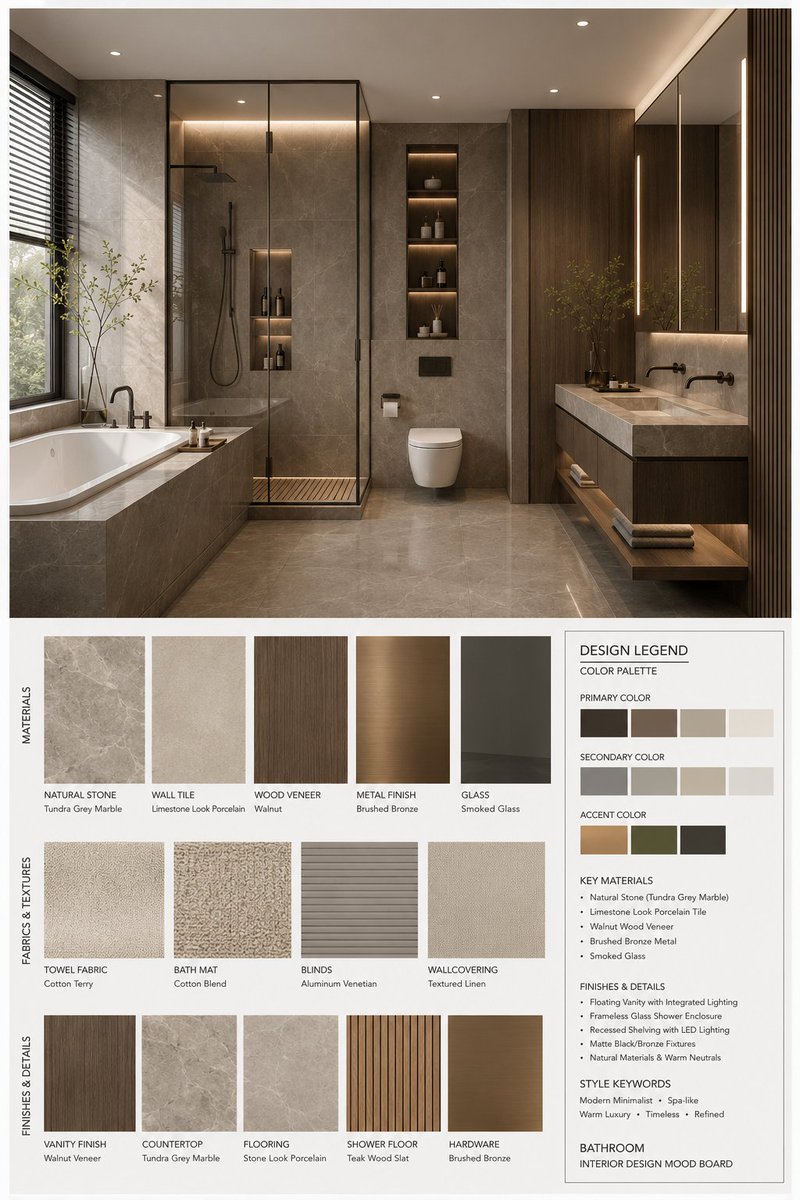
Interior Design Mood Board Generator
A comprehensive prompt for generating professional interior design mood boards. It creates a structured layout featuring a high-resolution 3D render of a space, paired with matching material samples, fabric textures, and a detailed design legend including color palettes and material specs.
This is a GPT Image 2 prompt case for Interior & Architecture. Use the copy-ready prompt below to generate similar visuals, and review Awesome GPT Image 2 Prompts attribution plus commercial-use rights before reuse.
Free 1K preview
Generate one preview image instantly, no sign-up required.
Free text preview doesn’t preserve reference-image consistency.
Prompt
Copy-ready prompt
You are a professional interior design Mood Board creator. Based on the provided {argument name="space type" default="bedroom"} design photo, generate a high-end vertical 3:4 mood board. The overall visual should reference professional design proposals, showing {argument name="style name" default="Modern Mid-century"} aesthetic features, possessing a [Mood Keywords] atmosphere, and conforming to [Branding Tone] design expression.
Space Type: {argument name="space type" default="bedroom"}
Layout Requirements:
Upper section: A high-resolution, photorealistic {argument name="space type" default="bedroom"} interior rendering. It must be consistent with the user's photo in structure, furniture, materials, colors, and lighting, but refined for a professional proposal. Focus on: [Key Furniture Elements], [Material Keywords], [Color Palette], [Lighting Style].
Lower section: Display material and furnishing samples strictly corresponding to the upper design, including: Material samples, fabric samples, color swatches, finish samples, and related wood/stone/metal/glass/leather samples. All must reflect the core material and color logic of the plan.
Bottom right: A Design Legend / Color Palette info box showing: Primary color, secondary color, accent color, core materials, finish descriptions, and style keywords.
Style and Output:
Professional firm-level layout; minimalist, clean, restrained, and orderly; clear visual hierarchy and white space control; material/color labels clear and modern; overall vibe matching {argument name="style name" default="Modern Mid-century"}; Render Quality: 4K Ultra HD, hyper-detailed, photorealistic rendering. Vertical 3:4 composition.
Label Requirements:
Each sample must have a clear label organized by [Label Language] material/color/finish names in a concise, professional, and well-aligned style.
Prompt variables
Editable argument placeholders found in the prompt, with their default values.
Best for
- - Interior & Architecture visual exploration
- - Image generation and reference-image edits
- - Reusable briefs that keep source attribution visible
Change these parts
- - Subject, product, character, or scene
- - Aspect ratio, camera, lighting, and background
- - Brand, text, color, and output constraints
Recommended model and settings
- - Model: gpt-image-2
- - Input mode: Image to Image
- - Aspect ratio: source
- - Commercial status: review original source
How to use this prompt
- 1. Copy the prompt and preserve its structure for the first test.
- 2. Replace the subject, context, and publishing channel.
- 3. Change one camera, lighting, or style variable per iteration.
- 4. Inspect the output, source, text, and rights before reuse.
Limitations, source, and reuse cautions
- - Generated output is an editable draft, not factual, legal, or rights evidence.
- - Review the linked source, people, brands, logos, text, and third-party media before commercial use.
More cases in this category
Prioritized by category, input mode compatibility, quality, and lower risk.
Reuse and source notes
Use this prompt safely after previewing the case.
- 1.Copy the prompt or open it directly in Dovoo with the generation button.
- 2.Adjust variables, aspect ratio, and reference images for your own use case.
- 3.Before publishing or paid usage, verify source rights, attribution requirements, and brand or likeness risks.
Can I use this prompt commercially?
Commercial-use status is allowed. Review the original source, license, brand constraints, and legal requirements before paid usage.
Where does this case come from?
This case is imported from Awesome GPT Image 2 Prompts; keep attribution visible and check the source URL before reuse.