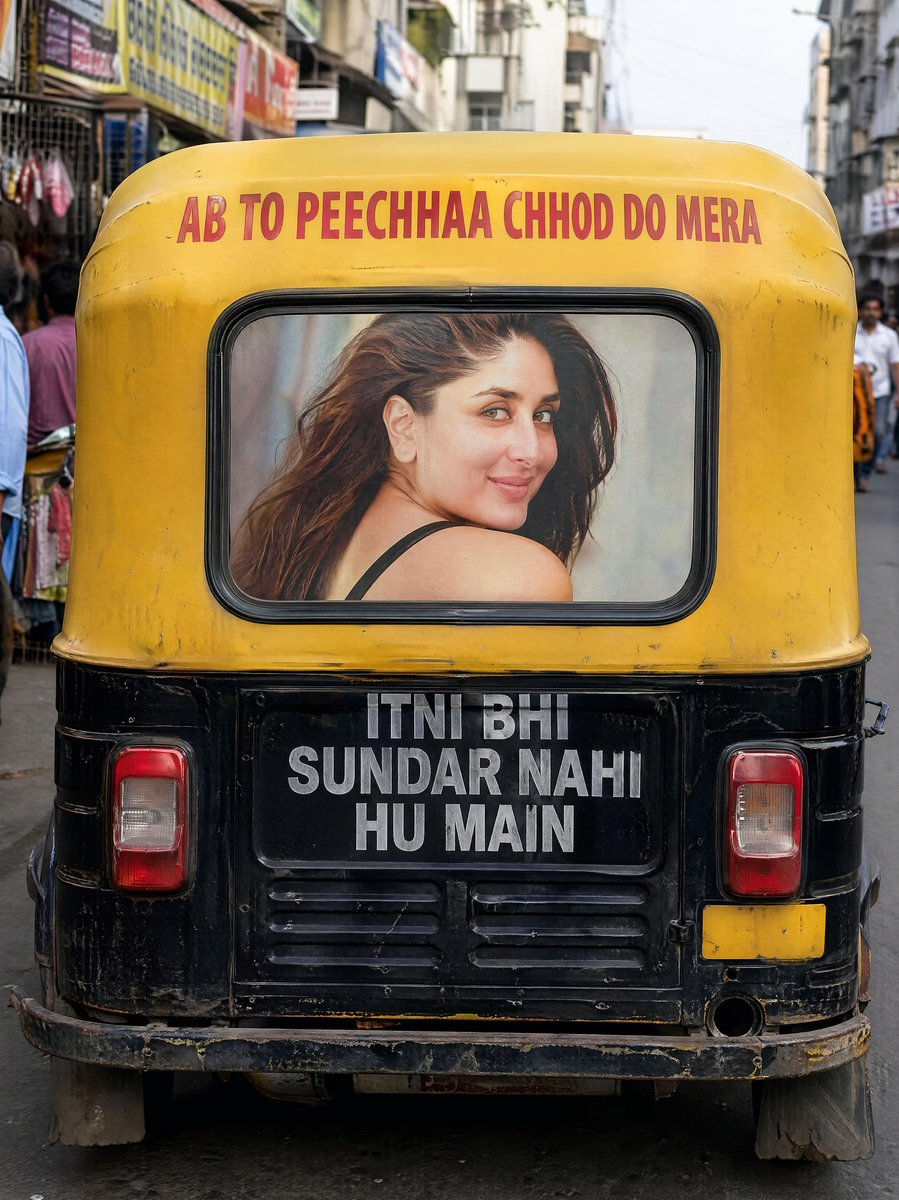
Indian Auto Rickshaw Street Photo
This prompt generates a realistic rear-view street photograph of a text-painted Indian auto rickshaw in a busy market, ideal for urban documentary-style visuals.
This is a GPT Image 2 prompt case for 风景自然. Use the copy-ready prompt below to generate similar visuals, and review Awesome GPT Image 2 Prompts attribution plus commercial-use rights before reuse.
Prompt
Copy-ready prompt
A realistic street photograph from India, taken vertically, shows a black and yellow motorized rickshaw directly behind the vehicle in a narrow, busy market street, with the vehicle centered in the frame. The camera is positioned low, directly behind the vehicle, creating a strong sense of symmetry, with the rickshaw occupying most of the frame. A striking large red lettering on the yellow canopy at the top reads:{argument name="top text" default="AB TO PEECHHAA CHHOD DO MERA"} Below the car window, on the black rear panel, are three lines of stacked, large, bold white text in capital letters, which read:{argument name="bottom text" default="ITNI BHI SUNDAR NAHI HU MAIN"} Inside the rear window is a print of a captivating female portrait with long, dark brown hair, seated sideways, revealing one bare shoulder and a black bra strap, resembling a poster pasted behind the glass; her face is blurred. The display showcases two rectangular taillights (one on each side), worn metal bumpers, fenders, faded paint, grime, scratches, and the vehicle's authentic signs of age. The street background includes market shops, signs, pedestrians on both sides, and some figures in the distance, but is kept softly blurred through shallow depth of field, keeping the rickshaw sharp. Warm sunlight, authentic Indian urban atmosphere, natural colors, subtle cinematic bokeh, high-detail textures, the realism of documentary street photography, 4K hyperrealism.Prompt variables
Editable argument placeholders found in the prompt, with their default values.
More cases in this category
Prioritized by category, input mode compatibility, quality, and lower risk.
Reuse and source notes
Use this prompt safely after previewing the case.
- 1.Copy the prompt or open it directly in Dovoo with the generation button.
- 2.Adjust variables, aspect ratio, and reference images for your own use case.
- 3.Before publishing or paid usage, verify source rights, attribution requirements, and brand or likeness risks.
Can I use this prompt commercially?
Commercial-use status is allowed. Review the original source, license, brand constraints, and legal requirements before paid usage.
Where does this case come from?
This case is imported from Awesome GPT Image 2 Prompts; keep attribution visible and check the source URL before reuse.