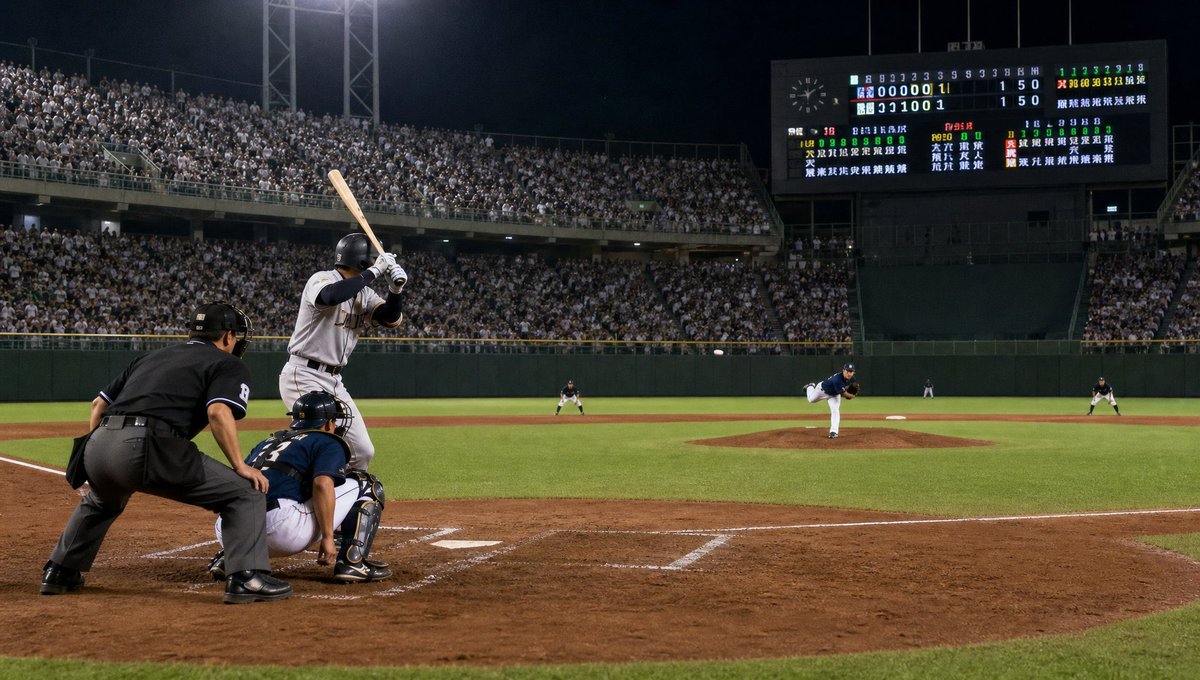
Night Baseball Stadium Pitch
A photorealistic wide sports scene of a tense nighttime baseball pitch in a packed Japanese stadium, useful for cinematic sports visuals.
This is a GPT Image 2 prompt case for 风景自然. Use the copy-ready prompt below to generate similar visuals, and review Awesome GPT Image 2 Prompts attribution plus commercial-use rights before reuse.
Prompt
Copy-ready prompt
创作一张高度写实的电影级体育摄影作品,展现一场在满座球场内进行的夜间职业棒球比赛,拍摄视角位于三垒侧本垒板后方的低位广角。画面中需清晰呈现 7 名场上人物:1 名身穿灰色客场队服、头戴黑色头盔并举起木棒的右打者,1 名蹲在本垒板后的海军蓝护具捕手,1 名蹲在捕手后方的黑色队服本垒裁判,1 名身穿海军蓝球衣、白色球裤正在投球的投手,以及 3 名分布在内/外野的远景防守队员。使用 {argument name="team colors" default="灰色客场队服对阵海军蓝主场队服"}。棒球应处于投手与打者之间的飞行轨迹中。画面需包含泥土打者区、白色粉笔线、绿草地、投手丘、外野围墙,以及在明亮球场泛光灯下坐满观众的看台。在右上角放置一个大型电子记分牌,显示局数、比分以及密集的日式球队/球员文字,呈现逼真的发光效果,无需完全清晰可辨。氛围:戏剧性、紧张、暖心的现场比赛氛围,如同决定胜负的局末投球。使用自然的球场灯光、深邃的夜空、照片级的细节、轻微的动态感、清晰的前景以及 16:9 的广角构图。自定义打者为 {argument name="main batter description" default="一名身穿灰色球衣、黑色袖子的强力右打者"},球场为 {argument name="stadium location" default="一座大型日本棒球场"},记分牌比分为 {argument name="scoreboard score" default="1 比 5"},相机风格为 {argument name="camera style" default="具备电影级写实感的专业体育新闻摄影"}。避免出现商标、水印、可辨认的品牌名称、除指定 7 人外的多余球员、卡通风格或空座位。Prompt variables
Editable argument placeholders found in the prompt, with their default values.
More cases in this category
Prioritized by category, input mode compatibility, quality, and lower risk.
Reuse and source notes
Use this prompt safely after previewing the case.
- 1.Copy the prompt or open it directly in Dovoo with the generation button.
- 2.Adjust variables, aspect ratio, and reference images for your own use case.
- 3.Before publishing or paid usage, verify source rights, attribution requirements, and brand or likeness risks.
Can I use this prompt commercially?
Commercial-use status is allowed. Review the original source, license, brand constraints, and legal requirements before paid usage.
Where does this case come from?
This case is imported from Awesome GPT Image 2 Prompts; keep attribution visible and check the source URL before reuse.