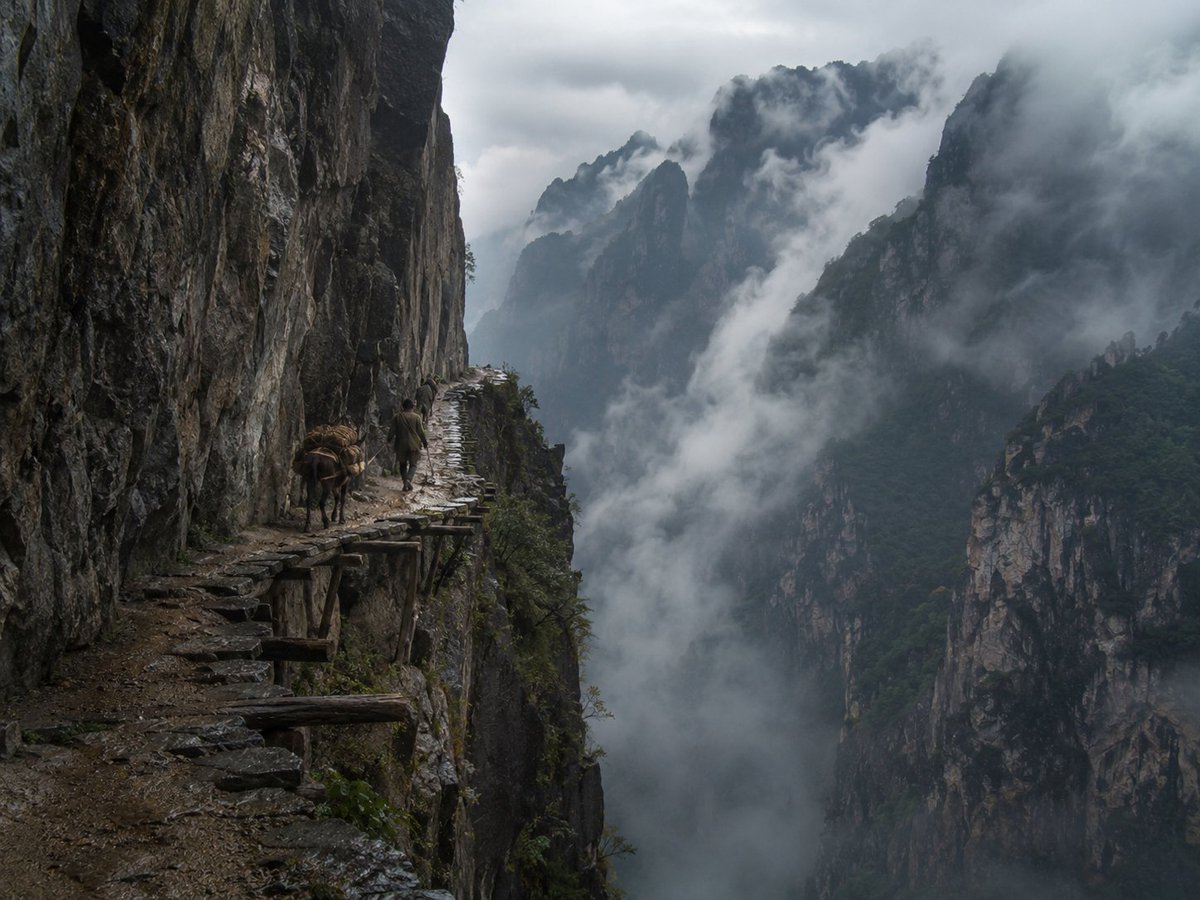
Misty Cliffside Mule Trail
Generates a realistic fine-art documentary photograph of a lone traveler and pack mule on a dangerous ancient mountain plank road above a fog-filled gorge.
This is a GPT Image 2 prompt case for Landscape & Nature. Use the copy-ready prompt below to generate similar visuals, and review Awesome GPT Image 2 Prompts attribution plus commercial-use rights before reuse.
Free 1K preview
Generate one preview image instantly, no sign-up required.
Prompt
Copy-ready prompt
Create a hyper-realistic collectible fine-art documentary landscape photograph inspired by ancient Chinese mountain travel writings: a lone traveler and one pack mule moving along a perilous cliffside plank road carved into a sheer rock wall in {argument name="location" default="a remote misty Chinese mountain gorge"}. The image is a wide horizontal frame, shot from behind and slightly to the left on the narrow path, with the dark vertical cliff face dominating the entire left third of the composition and a vast abyss opening to the right. The path is made of uneven wet stone slabs and old wooden support beams jutting out from the cliff, with rough dirt, broken edges, and no railing; count exactly 2 living subjects on the path: 1 human traveler in muted earth-toned traditional mountain clothing and 1 brown pack mule carrying bundled cargo. The traveler is small in scale, walking away from the camera beside the mule, emphasizing danger, solitude, and the immensity of nature. Across the right and center background, show multiple jagged limestone peaks and steep forested cliffs fading into layers of dense white-gray fog and low cloud, with swirling mist pouring through the valley below. Use a cold, moody, overcast atmosphere after rain, wet rock textures, deep shadows, desaturated blue-gray and charcoal tones with subtle green vegetation. Make it look like a real photograph taken by a top National Geographic or fine-art landscape photographer, with natural light, high dynamic range, sharp foreground detail, atmospheric depth, cinematic realism, no fantasy architecture, no modern objects, no text, no watermark. Camera feel: {argument name="camera feel" default="full-frame documentary photography, 28mm wide-angle lens, f/8, natural overcast light"}. Overall mood: {argument name="mood" default="awe, danger, ancient journey, and lonely grandeur"}.Prompt variables
Editable argument placeholders found in the prompt, with their default values.
Best for
- - Landscape & Nature visual exploration
- - Image generation and reference-image edits
- - Reusable briefs that keep source attribution visible
Change these parts
- - Subject, product, character, or scene
- - Aspect ratio, camera, lighting, and background
- - Brand, text, color, and output constraints
Recommended model and settings
- - Model: gpt-image-2
- - Input mode: Text to Image
- - Aspect ratio: source
- - Commercial status: review original source
How to use this prompt
- 1. Copy the prompt and preserve its structure for the first test.
- 2. Replace the subject, context, and publishing channel.
- 3. Change one camera, lighting, or style variable per iteration.
- 4. Inspect the output, source, text, and rights before reuse.
Limitations, source, and reuse cautions
- - Generated output is an editable draft, not factual, legal, or rights evidence.
- - Review the linked source, people, brands, logos, text, and third-party media before commercial use.
More cases in this category
Prioritized by category, input mode compatibility, quality, and lower risk.

Reuse and source notes
Use this prompt safely after previewing the case.
- 1.Copy the prompt or open it directly in Dovoo with the generation button.
- 2.Adjust variables, aspect ratio, and reference images for your own use case.
- 3.Before publishing or paid usage, verify source rights, attribution requirements, and brand or likeness risks.
Can I use this prompt commercially?
Commercial-use status is allowed. Review the original source, license, brand constraints, and legal requirements before paid usage.
Where does this case come from?
This case is imported from Awesome GPT Image 2 Prompts; keep attribution visible and check the source URL before reuse.