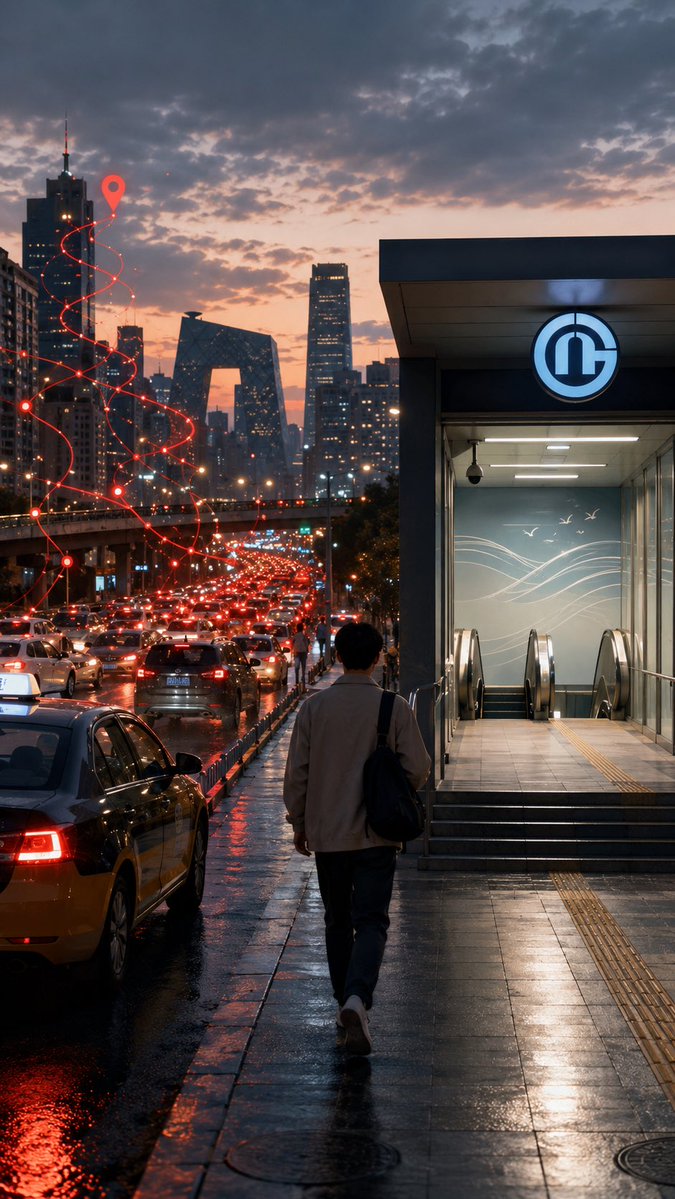
Rainy Beijing Metro Commute
A cinematic vertical urban scene contrasting traffic congestion with a calm walk toward a subway entrance, useful for illustrating modern commuting choices.
This is a GPT Image 2 prompt case for Landscape & Nature. Use the copy-ready prompt below to generate similar visuals, and review Awesome GPT Image 2 Prompts attribution plus commercial-use rights before reuse.
Free 1K preview
Generate one preview image instantly, no sign-up required.
Prompt
Copy-ready prompt
Create a cinematic vertical street-photography scene in {argument name="city" default="Beijing"} at dusk after rain, showing a lone commuter walking away from the camera on a glossy wet sidewalk toward a brightly lit subway entrance on the right. The subway entrance has a modern gray rectangular canopy, glass walls, stairs and escalators descending inside, cool fluorescent interior lighting, tactile yellow paving strips, and a circular blue-and-white metro logo above the doorway. On the left, a congested multi-lane road is packed with cars and taxis, their red brake lights reflecting across puddles and black asphalt. In the distance, show a dense skyline with recognizable modern high-rises, including the CCTV Headquarters-shaped building, under a dramatic cloudy sunset sky with peach, purple, and blue tones. Add a stylized glowing red navigation route overlay rising above the traffic: one continuous spiral path made of thin red lines, small connected nodes, and a large red map pin near the upper left skyline, symbolizing route uncertainty and traffic delay. The pedestrian is a young adult man seen from behind, average build, wearing {argument name="commuter outfit" default="a light beige jacket, dark trousers, white sneakers, and a black shoulder bag"}, walking with a calm but slightly weary posture. Use realistic proportions, moody urban atmosphere, high detail, wet reflections, shallow cinematic contrast, soft haze, and a documentary photo look. No visible captions, no watermark, no extra text.Prompt variables
Editable argument placeholders found in the prompt, with their default values.
Best for
- - Landscape & Nature visual exploration
- - Image generation and reference-image edits
- - Reusable briefs that keep source attribution visible
Change these parts
- - Subject, product, character, or scene
- - Aspect ratio, camera, lighting, and background
- - Brand, text, color, and output constraints
Recommended model and settings
- - Model: gpt-image-2
- - Input mode: Text to Image
- - Aspect ratio: source
- - Commercial status: review original source
How to use this prompt
- 1. Copy the prompt and preserve its structure for the first test.
- 2. Replace the subject, context, and publishing channel.
- 3. Change one camera, lighting, or style variable per iteration.
- 4. Inspect the output, source, text, and rights before reuse.
Limitations, source, and reuse cautions
- - Generated output is an editable draft, not factual, legal, or rights evidence.
- - Review the linked source, people, brands, logos, text, and third-party media before commercial use.
More cases in this category
Prioritized by category, input mode compatibility, quality, and lower risk.
Reuse and source notes
Use this prompt safely after previewing the case.
- 1.Copy the prompt or open it directly in Dovoo with the generation button.
- 2.Adjust variables, aspect ratio, and reference images for your own use case.
- 3.Before publishing or paid usage, verify source rights, attribution requirements, and brand or likeness risks.
Can I use this prompt commercially?
Commercial-use status is allowed. Review the original source, license, brand constraints, and legal requirements before paid usage.
Where does this case come from?
This case is imported from Awesome GPT Image 2 Prompts; keep attribution visible and check the source URL before reuse.