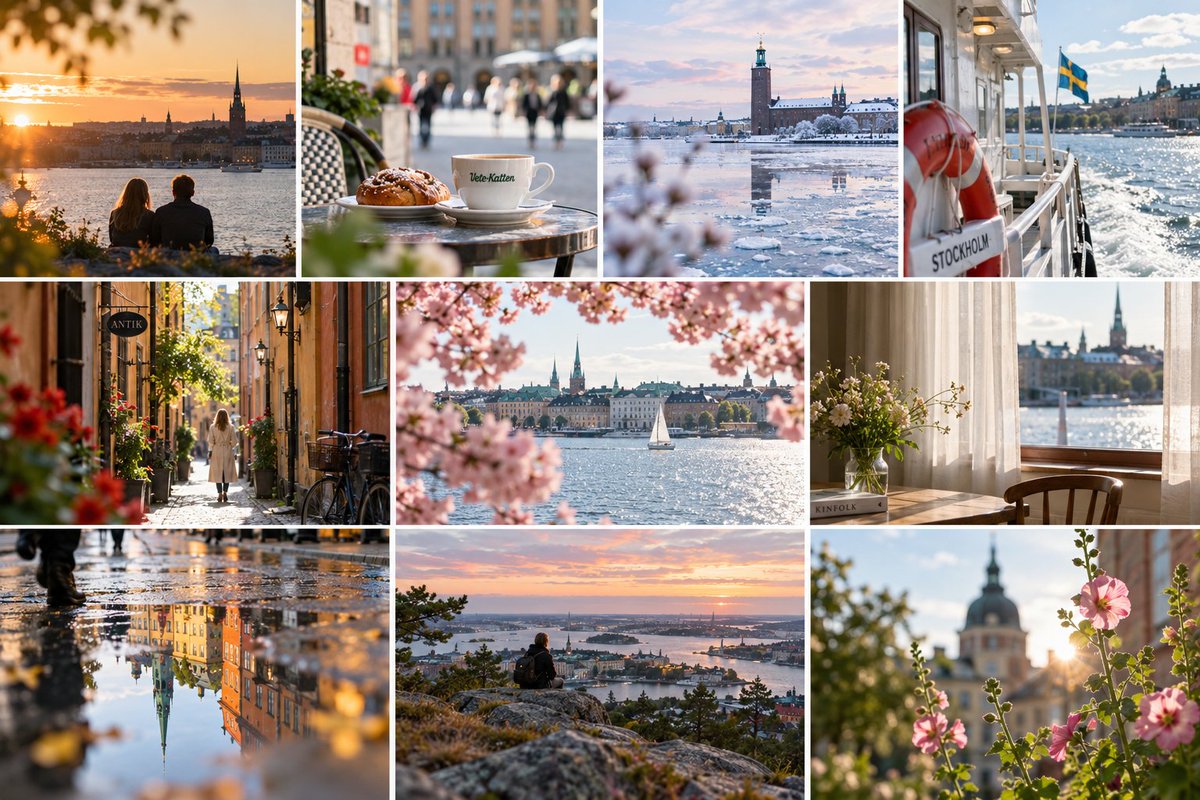
Stockholm Travel Photo Collage
A premium 10-panel editorial travel collage showcasing Stockholm landmarks, cafes, waterfronts, seasonal details, and cinematic lifestyle scenes.
This is a GPT Image 2 prompt case for Landscape & Nature. Use the copy-ready prompt below to generate similar visuals, and review Awesome GPT Image 2 Prompts attribution plus commercial-use rights before reuse.
Free 1K preview
Generate one preview image instantly, no sign-up required.
Prompt
Copy-ready prompt
Goal: Create a high-end editorial travel photography collage capturing {argument name="city" default="Stockholm"} through warm, cinematic lifestyle and landscape moments, like a premium tourism moodboard.

Canvas: Horizontal 3:2 collage, approximately 1200×800 px, with thin clean white gutters between panels and no outer border or watermark.

Layout: Use exactly 10 photo panels arranged in three rows: top row has 4 equal vertical panels; middle row has 3 panels with the center panel wider than the side panels; bottom row has 3 panels of similar width. Maintain crisp rectangular cropping and consistent white spacing.

Panel count and contents:
1. Top-left: golden sunset over the waterfront skyline, two people sitting from behind in the foreground, leafy bokeh framing the scene, church spire silhouette.
2. Top-second: close-up cafe table with a cinnamon bun and a white coffee cup labeled “Vete-Katten,” shallow depth of field, blurred pedestrians and city street behind.
3. Top-third: winter waterfront panorama with icy water, snow, pastel sky, and Stockholm City Hall tower reflected in the frozen harbor.
4. Top-right: view from a ferry deck with a red life ring labeled “STOCKHOLM,” Swedish flag waving, sparkling water and city skyline in the distance.
5. Middle-left: narrow old-town cobblestone alley with warm ochre buildings, hanging sign reading “ANTIK,” bicycles, flower pots, and a lone woman in a light coat walking away.
6. Middle-center: waterfront city view framed by soft pink cherry blossoms, a white sailboat on bright water, historic skyline and church spires in the background.
7. Middle-right: quiet interior window scene with sheer curtains, wooden chair, vase of wildflowers on a sill or table, book labeled “KINFOLK,” and waterfront skyline visible outside.
8. Bottom-left: rainy street reflection photo, wet pavement mirroring colorful historic buildings and a tall church spire, blurred walking legs at the edge, warm golden highlights.
9. Bottom-center: elevated overlook at {argument name="time of day" default="sunset"}, a lone backpacked person sitting on rocky ground, panoramic islands and waterways below, pink-orange sky.
10. Bottom-right: close-up pink hollyhock or garden flowers backlit by sun flare, soft bokeh, domed historic building and church spire blurred in the background.

Visual style: Photorealistic DSLR travel photography, Scandinavian city atmosphere, natural light, warm golden-hour tones mixed with one cool winter panel, shallow depth of field, realistic lens compression, subtle filmic color grading, clean editorial composition, crisp detail, gentle bokeh, no artificial illustration effects.

Constraints: Include exactly the 10 panels listed above; preserve the visible English/Swedish text on signs and objects; avoid extra captions, logos, people looking at camera, distorted architecture, duplicated landmarks, or messy collage borders.
Prompt variables
Editable argument placeholders found in the prompt, with their default values.
Best for
- - Landscape & Nature visual exploration
- - Image generation and reference-image edits
- - Reusable briefs that keep source attribution visible
Change these parts
- - Subject, product, character, or scene
- - Aspect ratio, camera, lighting, and background
- - Brand, text, color, and output constraints
Recommended model and settings
- - Model: gpt-image-2
- - Input mode: Text to Image
- - Aspect ratio: source
- - Commercial status: review original source
How to use this prompt
- 1. Copy the prompt and preserve its structure for the first test.
- 2. Replace the subject, context, and publishing channel.
- 3. Change one camera, lighting, or style variable per iteration.
- 4. Inspect the output, source, text, and rights before reuse.
Limitations, source, and reuse cautions
- - Generated output is an editable draft, not factual, legal, or rights evidence.
- - Review the linked source, people, brands, logos, text, and third-party media before commercial use.
More cases in this category
Prioritized by category, input mode compatibility, quality, and lower risk.

Reuse and source notes
Use this prompt safely after previewing the case.
- 1.Copy the prompt or open it directly in Dovoo with the generation button.
- 2.Adjust variables, aspect ratio, and reference images for your own use case.
- 3.Before publishing or paid usage, verify source rights, attribution requirements, and brand or likeness risks.
Can I use this prompt commercially?
Commercial-use status is allowed. Review the original source, license, brand constraints, and legal requirements before paid usage.
Where does this case come from?
This case is imported from Awesome GPT Image 2 Prompts; keep attribution visible and check the source URL before reuse.