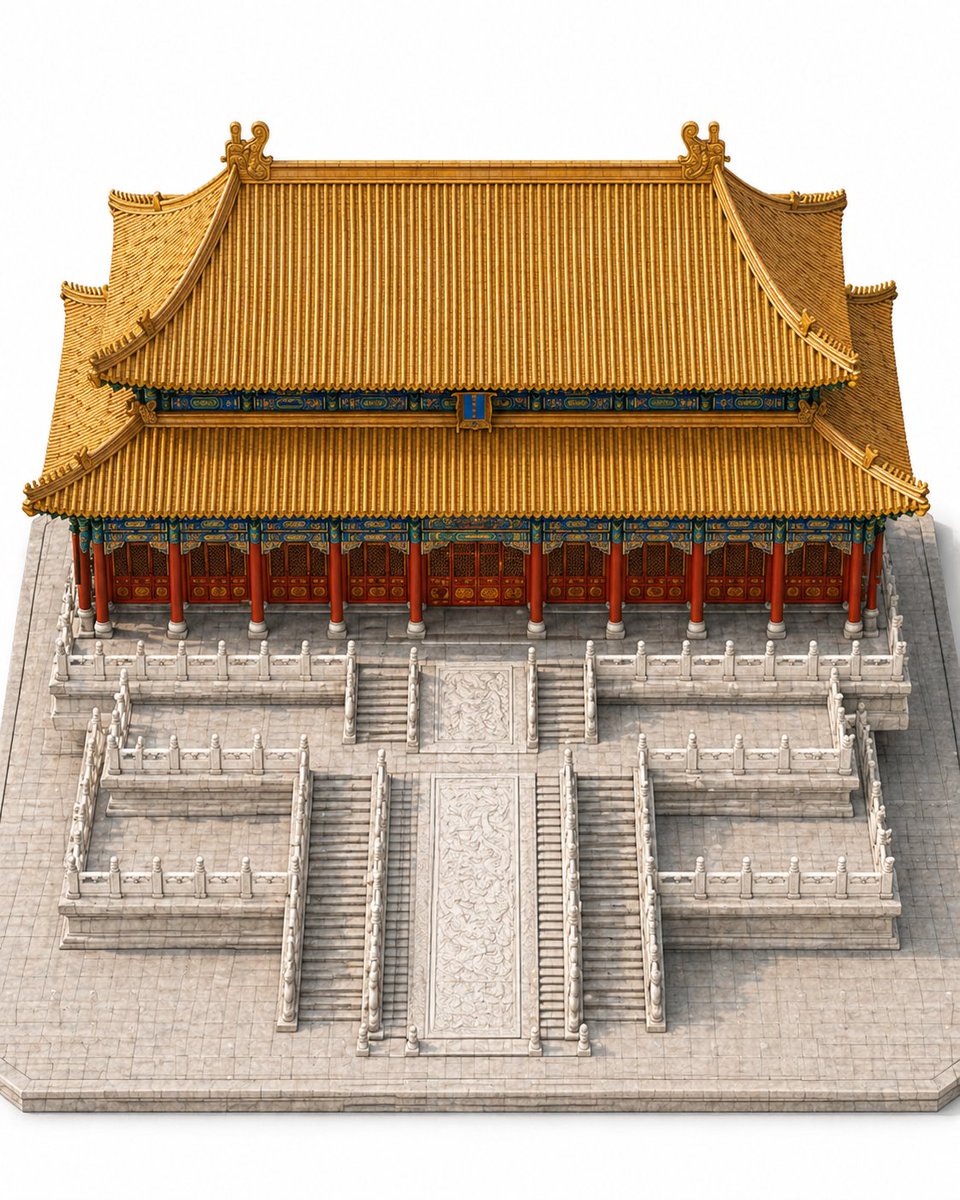
Imperial Chinese Hall Model Render
This prompt generates a clean isometric reference render of a traditional Chinese palace hall on a multi-tier marble platform, ideal for architectural visualization and build-sequence planning.
This is a GPT Image 2 prompt case for Interior & Architecture. Use the copy-ready prompt below to generate similar visuals, and review Awesome GPT Image 2 Prompts attribution plus commercial-use rights before reuse.
Free 1K preview
Generate one preview image instantly, no sign-up required.
Prompt
Copy-ready prompt
Create a highly detailed single-building architectural model image of a traditional Chinese imperial hall, resembling a Forbidden City palace throne hall, shown from an isometric slightly top-down view. The composition is perfectly centered and symmetrical, with the building occupying more than 70% of the frame. Show only the main building and its immediate stone platform environment on a clean light gray-white studio background, with no cityscape, no surrounding buildings, no people, no vehicles, no text, and no unrelated objects. The hall has a grand double-eaved hip roof with sweeping upturned corners, covered in rich golden-yellow glazed tiles, with ornate ridge decorations and curled roof ornaments at the top corners. Beneath the roof, include vivid blue-green and gold painted dougong bracket details running horizontally under both eaves. The facade is a long frontal elevation with 10 red cylindrical columns across the front, supporting the eaves above 9 red wooden door bays with intricate lattice panels and gold medallion details. The building sits on a tall pale stone platform complex with 3 terrace levels visible in front, all sharply symmetrical. Add a central monumental staircase aligned to the middle axis, with 1 wide carved marble ramp in the center and 2 narrower stair runs flanking it closely, plus additional symmetric side staircases descending from the upper terrace to the lower side platforms. Include white marble balustrades with posts and rails along all terrace edges and staircase sides. The central ramp should feature elaborate low-relief dragon-style stone carving. The stone base plaza should be light gray with subtle tile joints and crisp edges. Lighting is soft, even, and neutral, like a premium museum model render, emphasizing realistic materials and clean geometry. The image should feel like a polished standalone architectural reference render for AI construction animation.
Best for
- - Interior & Architecture visual exploration
- - Image generation and reference-image edits
- - Reusable briefs that keep source attribution visible
Change these parts
- - Subject, product, character, or scene
- - Aspect ratio, camera, lighting, and background
- - Brand, text, color, and output constraints
Recommended model and settings
- - Model: gpt-image-2
- - Input mode: Text to Image
- - Aspect ratio: source
- - Commercial status: review original source
How to use this prompt
- 1. Copy the prompt and preserve its structure for the first test.
- 2. Replace the subject, context, and publishing channel.
- 3. Change one camera, lighting, or style variable per iteration.
- 4. Inspect the output, source, text, and rights before reuse.
Limitations, source, and reuse cautions
- - Generated output is an editable draft, not factual, legal, or rights evidence.
- - Review the linked source, people, brands, logos, text, and third-party media before commercial use.
More cases in this category
Prioritized by category, input mode compatibility, quality, and lower risk.
Reuse and source notes
Use this prompt safely after previewing the case.
- 1.Copy the prompt or open it directly in Dovoo with the generation button.
- 2.Adjust variables, aspect ratio, and reference images for your own use case.
- 3.Before publishing or paid usage, verify source rights, attribution requirements, and brand or likeness risks.
Can I use this prompt commercially?
Commercial-use status is allowed. Review the original source, license, brand constraints, and legal requirements before paid usage.
Where does this case come from?
This case is imported from Awesome GPT Image 2 Prompts; keep attribution visible and check the source URL before reuse.