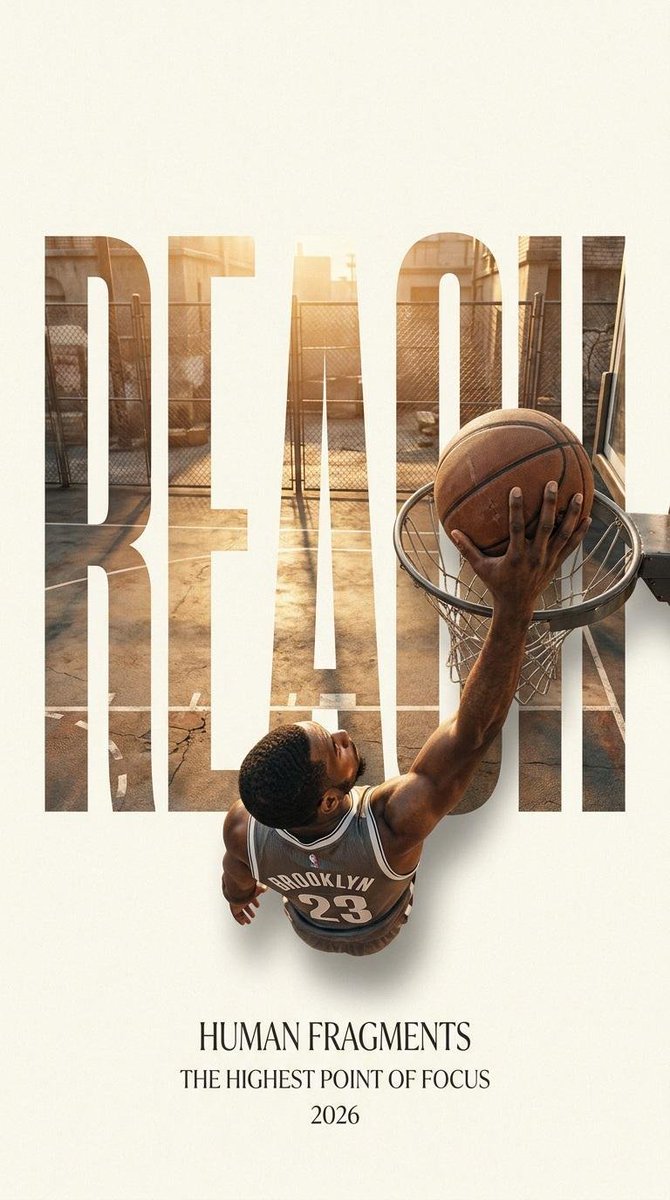
Human Fragments Typographic Poster System
A sophisticated editorial poster prompt using oversized typography as a masking framework for dynamic action shots.
This is a GPT Image 2 prompt case for Graphic & Poster. Use the copy-ready prompt below to generate similar visuals, and review Awesome GPT Image 2 Prompts attribution plus commercial-use rights before reuse.
Free 1K preview
Generate one preview image instantly, no sign-up required.
Prompt
Copy-ready prompt
Create a 9:16 editorial poster in the HUMAN FRAGMENTS visual system. Theme: {argument name="theme" default="Urban Energy"} Subject: {argument name="subject" default="a dynamic athlete"} Action: {argument name="action" default="a powerful jump"} Scene: [Scene Description] Title: [Title] Supporting Line: [Supporting Line] Year: 2026 Use oversized, cropped typography as the primary structural framework. The letters should function as windows that reveal the surrounding environment, while the main subject remains visually complete in front of the typography. Do not allow the letters to cut through the face, torso, arms, thighs, or any other important parts of the body. Instead, let one key action element extend beyond the typography to create strong depth and visual impact. Choose one of the following compositions: 1. WAVE CUT — A surfer carving across a rising wave, with the surfboard nose, leading hand, water spray, and curling wave extending beyond the typography. 2. RIM RISE — A basketball player reaching toward the hoop from a camera positioned above the rim, with the basketball, hand, and hoop fully extending beyond the letter masks while remaining naturally aligned. 3. IMPACT FRAME — A boxer throwing a straight punch toward the camera, with the enlarged foreground glove breaking beyond the typography while the gym environment remains visible inside the letters. 4. SOFT SWIRL — A graceful young woman decorating a cake, with the piping bag, hands, cake, and flowing cream details extending beyond the typography while the bakery interior appears inside the letterforms. Use realistic photography, believable anatomy, natural skin texture, strong foreground perspective, subtle paper grain, a warm off-white background, restrained colour grading, and clean editorial spacing. Keep the typography minimal and freely positioned: [Title] HUMAN FRAGMENTS [Supporting Line] 2026Prompt variables
Editable argument placeholders found in the prompt, with their default values.
Best for
- - Graphic & Poster visual exploration
- - Image generation and reference-image edits
- - Reusable briefs that keep source attribution visible
Change these parts
- - Subject, product, character, or scene
- - Aspect ratio, camera, lighting, and background
- - Brand, text, color, and output constraints
Recommended model and settings
- - Model: gpt-image-2
- - Input mode: Text to Image
- - Aspect ratio: source
- - Commercial status: review original source
How to use this prompt
- 1. Copy the prompt and preserve its structure for the first test.
- 2. Replace the subject, context, and publishing channel.
- 3. Change one camera, lighting, or style variable per iteration.
- 4. Inspect the output, source, text, and rights before reuse.
Limitations, source, and reuse cautions
- - Generated output is an editable draft, not factual, legal, or rights evidence.
- - Review the linked source, people, brands, logos, text, and third-party media before commercial use.
More cases in this category
Prioritized by category, input mode compatibility, quality, and lower risk.





Reuse and source notes
Use this prompt safely after previewing the case.
- 1.Copy the prompt or open it directly in Dovoo with the generation button.
- 2.Adjust variables, aspect ratio, and reference images for your own use case.
- 3.Before publishing or paid usage, verify source rights, attribution requirements, and brand or likeness risks.
Can I use this prompt commercially?
Commercial-use status is allowed. Review the original source, license, brand constraints, and legal requirements before paid usage.
Where does this case come from?
This case is imported from Awesome GPT Image 2 Prompts; keep attribution visible and check the source URL before reuse.