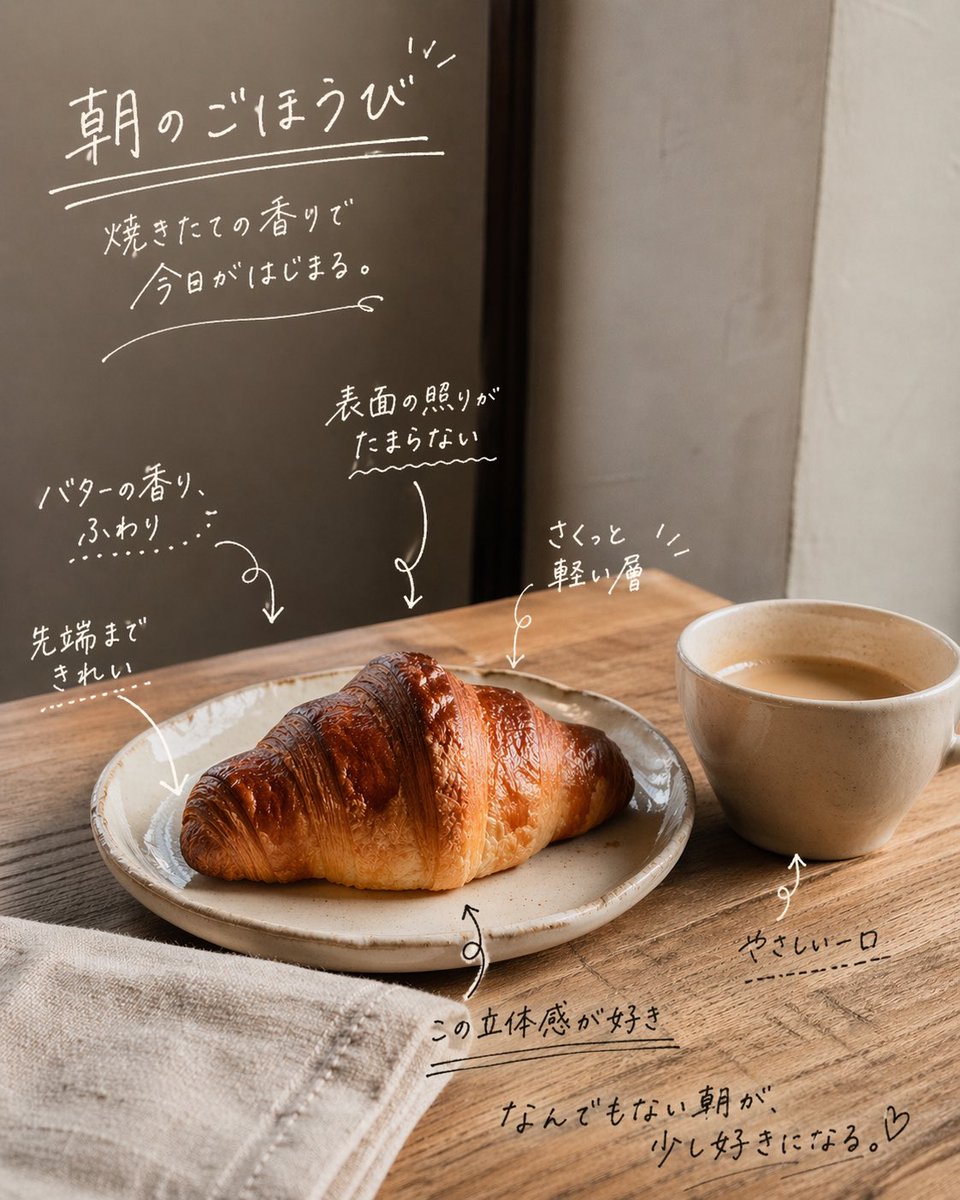
Handwritten Japanese Cafe Photo Overlay
This prompt adds emotive handwritten Japanese copy and callout annotations to a reference cafe photo for cozy social media or lifestyle promotional posts.
This is a GPT Image 2 prompt case for Food & Beverage. Use the copy-ready prompt below to generate similar visuals, and review Awesome GPT Image 2 Prompts attribution plus commercial-use rights before reuse.
Free 1K preview
Generate one preview image instantly, no sign-up required.
Free text preview doesn’t preserve reference-image consistency.
Prompt
Copy-ready prompt
Using the provided reference image, keep the cafe photo composition, lighting, food, cup, plate, table, and background unchanged, and turn it into an emotive social-media style annotated photo by overlaying handwritten white Japanese copy directly on the image. Add 1 main headline in the upper left with an underline and small accent marks: 「朝のごほうび」. Beneath it, add 1 short subcopy block in 2 lines: 「焼きたての香りで / 今日がはじまる。」. Then add 6 handwritten callout notes with sketchy arrows pointing to details in the scene: 1) 「バターの香り、ふわり…」 pointing to the croissant, 2) 「先端まできれい」 pointing to the left tip of the croissant, 3) 「表面の照りがたまらない〜」 pointing to the glossy top surface, 4) 「さくっと軽い層」 pointing to the upper right area of the croissant, 5) 「この立体感が好き」 near the plate edge, 6) 「やさしい一口」 pointing to the cup. Add 1 closing handwritten sentence near the lower right: 「なんでもない朝が、少し好きになる。♡」. Make all typography look like casual marker or chalk-pen handwriting with thin uneven strokes, soft organic spacing, doodled underlines, arrows, and small decorative marks. Keep the text integrated naturally into the empty wall and tabletop spaces, with a warm minimal Japanese lifestyle ad / UGC feel.
Best for
- - Food & Beverage visual exploration
- - Image generation and reference-image edits
- - Reusable briefs that keep source attribution visible
Change these parts
- - Subject, product, character, or scene
- - Aspect ratio, camera, lighting, and background
- - Brand, text, color, and output constraints
Recommended model and settings
- - Model: gpt-image-2
- - Input mode: Image to Image
- - Aspect ratio: source
- - Commercial status: review original source
How to use this prompt
- 1. Copy the prompt and preserve its structure for the first test.
- 2. Replace the subject, context, and publishing channel.
- 3. Change one camera, lighting, or style variable per iteration.
- 4. Inspect the output, source, text, and rights before reuse.
Limitations, source, and reuse cautions
- - Generated output is an editable draft, not factual, legal, or rights evidence.
- - Review the linked source, people, brands, logos, text, and third-party media before commercial use.
More cases in this category
Prioritized by category, input mode compatibility, quality, and lower risk.
Reuse and source notes
Use this prompt safely after previewing the case.
- 1.Copy the prompt or open it directly in Dovoo with the generation button.
- 2.Adjust variables, aspect ratio, and reference images for your own use case.
- 3.Before publishing or paid usage, verify source rights, attribution requirements, and brand or likeness risks.
Can I use this prompt commercially?
Commercial-use status is allowed. Review the original source, license, brand constraints, and legal requirements before paid usage.
Where does this case come from?
This case is imported from Awesome GPT Image 2 Prompts; keep attribution visible and check the source URL before reuse.