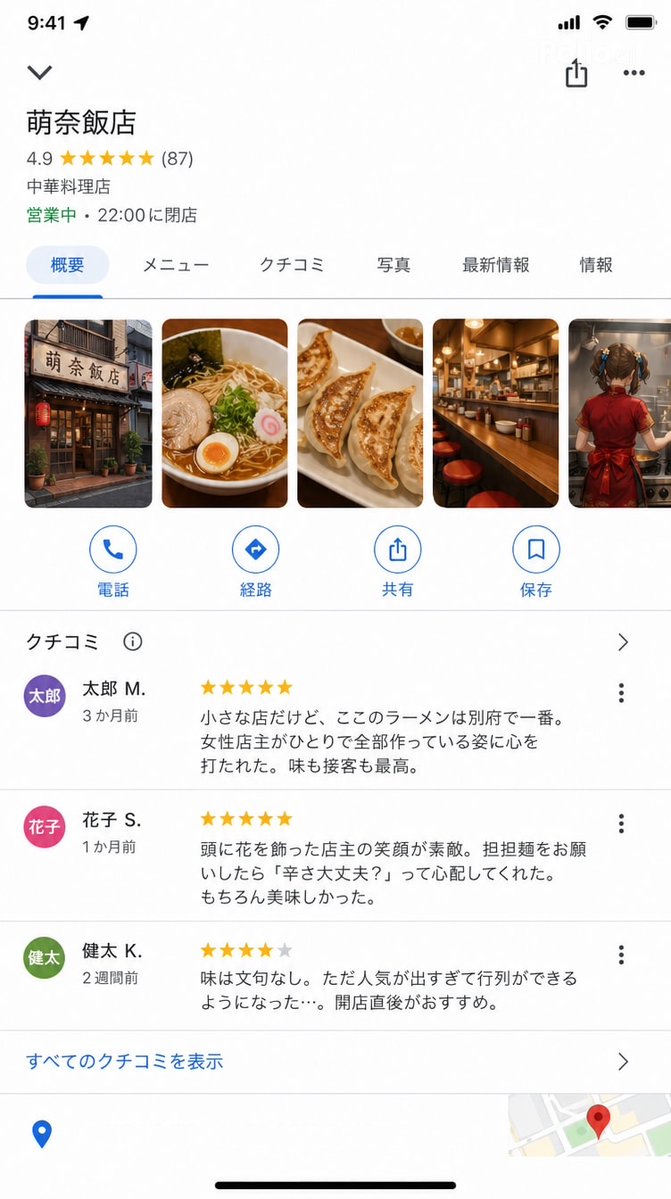
Google Maps UI Mockup
A complex prompt that recreates the Google Maps iOS app interface for a fictional restaurant with high UI accuracy.
This is a GPT Image 2 prompt case for Graphic & Poster. Use the copy-ready prompt below to generate similar visuals, and review Awesome GPT Image 2 Prompts attribution plus commercial-use rights before reuse.
Free 1K preview
Generate one preview image instantly, no sign-up required.
Prompt
Copy-ready prompt
A screenshot of the Google Maps iOS app store detail screen (9:16).

With accurate Google Maps UI:

Store Name: "{argument name="store name" default="Mona Hanten"}"
Rating: ★★★★★ 4.9 (87 reviews)
Category: "Chinese Restaurant"
Status: "Open · Closes at 22:00"

Photo section (horizontal scroll):
Store exterior / Photo of ramen / Gyoza / Counter / {argument name="photo content" default="The back of a young girl cooking"}

Review section (a few are readable):

★★★★★ "It's a small shop, but the ramen here is the best in Beppu. I was moved by the female owner making everything by herself. Both taste and service are the best." — {argument name="reviewer" default="Taro M."} (3 months ago)

★★★★★ "The owner's smile with flowers in her hair is wonderful. When I ordered dandan noodles, she asked 'Are you okay with the spice?' She was so considerate. Of course, it was delicious." — Hanako S. (1 month ago)

★★★★☆ "The taste is beyond reproach. However, it's become so popular that there's always a line... I recommend going right after opening." — Kenta K. (2 weeks ago)

Google Maps UI elements at the bottom (Directions, Call, Save buttons).

UI precision that could be mistaken for a real Google Maps screenshot.
Prompt variables
Editable argument placeholders found in the prompt, with their default values.
Best for
- - Graphic & Poster visual exploration
- - Image generation and reference-image edits
- - Reusable briefs that keep source attribution visible
Change these parts
- - Subject, product, character, or scene
- - Aspect ratio, camera, lighting, and background
- - Brand, text, color, and output constraints
Recommended model and settings
- - Model: gpt-image-2
- - Input mode: Text to Image
- - Aspect ratio: source
- - Commercial status: review original source
How to use this prompt
- 1. Copy the prompt and preserve its structure for the first test.
- 2. Replace the subject, context, and publishing channel.
- 3. Change one camera, lighting, or style variable per iteration.
- 4. Inspect the output, source, text, and rights before reuse.
Limitations, source, and reuse cautions
- - Generated output is an editable draft, not factual, legal, or rights evidence.
- - Review the linked source, people, brands, logos, text, and third-party media before commercial use.
More cases in this category
Prioritized by category, input mode compatibility, quality, and lower risk.





Reuse and source notes
Use this prompt safely after previewing the case.
- 1.Copy the prompt or open it directly in Dovoo with the generation button.
- 2.Adjust variables, aspect ratio, and reference images for your own use case.
- 3.Before publishing or paid usage, verify source rights, attribution requirements, and brand or likeness risks.
Can I use this prompt commercially?
Commercial-use status is allowed. Review the original source, license, brand constraints, and legal requirements before paid usage.
Where does this case come from?
This case is imported from Awesome GPT Image 2 Prompts; keep attribution visible and check the source URL before reuse.