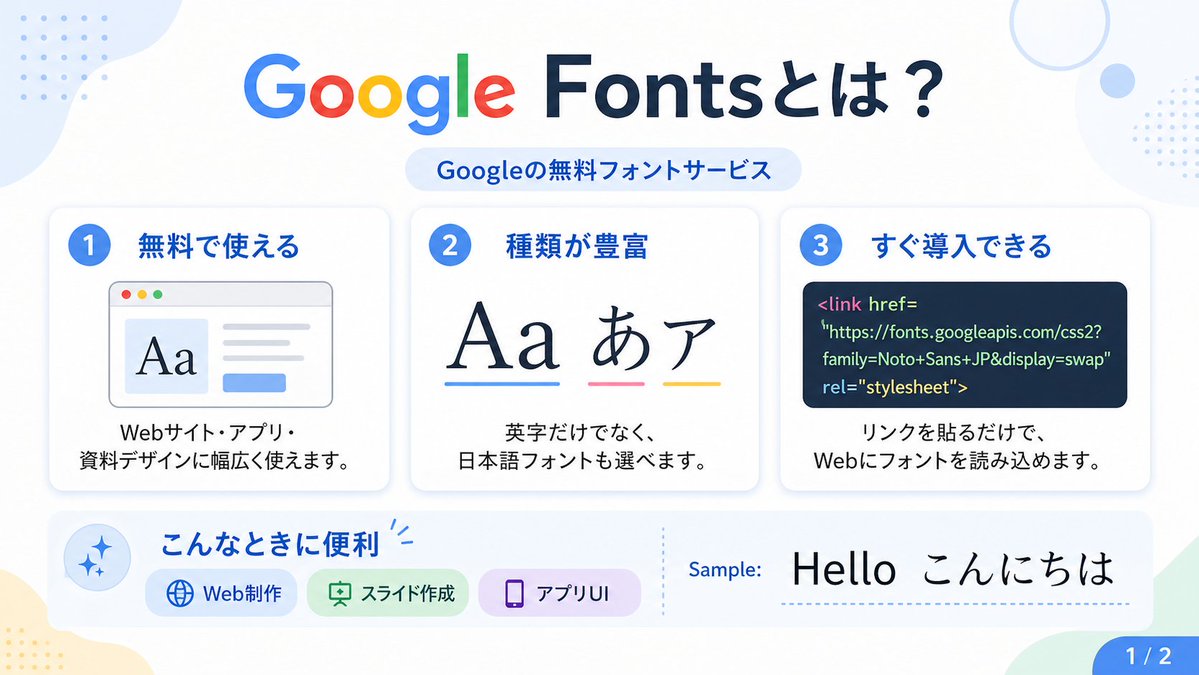
Google Fonts Japanese Infographic
A clean Japanese presentation-style infographic explaining Google Fonts, suitable for social posts, slides, or educational design content.
This is a GPT Image 2 prompt case for Graphic & Poster. Use the copy-ready prompt below to generate similar visuals, and review Awesome GPT Image 2 Prompts attribution plus commercial-use rights before reuse.
Free 1K preview
Generate one preview image instantly, no sign-up required.
Prompt
Copy-ready prompt
{
  "type": "Japanese infographic poster",
  "topic": "Google Fonts introduction",
  "style": {
    "look": "clean flat modern presentation slide",
    "palette": "white background with soft pastel blue, green, yellow, and lavender accents",
    "aspect_ratio": "16:9",
    "lighting": "bright even digital graphic lighting",
    "finish": "crisp vector-like infographic with subtle shadows and rounded cards"
  },
  "text": {
    "headline": "{argument name=\"headline text\" default=\"Google Fontsとは?\"}",
    "subheadline": "Googleの無料フォントサービス",
    "sample_label": "Sample:",
    "sample_text": "{argument name=\"sample text\" default=\"Hello こんにちは\"}",
    "page_indicator": "1 / 2"
  },
  "layout": {
    "sections": [
      {
        "title": "top header",
        "position": "top center",
        "count": 2,
        "labels": [
          "Google Fontsとは?",
          "Googleの無料フォントサービス"
        ]
      },
      {
        "title": "feature cards",
        "position": "middle row",
        "count": 3,
        "labels": [
          "1 無料で使える",
          "2 種類が豊富",
          "3 すぐ導入できる"
        ]
      },
      {
        "title": "use cases bar",
        "position": "bottom left to center",
        "count": 4,
        "labels": [
          "こんなときに便利",
          "Web Production",
          "スライド作成",
          "アプリUI"
        ]
      },
      {
        "title": "sample area",
        "position": "bottom right",
        "count": 2,
        "labels": [
          "Sample:",
          "Hello こんにちは"
        ]
      },
      {
        "title": "page marker",
        "position": "bottom right corner",
        "count": 1,
        "labels": [
          "1 / 2"
        ]
      }
    ],
    "background_decorations": {
      "count": 7,
      "items": [
        "pale blue organic blob in top left",
        "small blue dotted grid in top left",
        "thin pale blue ring in top right",
        "small pale blue circle near top right",
        "small blue dotted grid at upper right edge",
        "pale yellow organic blob in bottom left",
        "pale green angular shape in bottom right"
      ]
    }
  },
  "cards": [
    {
      "number": "1",
      "title": "無料で使える",
      "description": "Webサイト・アプリ・資料デザインに幅広く使えます。",
      "visual": "rounded white card with light shadow, blue number badge, browser window illustration showing large serif Aa on the left, gray text lines on the right, and a small blue button below"
    },
    {
      "number": "2",
      "title": "種類が豊富",
      "description": "英字だけでなく、日本語フォントも選べます。",
      "visual": "rounded white card with light shadow, blue number badge, large typography samples reading Aa あ ア, each with colored underline in blue, pink, and yellow"
    },
    {
      "number": "3",
      "title": "すぐ導入できる",
      "description": "リンクを貼るだけで、Webにフォントを読み込めます。",
      "visual": "rounded white card with light shadow, blue number badge, dark navy code panel containing HTML link tag for Google Fonts"
    }
  ],
  "lower_band": {
    "left_icon": "blue sparkle icon inside pale blue circle",
    "title": "こんなときに便利",
    "chips": {
      "count": 3,
      "items": [
        {
          "label": "Web Production",
          "color": "light blue",
          "icon": "globe"
        },
        {
          "label": "スライド作成",
          "color": "light green",
          "icon": "presentation board"
        },
        {
          "label": "アプリUI",
          "color": "light purple",
          "icon": "smartphone"
        }
      ]
    },
    "divider": "vertical dotted line",
    "sample_preview": "large black typography sample on white background"
  },
  "typography": {
    "headline_font": "{argument name=\"headline font\" default=\"Google Sans-like rounded sans serif\"}",
    "body_font": "{argument name=\"body font\" default=\"clean Japanese sans serif\"}",
    "notes": "The word Google in the headline uses the official multicolor Google logo style: blue G, red o, yellow o, blue g, green l, red e; the rest of the headline is dark navy."
  }
}
Prompt variables
Editable argument placeholders found in the prompt, with their default values.
Best for
- - Graphic & Poster visual exploration
- - Image generation and reference-image edits
- - Reusable briefs that keep source attribution visible
Change these parts
- - Subject, product, character, or scene
- - Aspect ratio, camera, lighting, and background
- - Brand, text, color, and output constraints
Recommended model and settings
- - Model: gpt-image-2
- - Input mode: Text to Image
- - Aspect ratio: source
- - Commercial status: review original source
How to use this prompt
- 1. Copy the prompt and preserve its structure for the first test.
- 2. Replace the subject, context, and publishing channel.
- 3. Change one camera, lighting, or style variable per iteration.
- 4. Inspect the output, source, text, and rights before reuse.
Limitations, source, and reuse cautions
- - Generated output is an editable draft, not factual, legal, or rights evidence.
- - Review the linked source, people, brands, logos, text, and third-party media before commercial use.
More cases in this category
Prioritized by category, input mode compatibility, quality, and lower risk.


Reuse and source notes
Use this prompt safely after previewing the case.
- 1.Copy the prompt or open it directly in Dovoo with the generation button.
- 2.Adjust variables, aspect ratio, and reference images for your own use case.
- 3.Before publishing or paid usage, verify source rights, attribution requirements, and brand or likeness risks.
Can I use this prompt commercially?
Commercial-use status is allowed. Review the original source, license, brand constraints, and legal requirements before paid usage.
Where does this case come from?
This case is imported from Awesome GPT Image 2 Prompts; keep attribution visible and check the source URL before reuse.