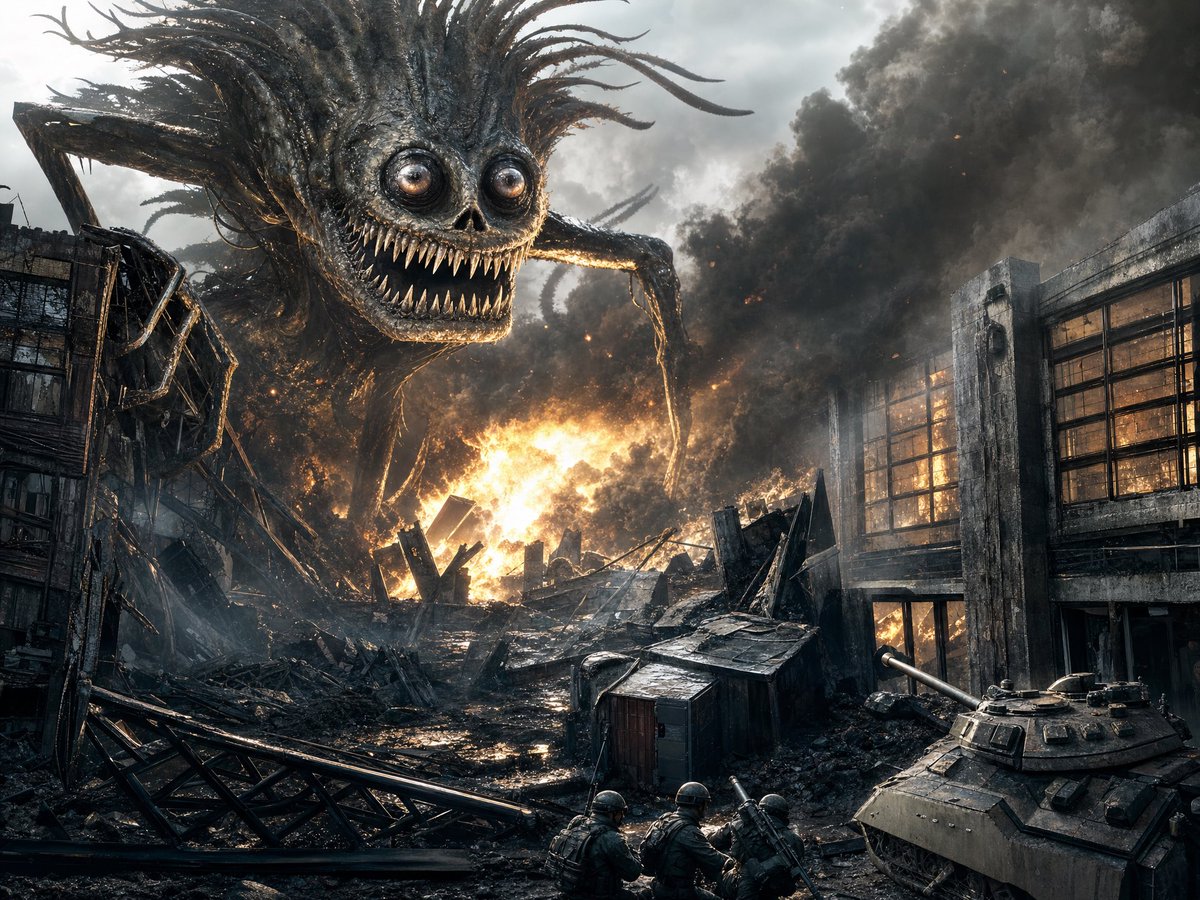
Colossal Monster in Burning City
Generates a cinematic photorealistic apocalypse scene with a giant spider-like horror creature attacking a war-torn city.
This is a GPT Image 2 prompt case for Illustration & Art. Use the copy-ready prompt below to generate similar visuals, and review Awesome GPT Image 2 Prompts attribution plus commercial-use rights before reuse.
Need the full prompt set? Use the Illustration & Art topic hub for more related examples, or open the GPT Image 2 prompt library for the full example index, reusable structures, and source attribution.
Free 1K preview
Generate one preview image instantly, no sign-up required.
1314/4000
Prompt
Copy-ready prompt
Create a cinematic photorealistic dark-fantasy war scene in a destroyed city, showing a colossal spider-like monster looming over burning ruins. The creature has a huge grotesque skull-like face, bulging glossy round eyes, a wide predatory grin filled with many sharp needle teeth, black charred organic armor, long spindly insect legs, and wild tendril-like hair or quills streaming backward. Place it in the upper left and center of the frame, towering over collapsed industrial buildings and rubble. The environment is an apocalyptic urban battlefield with exactly three main human-scale military elements visible: a tank in the lower right foreground aiming its cannon toward the destruction, three small soldiers crouched near the bottom center with helmets and heavy weapons, and scattered wreckage barriers across the foreground. Add intense orange fire and explosions in the middle distance, thick black smoke clouds filling the sky, glowing embers, wet reflective mud, twisted steel beams, shattered concrete, broken window grids, and burned-out structures on both sides. Use dramatic low-angle composition, wide 4:3 landscape framing, high contrast between cold gray smoke and hot orange flames, realistic textures, gritty detail, volumetric smoke, cinematic lighting, sharp focus, no text, no watermark.
Best for
- - Illustration & Art visual exploration
- - Image generation and reference-image edits
- - Reusable briefs that keep source attribution visible
Change these parts
- - Subject, product, character, or scene
- - Aspect ratio, camera, lighting, and background
- - Brand, text, color, and output constraints
Recommended model and settings
- - Model: gpt-image-2
- - Input mode: Text to Image
- - Aspect ratio: source
- - Commercial status: review original source
How to use this prompt
- 1. Copy the prompt and preserve its structure for the first test.
- 2. Replace the subject, context, and publishing channel.
- 3. Change one camera, lighting, or style variable per iteration.
- 4. Inspect the output, source, text, and rights before reuse.
Limitations, source, and reuse cautions
- - Generated output is an editable draft, not factual, legal, or rights evidence.
- - Review the linked source, people, brands, logos, text, and third-party media before commercial use.
Imported from Awesome GPT Image 2 Prompts. Attribution is required. Commercial-use status is allowed; review source rights before paid usage.
More cases in this category
Prioritized by category, input mode compatibility, quality, and lower risk.
Reuse and source notes
Use this prompt safely after previewing the case.
- 1.Copy the prompt or open it directly in Dovoo with the generation button.
- 2.Adjust variables, aspect ratio, and reference images for your own use case.
- 3.Before publishing or paid usage, verify source rights, attribution requirements, and brand or likeness risks.
Can I use this prompt commercially?
Commercial-use status is allowed. Review the original source, license, brand constraints, and legal requirements before paid usage.
Where does this case come from?
This case is imported from Awesome GPT Image 2 Prompts; keep attribution visible and check the source URL before reuse.