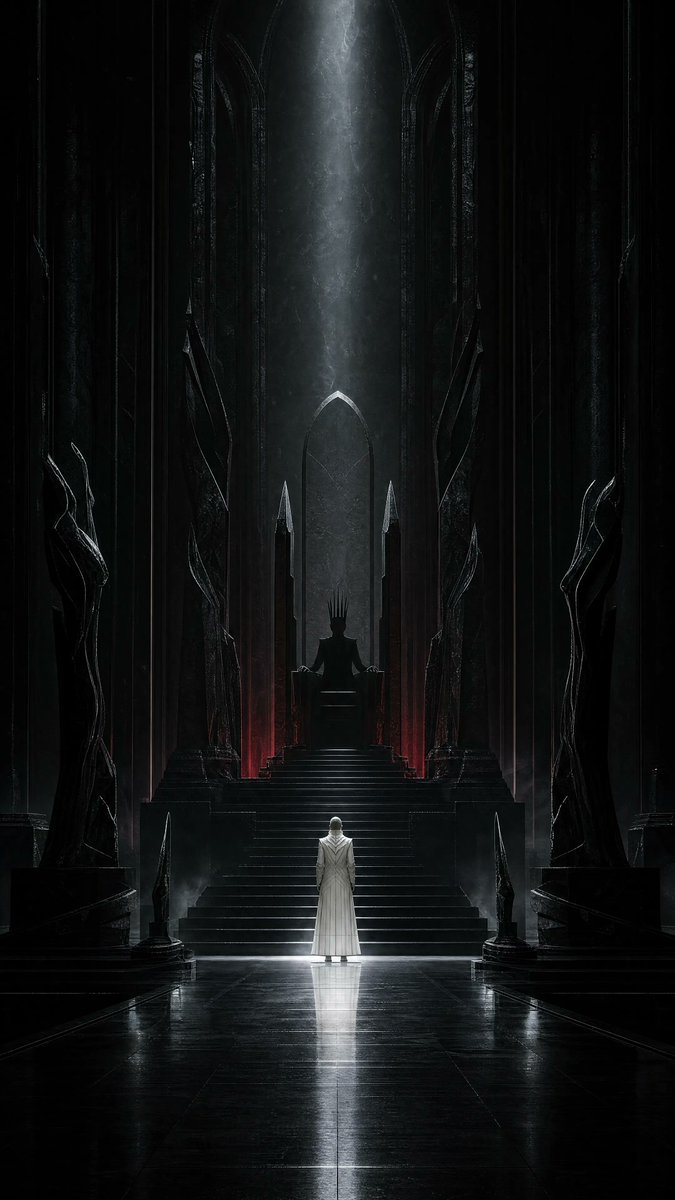
Dark Surrealist Shadow Throne Prompt
A conceptual dark-surrealist prompt featuring an obsidian throne room where a figure's shadow acts independently, focusing on cinematic lighting and scale.
This is a GPT Image 2 prompt case for Illustration & Art. Use the copy-ready prompt below to generate similar visuals, and review Awesome GPT Image 2 Prompts attribution plus commercial-use rights before reuse.
Free 1K preview
Generate one preview image instantly, no sign-up required.
Prompt
Copy-ready prompt
Use case: stylized-concept
Asset type: vertical social-media artwork for the “Your Dark Side” theme

Create a completely original cinematic dark-surrealist scene inside an endless throne hall carved from {argument name="material" default="glossy obsidian"}. A solitary human figure in a long bone-white ceremonial coat stands at the foot of an impossibly tall empty throne. The person is small, seen from behind, perfectly still. Their shadow climbs the throne steps against the direction of the light and sits upon the throne as a regal hornless humanoid silhouette, wearing a crown made from long black fingers. The physical figure casts no normal shadow anywhere else.

Vertical {argument name="aspect ratio" default="9:16"} composition, monumental symmetry, very low camera angle, cathedral-scale architecture, strong central vanishing point, generous darkness, clean readable silhouettes. A narrow cold silver beam falls on the white figure while a restrained deep-crimson glow leaks from beneath the throne. Wet polished stone, drifting dust, faint mist, subtle reflections, premium photorealistic concept art, psychologically disturbing rather than graphic, extremely refined cinematic lighting.

Color palette: obsidian black, bone white, cold silver, minimal deep crimson.

Constraints: entirely original character and environment; no recognizable person; no text, typography, logos, signatures, borders, or watermark.

Avoid: close-up portrait, split face, damaged skin, black liquid on a face, glowing red eye, gore, demons with conventional horns or wings, fantasy armor, crowded scene, imitation of any named artist.
Prompt variables
Editable argument placeholders found in the prompt, with their default values.
Best for
- - Illustration & Art visual exploration
- - Image generation and reference-image edits
- - Reusable briefs that keep source attribution visible
Change these parts
- - Subject, product, character, or scene
- - Aspect ratio, camera, lighting, and background
- - Brand, text, color, and output constraints
Recommended model and settings
- - Model: gpt-image-2
- - Input mode: Text to Image
- - Aspect ratio: source
- - Commercial status: review original source
How to use this prompt
- 1. Copy the prompt and preserve its structure for the first test.
- 2. Replace the subject, context, and publishing channel.
- 3. Change one camera, lighting, or style variable per iteration.
- 4. Inspect the output, source, text, and rights before reuse.
Limitations, source, and reuse cautions
- - Generated output is an editable draft, not factual, legal, or rights evidence.
- - Review the linked source, people, brands, logos, text, and third-party media before commercial use.
More cases in this category
Prioritized by category, input mode compatibility, quality, and lower risk.
Reuse and source notes
Use this prompt safely after previewing the case.
- 1.Copy the prompt or open it directly in Dovoo with the generation button.
- 2.Adjust variables, aspect ratio, and reference images for your own use case.
- 3.Before publishing or paid usage, verify source rights, attribution requirements, and brand or likeness risks.
Can I use this prompt commercially?
Commercial-use status is allowed. Review the original source, license, brand constraints, and legal requirements before paid usage.
Where does this case come from?
This case is imported from Awesome GPT Image 2 Prompts; keep attribution visible and check the source URL before reuse.