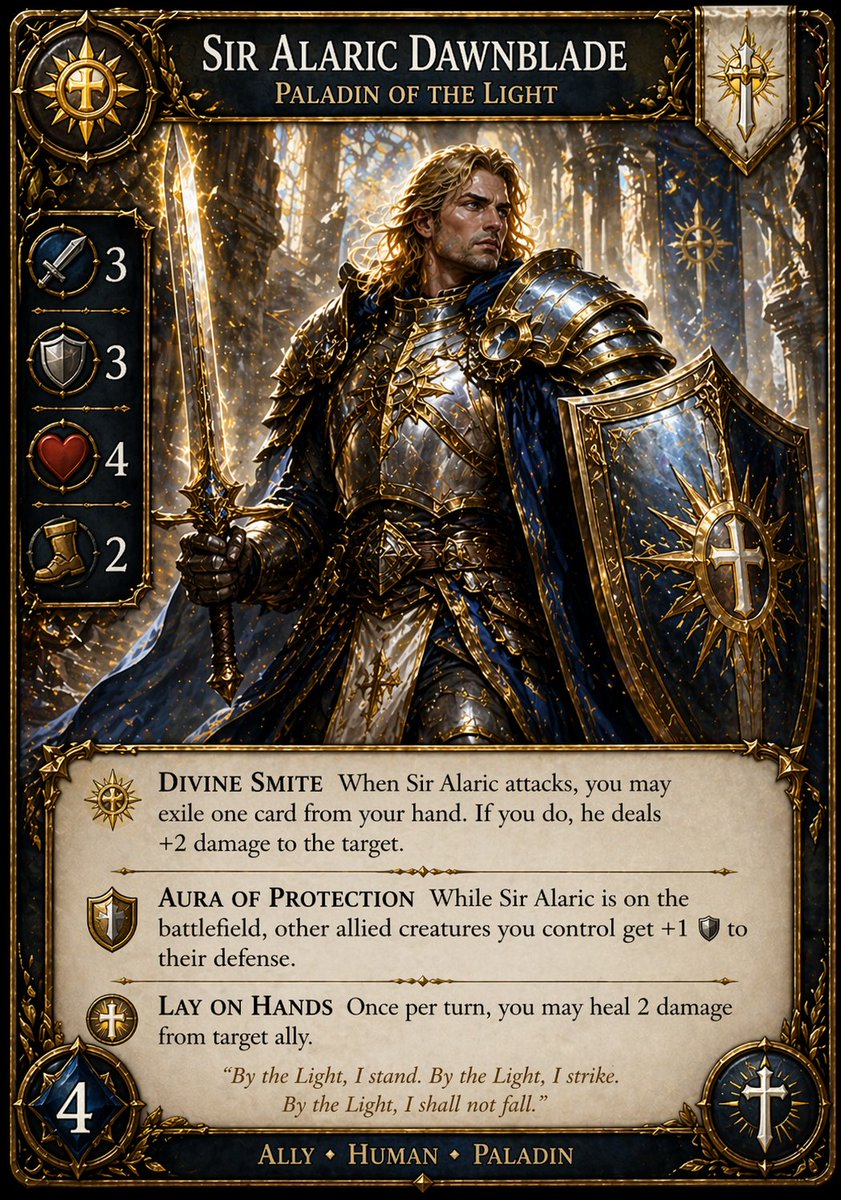
Fantasy Paladin Trading Card
A premium fantasy TCG character card featuring a radiant armored paladin, ornate stats and icons, and fully readable card-game layout for custom card design mockups.
This is a GPT Image 2 prompt case for Anime & Game. Use the copy-ready prompt below to generate similar visuals, and review Awesome GPT Image 2 Prompts attribution plus commercial-use rights before reuse.
Free 1K preview
Generate one preview image instantly, no sign-up required.
Prompt
Copy-ready prompt
Create a highly detailed fantasy trading card game card in a polished premium TCG style, full-frame vertical layout with ornate gilded borders, engraved filigree corners, and a dark navy, black, ivory, and radiant gold color palette. The card title at the top reads {argument name="character name" default="SIR ALARIC DAWNBLADE"} in large serif capitals, with the subtitle {argument name="class title" default="PALADIN OF THE LIGHT"} beneath it. The main illustration shows a heroic male paladin standing in a luminous cathedral filled with tall glowing stained-glass windows, drifting golden sparks, and sacred light rays. He has long wavy blond hair, wears elaborate gold-and-steel plate armor with blue cloth accents and a flowing deep blue cloak, holds a glowing longsword upright in one hand, and carries a massive ornate shield in the other, emblazoned with a radiant sun-cross emblem. His pose is noble, powerful, and defensive, centered as the card’s focal figure. Add exactly 4 stat icons stacked vertically along the left side in circular medallions with numbers: crossed swords with 3, shield with 3, heart with 4, and boot with 2. Include a sun emblem medallion in the upper left corner and a vertical banner crest in the upper right with a gold sword-and-cross symbol. The lower third contains a parchment-like rules text box with exactly 3 named abilities, each with a small icon and bold serif name followed by rules text: {argument name="ability one" default="DIVINE SMITE"}, {argument name="ability two" default="AURA OF PROTECTION"}, and {argument name="ability three" default="LAY ON HANDS"}. Beneath the abilities, add an italic flavor quote centered on the parchment: {argument name="flavor quote" default="By the Light, I stand. By the Light, I strike. By the Light, I shall not fall."} At the very bottom, place the type line in serif capitals reading {argument name="creature line" default="ALLY ♦ HUMAN ♦ PALADIN"}. Add a large blue-and-gold gem-framed mana or cost badge with the number 4 in the lower left corner, and a circular faction badge with a white sword or holy symbol in the lower right corner. The overall look should feel like an official premium fantasy card game, cinematic, readable, richly illuminated, intricately textured, and collector-grade.Prompt variables
Editable argument placeholders found in the prompt, with their default values.
Best for
- - Anime & Game visual exploration
- - Image generation and reference-image edits
- - Reusable briefs that keep source attribution visible
Change these parts
- - Subject, product, character, or scene
- - Aspect ratio, camera, lighting, and background
- - Brand, text, color, and output constraints
Recommended model and settings
- - Model: gpt-image-2
- - Input mode: Text to Image
- - Aspect ratio: source
- - Commercial status: review original source
How to use this prompt
- 1. Copy the prompt and preserve its structure for the first test.
- 2. Replace the subject, context, and publishing channel.
- 3. Change one camera, lighting, or style variable per iteration.
- 4. Inspect the output, source, text, and rights before reuse.
Limitations, source, and reuse cautions
- - Generated output is an editable draft, not factual, legal, or rights evidence.
- - Review the linked source, people, brands, logos, text, and third-party media before commercial use.
More cases in this category
Prioritized by category, input mode compatibility, quality, and lower risk.


Reuse and source notes
Use this prompt safely after previewing the case.
- 1.Copy the prompt or open it directly in Dovoo with the generation button.
- 2.Adjust variables, aspect ratio, and reference images for your own use case.
- 3.Before publishing or paid usage, verify source rights, attribution requirements, and brand or likeness risks.
Can I use this prompt commercially?
Commercial-use status is allowed. Review the original source, license, brand constraints, and legal requirements before paid usage.
Where does this case come from?
This case is imported from Awesome GPT Image 2 Prompts; keep attribution visible and check the source URL before reuse.