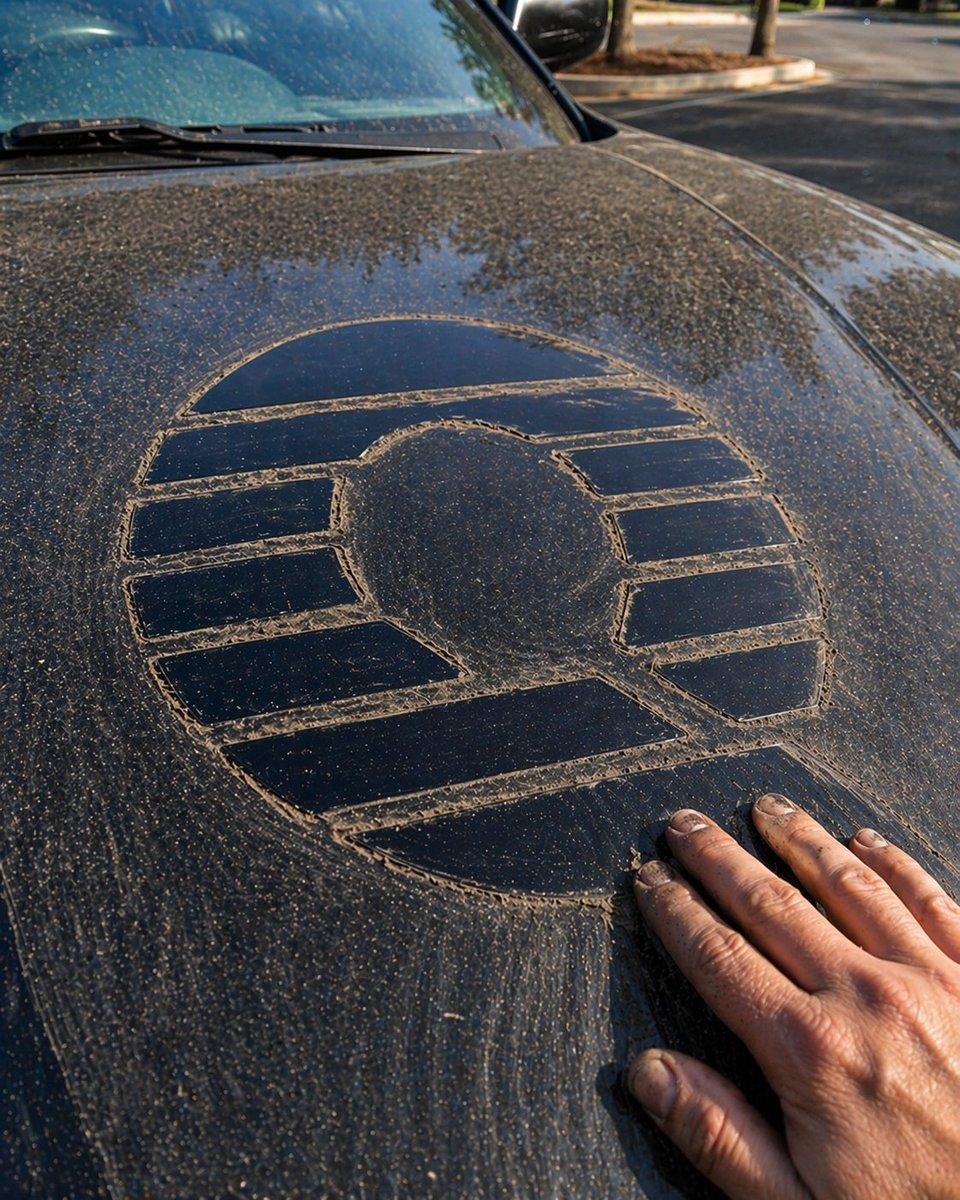
Dust-Drawn Symbol on Car Hood
This prompt generates a realistic close-up photo of a dusty car hood with a large hand-drawn emblem, useful for automotive, environmental, or symbolic visual storytelling.
This is a GPT Image 2 prompt case for Other Inspiration. Use the copy-ready prompt below to generate similar visuals, and review Awesome GPT Image 2 Prompts attribution plus commercial-use rights before reuse.
Free 1K preview
Generate one preview image instantly, no sign-up required.
Prompt
Copy-ready prompt
A photorealistic close-up of the hood of a dark blue or black car parked outdoors, covered in a thick layer of beige-brown dust and pollen. In the center of the hood, a large clean emblem-like shape has been finger-drawn through the dust, revealing the glossy paint underneath. The symbol is a circular logo with 8 segmented bars around a raised circular center: 1 wide curved segment across the top, 3 horizontal bar segments on the left side, 3 horizontal bar segments on the right side, and 1 wide angled segment across the bottom. A realistic adult human hand with dirty fingernails rests on the lower right area of the hood, as if it has just finished drawing the symbol. Show streaks, smudges, and finger-trace texture in the dust around the edges of the design. Include part of the windshield and 1 windshield wiper at the top left, with soft reflections of trees in the glass and paint. Background is a slightly blurred parking lot with sunlit pavement, curb, and 3 tree trunks. Warm late-afternoon natural lighting, shallow depth of field, high-detail automotive surface reflections, candid documentary-style composition, vertical smartphone photo framing.
Best for
- - Other Inspiration visual exploration
- - Image generation and reference-image edits
- - Reusable briefs that keep source attribution visible
Change these parts
- - Subject, product, character, or scene
- - Aspect ratio, camera, lighting, and background
- - Brand, text, color, and output constraints
Recommended model and settings
- - Model: gpt-image-2
- - Input mode: Text to Image
- - Aspect ratio: source
- - Commercial status: review original source
How to use this prompt
- 1. Copy the prompt and preserve its structure for the first test.
- 2. Replace the subject, context, and publishing channel.
- 3. Change one camera, lighting, or style variable per iteration.
- 4. Inspect the output, source, text, and rights before reuse.
Limitations, source, and reuse cautions
- - Generated output is an editable draft, not factual, legal, or rights evidence.
- - Review the linked source, people, brands, logos, text, and third-party media before commercial use.
More cases in this category
Prioritized by category, input mode compatibility, quality, and lower risk.

Reuse and source notes
Use this prompt safely after previewing the case.
- 1.Copy the prompt or open it directly in Dovoo with the generation button.
- 2.Adjust variables, aspect ratio, and reference images for your own use case.
- 3.Before publishing or paid usage, verify source rights, attribution requirements, and brand or likeness risks.
Can I use this prompt commercially?
Commercial-use status is allowed. Review the original source, license, brand constraints, and legal requirements before paid usage.
Where does this case come from?
This case is imported from Awesome GPT Image 2 Prompts; keep attribution visible and check the source URL before reuse.