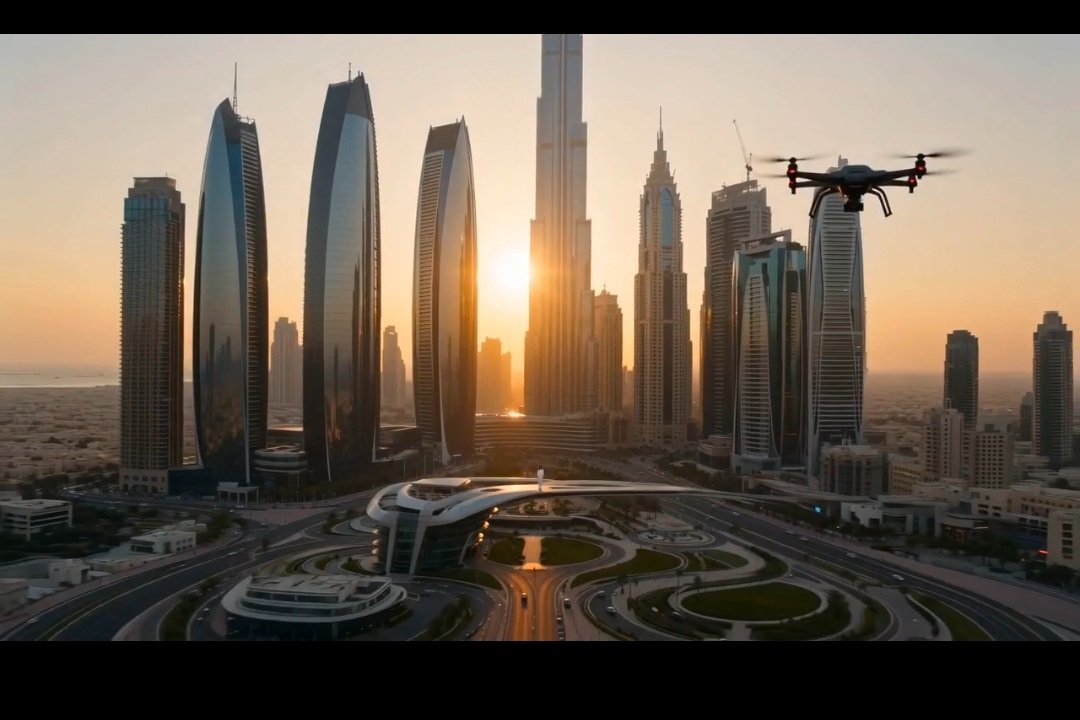
Cinematic Dubai Skyline Drone View
A photorealistic golden-hour aerial cityscape with a quadcopter drone, ideal for cinematic travel, technology, or luxury urban visuals.
This is a GPT Image 2 prompt case for Landscape & Nature. Use the copy-ready prompt below to generate similar visuals, and review Awesome GPT Image 2 Prompts attribution plus commercial-use rights before reuse.
Free 1K preview
Generate one preview image instantly, no sign-up required.
Prompt
Copy-ready prompt
Create an ultra-realistic cinematic aerial still of {argument name="city" default="Dubai downtown skyline"} at golden hour, viewed from a high drone perspective in a wide 16:9 movie frame with black letterbox bars. The sun is low on the horizon, shining directly between the tallest glass skyscrapers and creating warm orange backlight, long shadows, slight haze, and lens flare. Show a futuristic luxury downtown with many modern towers, including one extremely tall central tower and several curved reflective skyscrapers on the left, plus dense high-rises fading into the desert-like distance. In the foreground, include an elevated futuristic metro or pedestrian station, sweeping multilane roads, interchanges, landscaped circular roundabouts, and small cars moving below. Add exactly one black quadcopter drone in the upper right sky, close to camera, with four blurred spinning propellers and small red lights, silhouetted against the sunset. Use photorealistic architectural detail, cinematic color grading, warm highlights, cool glass reflections, crisp depth, and a grand luxury travel-film atmosphere. No people, no text, no logos, no watermark.Prompt variables
Editable argument placeholders found in the prompt, with their default values.
Best for
- - Landscape & Nature visual exploration
- - Image generation and reference-image edits
- - Reusable briefs that keep source attribution visible
Change these parts
- - Subject, product, character, or scene
- - Aspect ratio, camera, lighting, and background
- - Brand, text, color, and output constraints
Recommended model and settings
- - Model: gpt-image-2
- - Input mode: Text to Image
- - Aspect ratio: source
- - Commercial status: review original source
How to use this prompt
- 1. Copy the prompt and preserve its structure for the first test.
- 2. Replace the subject, context, and publishing channel.
- 3. Change one camera, lighting, or style variable per iteration.
- 4. Inspect the output, source, text, and rights before reuse.
Limitations, source, and reuse cautions
- - Generated output is an editable draft, not factual, legal, or rights evidence.
- - Review the linked source, people, brands, logos, text, and third-party media before commercial use.
More cases in this category
Prioritized by category, input mode compatibility, quality, and lower risk.
Reuse and source notes
Use this prompt safely after previewing the case.
- 1.Copy the prompt or open it directly in Dovoo with the generation button.
- 2.Adjust variables, aspect ratio, and reference images for your own use case.
- 3.Before publishing or paid usage, verify source rights, attribution requirements, and brand or likeness risks.
Can I use this prompt commercially?
Commercial-use status is allowed. Review the original source, license, brand constraints, and legal requirements before paid usage.
Where does this case come from?
This case is imported from Awesome GPT Image 2 Prompts; keep attribution visible and check the source URL before reuse.