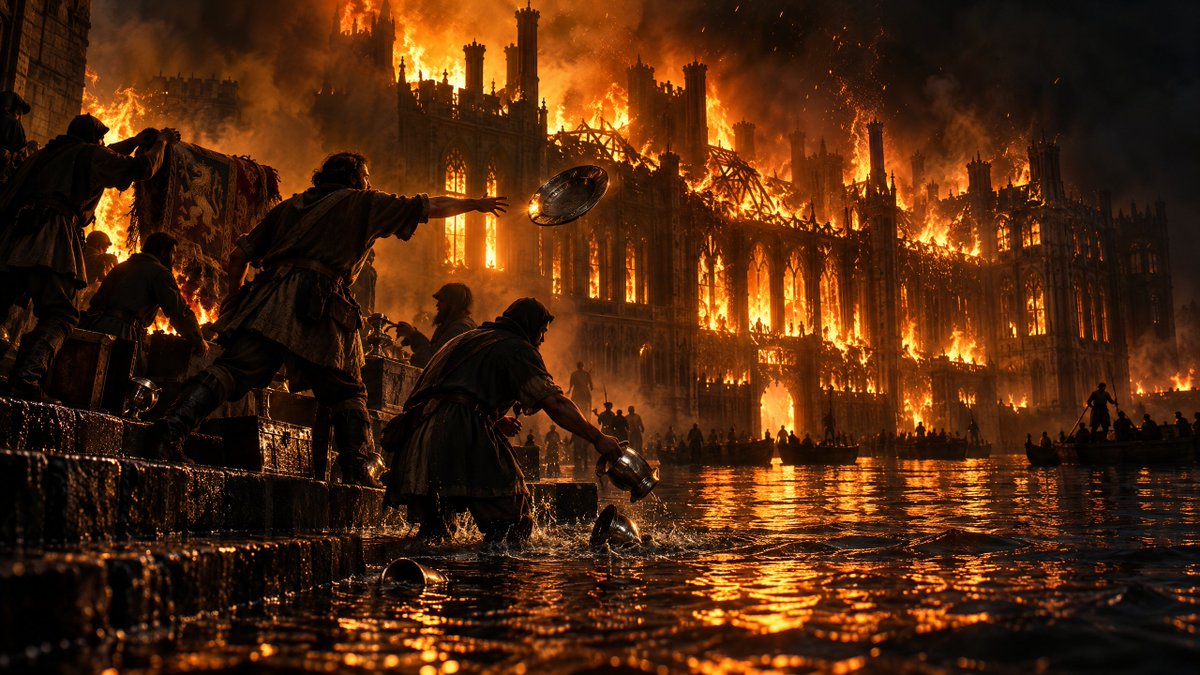
Burning Gothic Flood Escape
A cinematic medieval disaster scene showing refugees fleeing through floodwater as a vast Gothic structure burns behind them.
This is a GPT Image 2 prompt case for Landscape & Nature. Use the copy-ready prompt below to generate similar visuals, and review Awesome GPT Image 2 Prompts attribution plus commercial-use rights before reuse.
Free 1K preview
Generate one preview image instantly, no sign-up required.
Prompt
Copy-ready prompt
Create a cinematic dark-fantasy disaster scene in ultra-wide 16:9 format: a vast {argument name="building type" default="Gothic cathedral-palace"} is engulfed in an enormous inferno at night, its spires, arched windows, flying buttresses, and roof skeleton silhouetted against towering orange flames and black smoke. The lower half of the scene is flooded water reflecting the fire in rippling molten-gold highlights. In the foreground, show exactly 5 medieval refugees on wet stone steps and in waist-deep water: 1 hooded figure at far left carrying a patterned tapestry or banner, 1 crouched person beside crates, 1 central man reaching forward while throwing a round metal shield or platter into the water, 1 kneeling hooded person scooping or dropping a metal jug, and 1 small partial silhouette at the extreme left edge. Include exactly 3 prominent loose metal objects in the water near the foreground: a round bowl, a small cup, and a dropped pitcher. In the middle distance, add exactly 3 small boats carrying dark silhouettes, plus scattered tiny figures along the flooded quay, all dwarfed by the burning architecture. Use {argument name="era" default="medieval"} clothing, rough cloaks, leather belts, tunics, and wet fabric. Lighting should be dramatic and realistic, with intense backlight from the blaze, ember sparks in the air, smoke haze, high contrast chiaroscuro, wet stone texture, water splashes, and volumetric fire glow. Camera is low at water level, wide-angle, immersive, epic scale, photorealistic, highly detailed, no text, no modern objects, no watermark.Prompt variables
Editable argument placeholders found in the prompt, with their default values.
Best for
- - Landscape & Nature visual exploration
- - Image generation and reference-image edits
- - Reusable briefs that keep source attribution visible
Change these parts
- - Subject, product, character, or scene
- - Aspect ratio, camera, lighting, and background
- - Brand, text, color, and output constraints
Recommended model and settings
- - Model: gpt-image-2
- - Input mode: Text to Image
- - Aspect ratio: source
- - Commercial status: review original source
How to use this prompt
- 1. Copy the prompt and preserve its structure for the first test.
- 2. Replace the subject, context, and publishing channel.
- 3. Change one camera, lighting, or style variable per iteration.
- 4. Inspect the output, source, text, and rights before reuse.
Limitations, source, and reuse cautions
- - Generated output is an editable draft, not factual, legal, or rights evidence.
- - Review the linked source, people, brands, logos, text, and third-party media before commercial use.
More cases in this category
Prioritized by category, input mode compatibility, quality, and lower risk.

Reuse and source notes
Use this prompt safely after previewing the case.
- 1.Copy the prompt or open it directly in Dovoo with the generation button.
- 2.Adjust variables, aspect ratio, and reference images for your own use case.
- 3.Before publishing or paid usage, verify source rights, attribution requirements, and brand or likeness risks.
Can I use this prompt commercially?
Commercial-use status is allowed. Review the original source, license, brand constraints, and legal requirements before paid usage.
Where does this case come from?
This case is imported from Awesome GPT Image 2 Prompts; keep attribution visible and check the source URL before reuse.